Operation
4812164901_A.pdf2022-11-14
Battery status
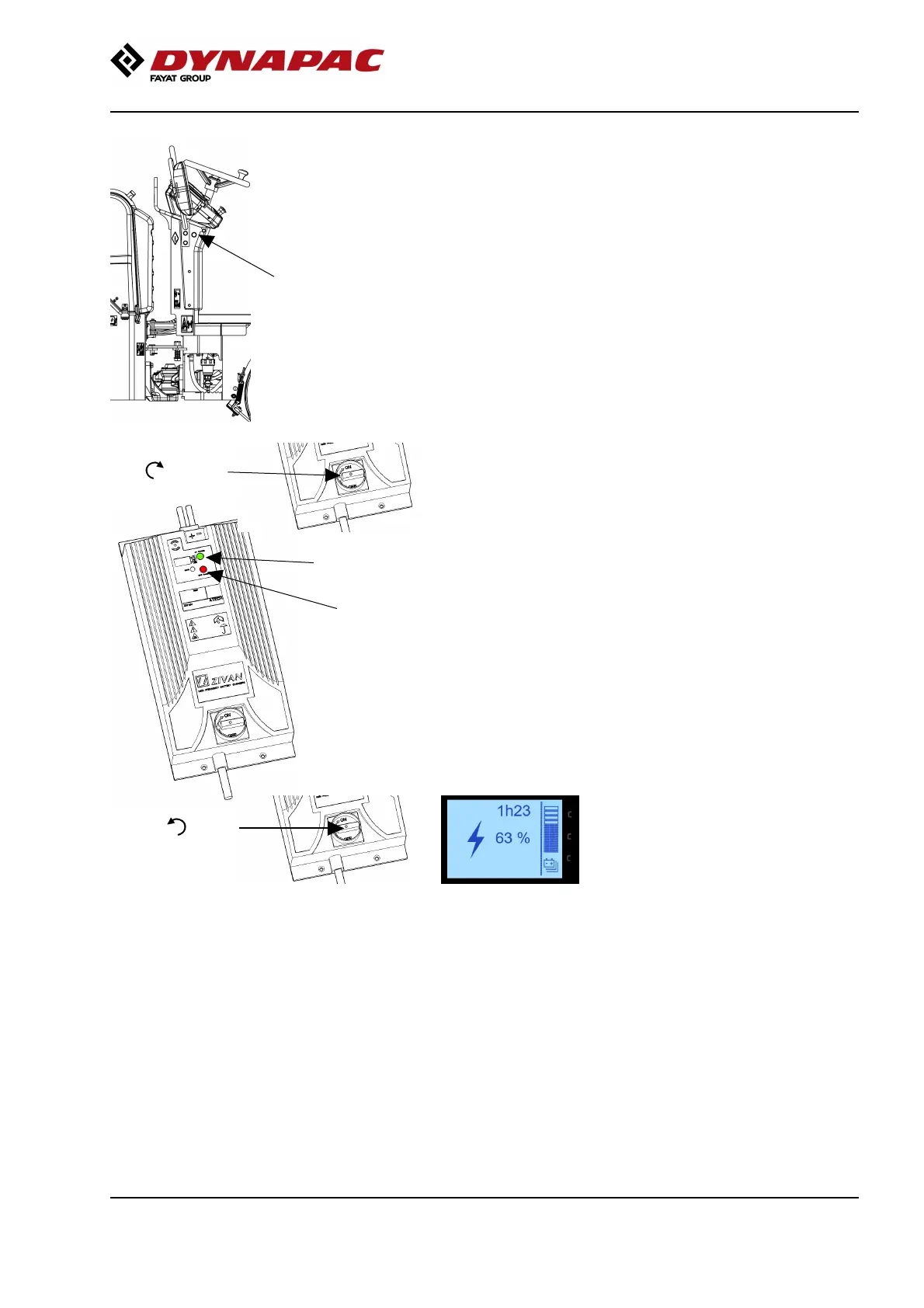
light– green light
The battery is initialized for 2–3 seconds and the
battery status light emits a solid light when the battery
and its monitoring system are ready for charging.
ON
Red
Green
OFF
Start charging by setting the battery charger switch to
the ON position.
Red light shows that the charger has started charging,
phase 1.
A flashing red light indicates that the charge is now in
phase 2.
Flashing red and green lights indicate that the charge
is in phase 3 and is approaching full charge.
The green light indicates that the battery is fully
charged.
If you during the charging procedure turn on the
machine´s ignition and start the display you are able to
see the current charging level in % and also the
estimate remaining charge time until fully charged.
The green indicator lamp on the machine´s steering
column goes out when the charging is completed.
To stop charging, switch the charger to OFF.
Remove the charging cable from the machine’s
charging socket.
If needed, disconnect the charger’s 3-phase plug from
the wall socket.
61



 To Next Page