74
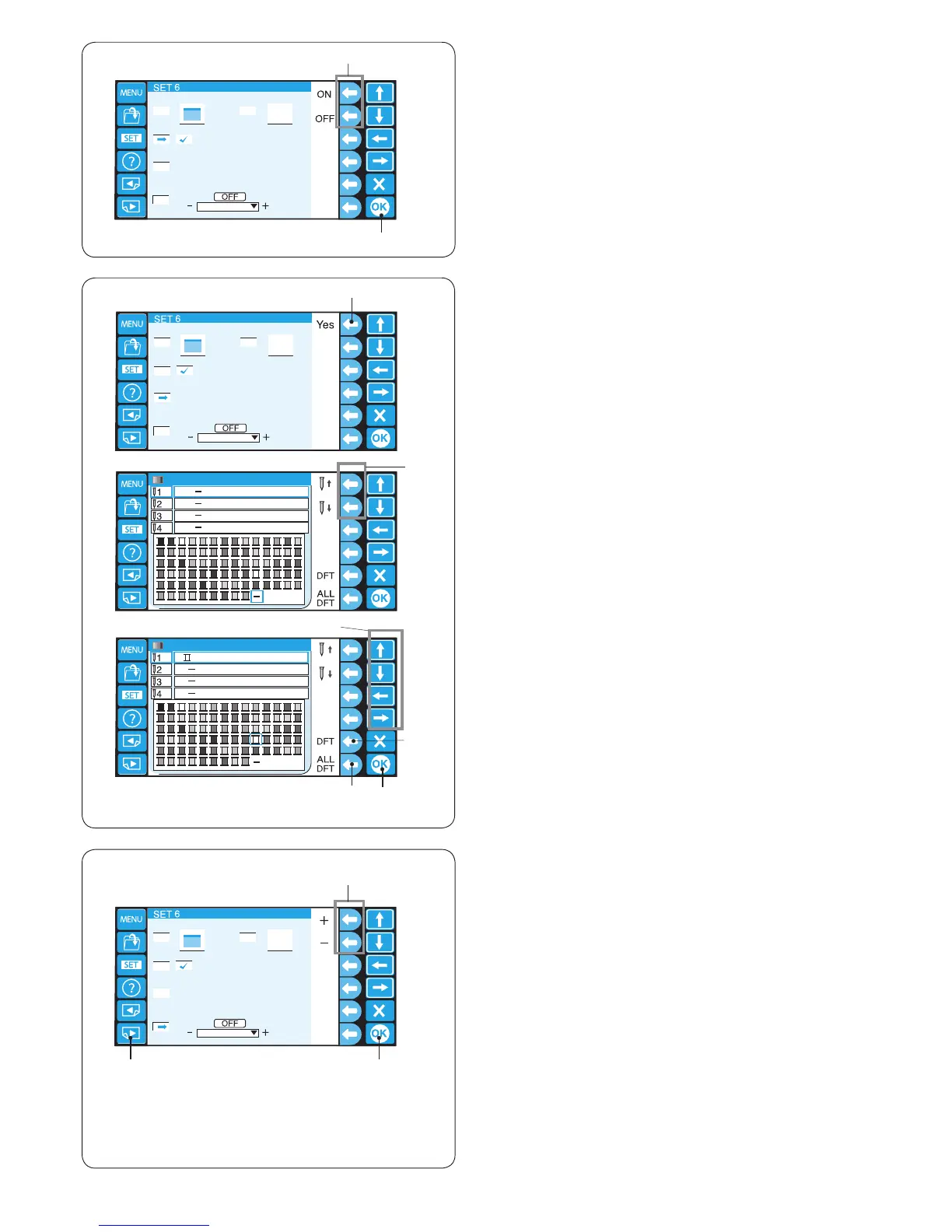
17. Reminder message ON/OFF
When you press the START/STOP button, a reminder
message will appear on the LCD touch panel. However,
you can turn off the reminder.
Press the function key next to OFF to turn off the
reminder.
To turn the reminder message on, press the function key
next to ON.
q Function keys (ON, OFF)
Press the OK key.
w OK key
q
we
t
y
18. Reserving the color for the needle bar
When you select a multi-color design, the machine will
automatically assign the thread color to each needle bar.
However, when you are sewing the second pattern that
uses the color same as one of the rst pattern used, you
can reserve this color for the needle bar already threaded
with this color.
If the rst pattern uses Ivory white thread on needle bar
No.1 and the second pattern uses Ivory white on needle
bar No. 3, reserve Ivory white for needle bar No.1.
So you do not need to unthread needle bar No. 1.
* You can reserve the color for up to 6 needle bars.
Press the function key next to “Yes”, the color setting
window will open.
q Function key (Yes)
Select needle bar No. 1 by pressing the function key next
to the needle bar icon No. 1.
w Function key (needle bar No.1)
Press the arrow keys to select Ivory white from the color
pallet and press the OK key to conrm your setting.
e Arrow keys
r OK key
To cancel the changes of setting for the selected needle
bar, press the function key next to the DFT icon.
To cancel the changes of setting for all the needle bars,
press the function key next to the ALL DFT icon.
t Function key (DFT)
y Function key (ALL DFT)
19. Ignoring short stitches
To avoid thread breakage due to short stitches, activate
the ignoring short stitches function to eliminate short
stitches from stitch data.
Press the function key next to “+” or “–” to select the
stitch length so that stitches of the selected length or
shorter will be eliminated.
The adjustable range is from 0.0 to 1.0 mm.
q Function keys (+, –)
To turn off this function, press the function key next to “+”
until OFF is indicated.
Press the OK key to register the new setting.
w OK key
To go to the next page, press the next page key.
e Next page key















 To Next Page