CR825 and CE875 Instant Issuance System User’s Guide A-7
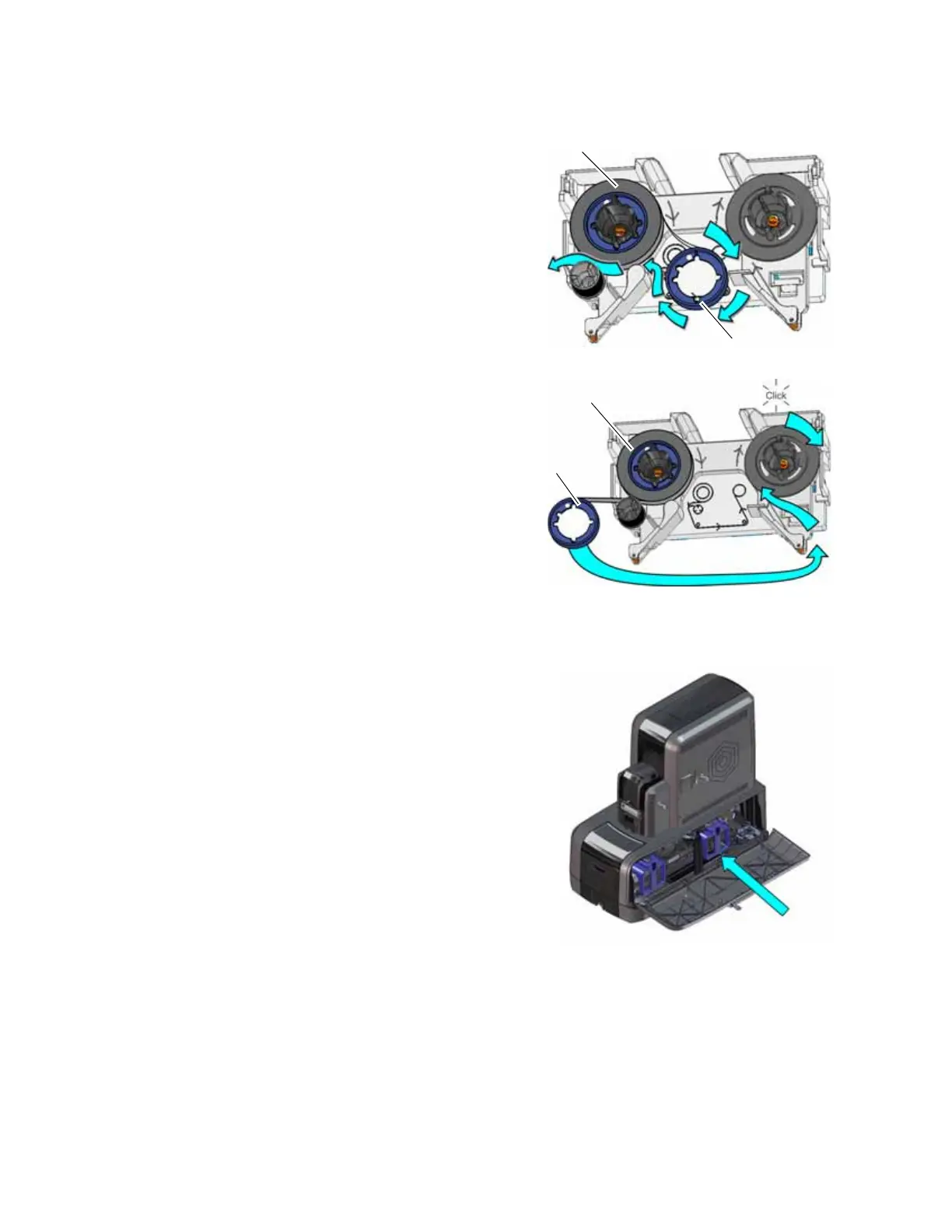
3. Prepare the ribbon for routing.
a. Roll up one full turn of indent ribbon on
the silver take-up spool.
b. Roll out a slack length of indent ribbon
from the supply spool.
4. Route the ribbon around the rollers on the
indent ribbon cartridge.
IMPORTANT! Do not twist the ribbon while
routing.
5. Secure the take-up spool into the spindle.
a. Match the keyed pattern of the take-up
spool hub with the right-side spindle.
b. Push the take-up spool into the spindle
until it clicks securely into place.
6. Turn the take-up spool one full turn clockwise to take up ribbon slack.
7. Replace the indent ribbon cartridge.
a. Hold the cartridge by its handle.
b. Align the cartridge with the guides inside the
embosser.
c. Slide the cartridge in until it clicks and stops.
8. Close and lock the embosser supplies access
door.
Supply
Spool
Take-up
Spool
Supply
Spool
Take-up
Spool



 To Next Page