CR825 and CE875 Instant Issuance System User’s Guide 37
Replace the Retransfer Film
Replace the retransfer film when the film runs out.
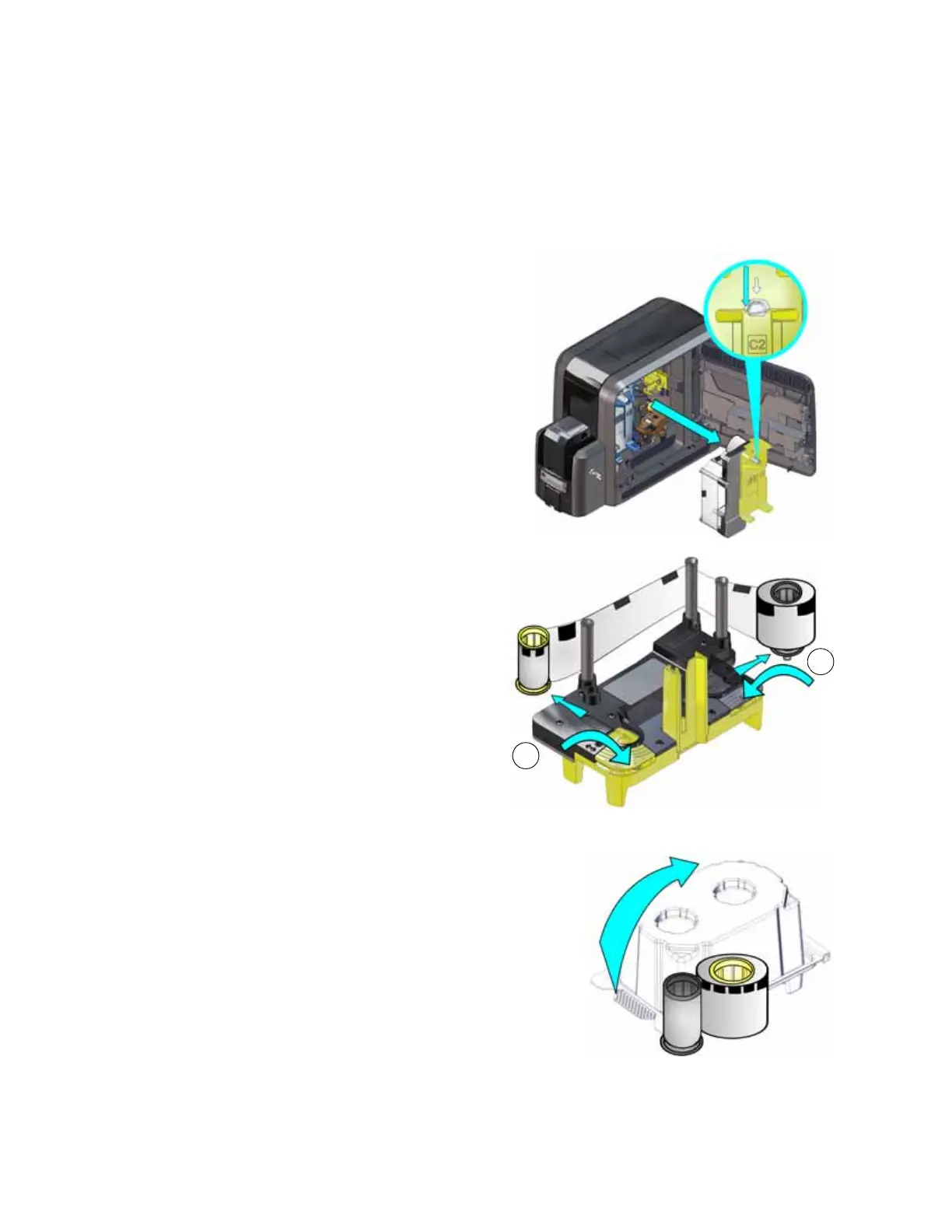
1. Unlock the access door lock and open the printer access door.
2. Press the retransfer film cartridge release
button and remove the yellow retransfer film
cartridge (C2).
3. Place the cartridge on a flat surface with the
spindles facing up.
4. Remove both used spools from the
cartridge.
a. Press the yellow latch button and
slide the used supply spool out from
the cartridge.
b. Press the silver latch button and slide
the full take-up spool out from the
cartridge.
c. Follow your site’s guidelines to
properly discard the used retransfer
film.
5. Remove the new roll of retransfer film from its
package. Hold the film cores and pull them up from
the package base.



 To Next Page