CR825 and CE875 Instant Issuance System User’s Guide 45
Clean the Printhead Cam Rollers
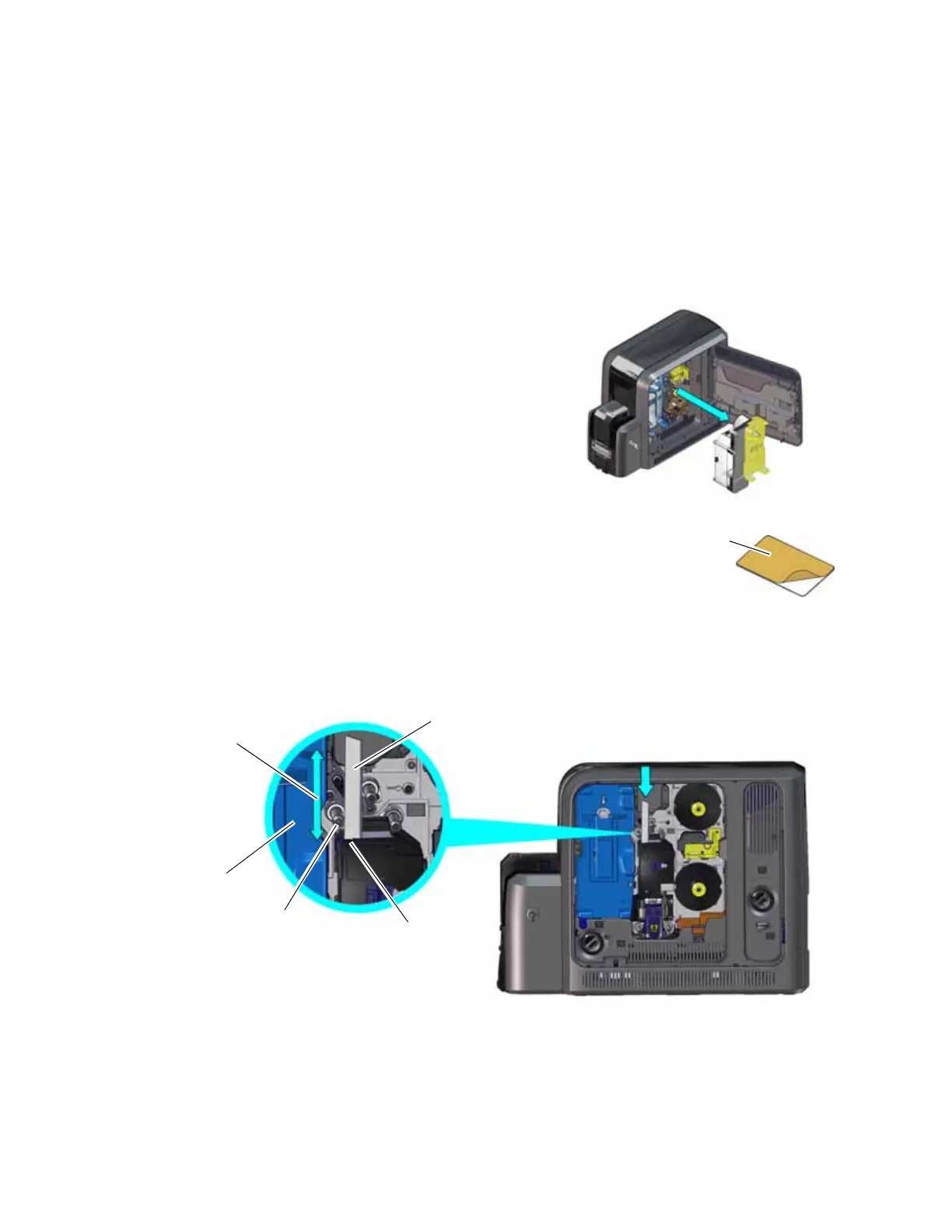
Use the double-sided, sticky cleaning card to clean the printhead cam rollers. Perform this
procedure first.
1. Power off the printer, if necessary.
2. Unlock the access door lock and open the printer access door.
3. Remove the retransfer cartridge (C2) from the
printer.
4. Peel off the wrapper from one side of the sticky cleaning card.
5. Insert the cleaning card vertically into the printer between the retransfer cartridge guidepost
and the rollers. Make sure that the adhesive side of the card is facing to the right and is
touching the rollers.
6. Move the cleaning card up and down along the rollers to remove any debris found on the
rollers.
7. Continue with “Clean the Inside of the Printer” on page 46.
Ink Ribbon
Cartridge
Guidepost
Sticky
Cleaning Card
Printhead
Cam Rollers
Move the cleaning
card up and down



 To Next Page