64 Troubleshooting
Printer Card Jams
A card jam occurs when the card does not reach the proper position for the next action, such as
printing or ejecting the card. The error condition that displays on the LCD helps you identify the
location of the card jam.
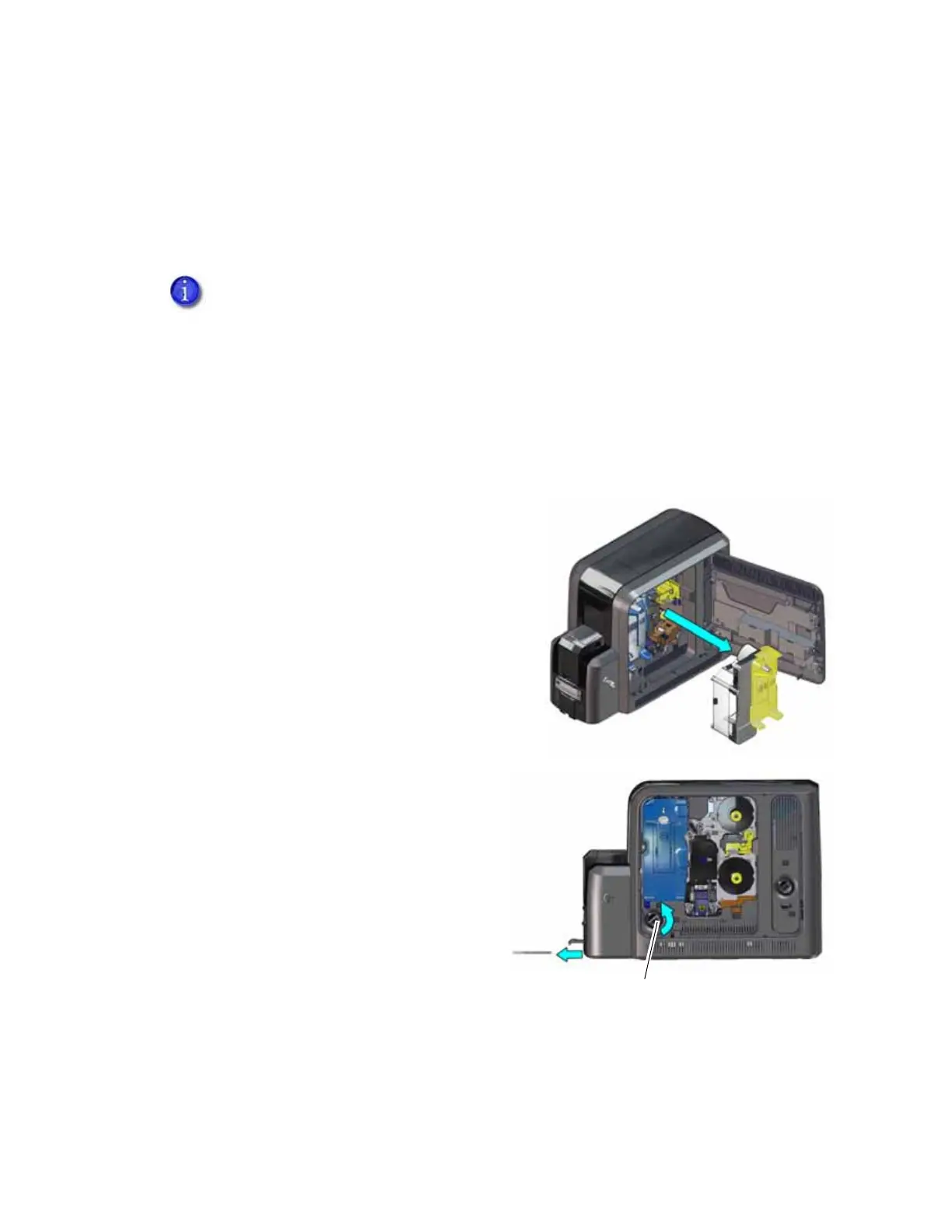
Clear a Card Jam in the K1 Horizontal Transport
If message 234: “K1 transport card jam” displays, you usually can resolve the error by pressing
the U
SER button to move the card into the reject tray. If the error persists, do the following to
remove the card from the printer.
Single-Hopper Printer
1. Unlock the printer and open the printer access
door.
2. Remove the retransfer film cartridge.
3. Turn the K1 manual advance knob
counterclockwise to move the jammed
card into the output hopper.
4. Remove the card through the output
hopper.
5. Replace the retransfer film cartridge and
close the printer access door.
6. Lock the printer.
7. Press the U
SER button on the printer to
clear the message.
If your system includes an embosser, refer to “Clear an Embosser Card Jam” on
page A-10.



 To Next Page