CR825 and CE875 Instant Issuance System User’s Guide 47
Multi-Hopper Printer
1. Power on the printer, if necessary.
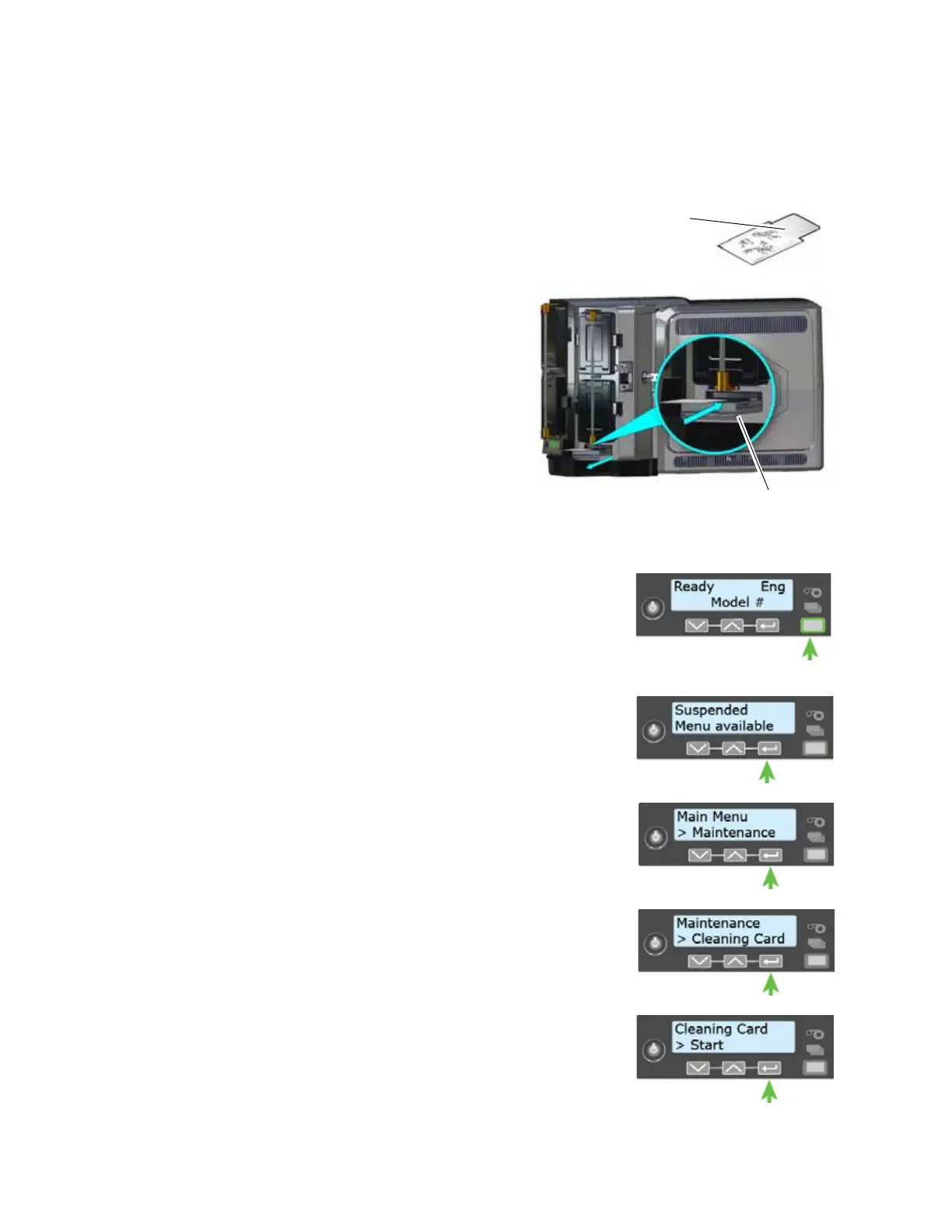
2. Open the isopropanol-coated cleaning card package and
remove the card.
3. Pull out the multi-hopper exception
slide and insert the cleaning card.
4. Push in the exception slide.
Plan to clean the printer immediately.
The cleaning card dries out if it is out of
its package for more than a few minutes.
5. Continue with “Start the Cleaning
Cycle”.
Start the Cleaning Cycle
1. Use the LCD menu system to start the cleaning cycle.
a. Begin when the printer displays Ready and the U
SER
button shows steady green. Press the U
SER button.
Suspended displays on line 1 of the LCD panel.
b. Press E
NTER to enter the menu system.
c. Maintenance displays on line 2 of the LCD panel. Press
E
NTER to enter the Maintenance menu.
d. Cleaning Card displays on line 2 of the LCD panel. Press
E
NTER to enter the Cleaning Card menu.
e. Start displays on line 2 of the LCD panel. Press E
NTER to
start the cleaning process.
Isopropanol
Cleaning Card



 To Next Page