© EPRAD Incorporated
2. Control Panel
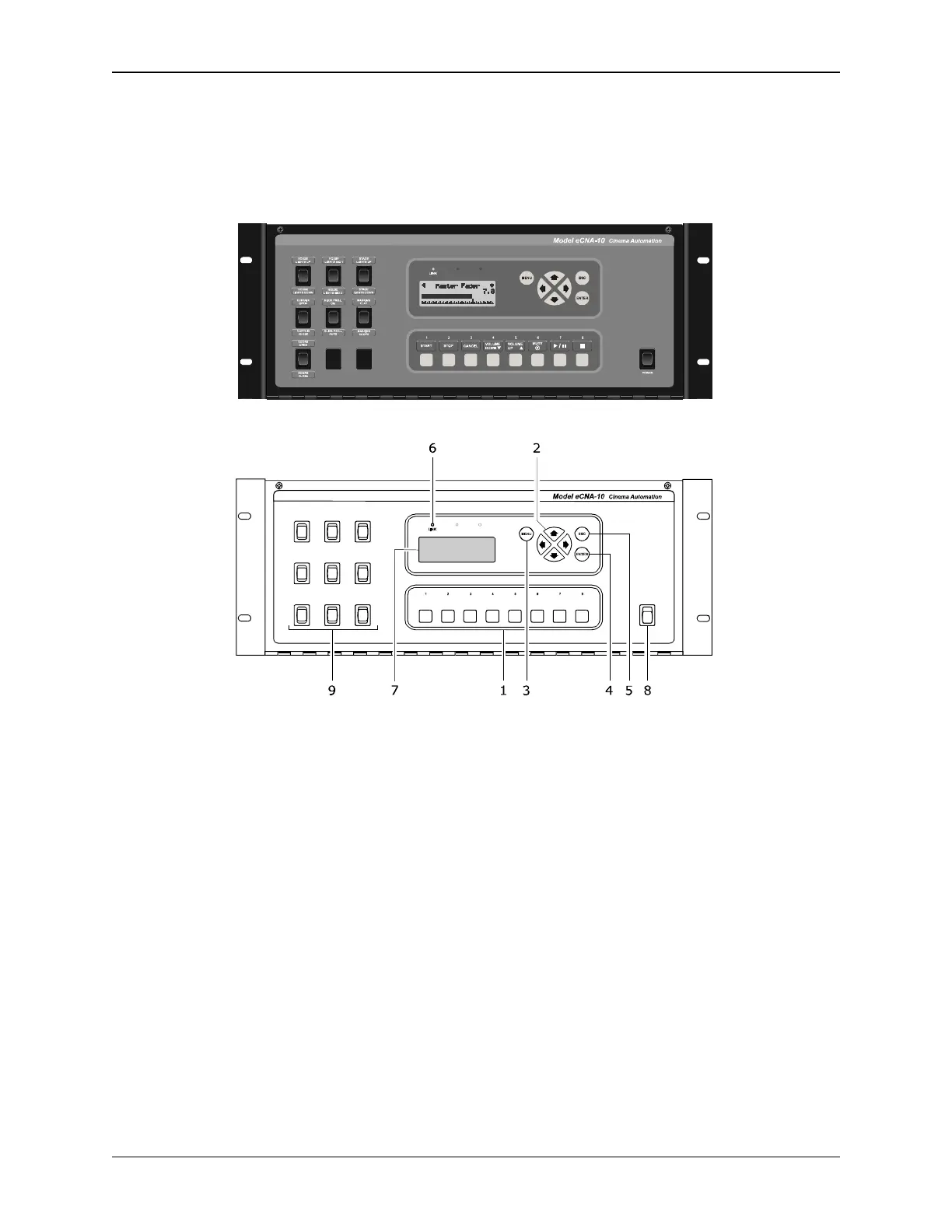
The eCNA-10 is available in a 4RU steel cabinet. The control panel features a display and navigation
keys, eight user-definable keys and emergency manual override switches.
Front Control Panel
1) User-Defined Keys These eight (8) keys can be programmed to control any number of
functions.
2) Cursor Keys The left, right, up and down cursor keys are used to navigate the screens and
menu system.
3) MENU Key This key is used to enter the menu system.
4) ESC key This key is used to abort a screen and return to the previously viewed top level screen.
5) ENTER Key This key is used to change or save a value.
6) LINK LED This (Green) LED will light up when there is a connection made to the Ethernet port.
It will blink when there is activity on the port.
7) LCD Screen The liquid crystal display screen shows real time status and menus for viewing set
up data. The screen is backlit for easy viewing in a dimly lit environment.
8) POWER Switch Used to turn on/off the eCNA-10 controller.
9) Manual Override Switches The control panel supports up to nine (9) manual control switches
generally used for emergency manual override. These switches circumvent the electronic circuitry
giving the operator the ability to control major functions in the event of a control system failure
or for testing purposes.
2
eCNA-10 Operation and Installation Manual Version 1.270-00



 To Next Page