© EPRAD Incorporated
3.2 Top level screens
The top level screens provide the operator with real-time information about booth and auditorium
functions such as show status, auditorium sound and light levels, and screen format. Many functions
can be manually controlled from these screens. Press the or keys to navigate to a new top level
screen. These screens are memorized by the system, so that on a power up, the screen that was
being viewed prior to a power down is displayed.
3.2.1 Run Status screen
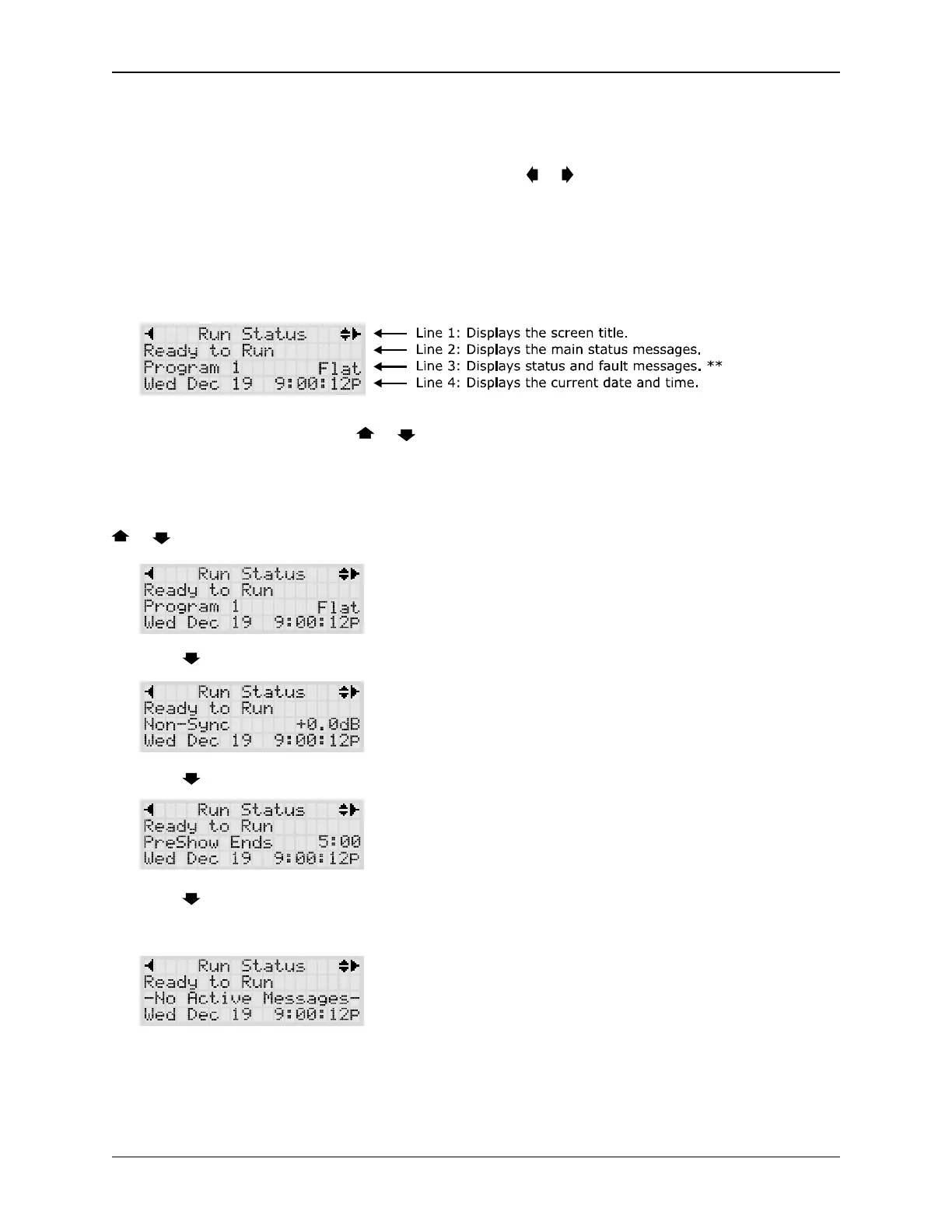
The Run Status screen displays
** Line 3 can be scrolled with the or keys.
Line 2 displays the main status messages.
Line 3 displays the active program and the screen format. The program number can be changed from
this screen. Press the ENTER key for two seconds. The program number will start to blink. Press the
or keys to change the number. Press the ENTER key again.
Press the key to display the sound format and output level.
Press the key to display the active Show Segment. The Wait Time is also displayed here.
Press the key to display the type of fault message. If no system faults are present, the message
-No Active Messages- is displayed. See section 3.3.6 for list of system fault and status messages
and their definitions.
4
eCNA-10 Operation and Installation Manual Version 1.270-00



 To Next Page