© EPRAD Incorporated
Appendix B: Status/Control Message Table
B.1 Cinema Automation Interface (CAI) Client Status/Control Messages
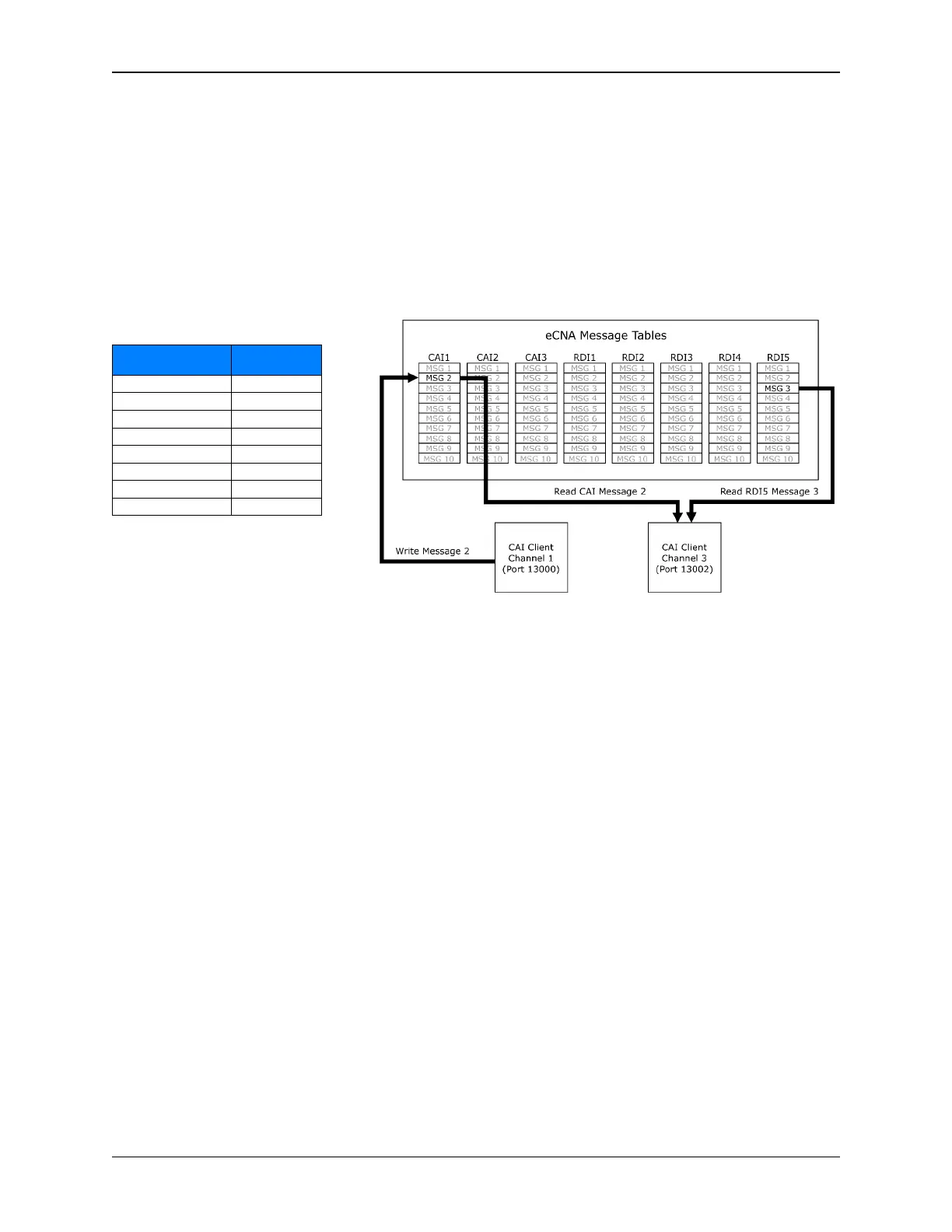
A CAI client can exchange information with other CAI clients via the eCNA client message tables.
Messages can be used for both status and control purposes. Each CAI client can write to its’ own
table and read data from any other client table including its’ own. The eCNA currently supports up to
10 messages per table, each containing up to 24 ASCII characters. The client uses the
STATUS/CONTROL MESSAGE WRITE command to write a message to its’ message table and the
STATUS/CONTROL MESSAGE READ command to read a message from any client table. A CAI client
can also read messages from the Remote Device (RDI) status tables.
Device
Channel
Message
Table
CAI Channel 1 CAI1
CAI Channel 2 CAI2
CAI Channel 3 CAI3
RDI Channel 1 RDI1
RDI Channel 2 RDI2
RDI Channel 3 RDI3
RDI Channel 4 RDI4
RDI Channel 5 RDI5
The eCNA can be configured to send these client messages, unsolicited, to any CAI channel. In other
words, each client can independently configure the eCNA to receive messages from only the table(s)
it wants. These messages are automatically sent when the message changes. Use the
CONFIGURATION command to enable or disable the Status/Control unsolicited messages. The client
can also force an unsolicited message every time the message is written by putting the “!” character
at the beginning of the message.
Notes:
1) All characters are supported except:
double quote “ less than < ampersand & backslash \
single quote ‘ greater than > open bracket [
semi-colon ; comma , close bracket ]
• Invalid characters are quietly converted to spaces (20h).
• Messages exceeding 24 characters in length are truncated.
2) After an eCNA power up, the message table is filled with empty strings.
3) Outgoing ‘unsolicited’ client message events are placed into a fixed size output buffer. The eCNA
sends these messages attempting to keep this buffer empty. Be aware that this buffer can
overflow if the clients pushing new messages to their message tables exceeds the rate at which
clients are accepting the unsolicited messages. Oldest messages are lost first. The number of
messages that can be buffered depends on the length of the messages. A maximum of 35 (24
character) messages can be buffered. A maximum of 100 messages (of smaller lengths) can be
buffered.
158
eCNA-10 Operation and Installation Manual Version 1.270-00



 To Next Page