© EPRAD Incorporated
4.3.21 Setup: QDC-400 Dimmer Boards
QDC-400 dimmer control board channels must be configured for the desired lighting zone. The
‘physical’ wiring of the dimmer power modules and lights will determine how the zones are
configured. The eCNA-10 supports up to four QDC-400 dimmer control boards. The channels are
assigned to the dimmer boards as follows:
QDC-400 Dimmer Board Channels
1 1, 2, 3, 4
2 5, 6, 7, 8
3 9, 10, 11, 12
4 13, 14, 15, 16
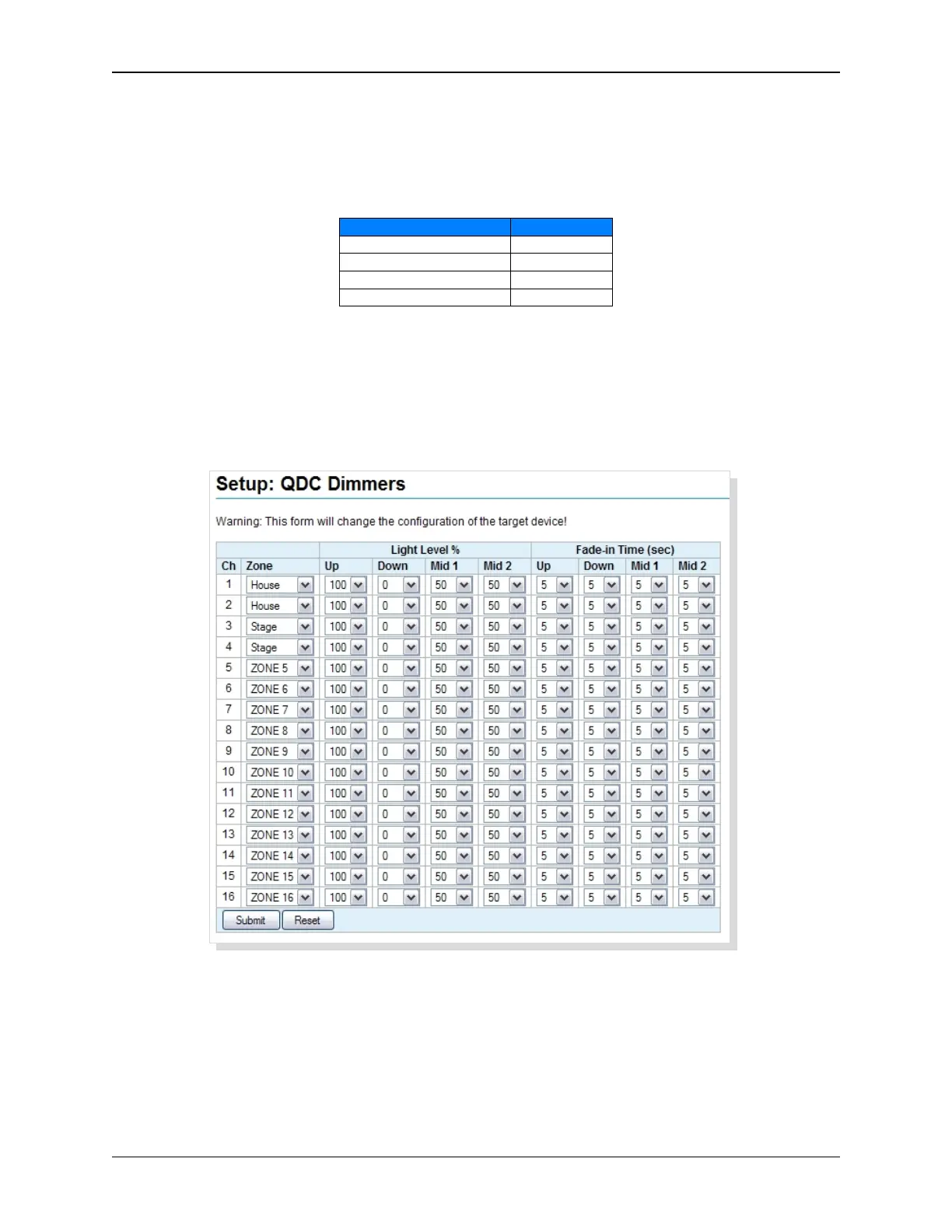
Click on QDC-400 Dimmer Boards under Light Control in the Setup Menu. Use the Zone list box to
select a zone to assign to a channel. Four light levels, Up, Down, Mid 1 and Mid 2 can be
configured from 0% to 100% for each channel. The Fade-in Time controls how long it takes to ramp
to that level from any other light level. The range is 0 to 99 seconds.
Click on the Reset button to put the original data back. Click the Submit button to save new settings
to the eCNA-10.
52
eCNA-10 Operation and Installation Manual Version 1.270-00



 To Next Page