© EPRAD Incorporated
6. CAI Serial Commands
This section describes the Cinema Automation Interface (CAI) ASCII serial commands. These
commands are used by the client for control and status purposes. The eCNA can also be configured
to send unsolicited messages to the client for status, control and logging purposes. These unsolicited
messages can be enabled or disabled with the configuration command.
The eCNA supports three CAI channels:
CAI Channel 1: TCP Port 13000 or RS-232 port (P9)
CAI Channel 2: TCP Port 13001
CAI Channel 3: TCP Port 13002 or RS-232 port (P1 on the 39446 optional adapter board)
CAI Channel 4: TCP Port 13003
Hardware Connection:
RS-232 (P9, P1 on the 39446 adapter):
Baud Rate: 19200 bps
Data Length: 8 bits
Parity Bit: No Parity
Stop Bits: 1 bit
Flow Control: Hardware (RTS-CTS)
Ethernet (J2):
10Base-T: 10 mbps
Duplex: Half or Full
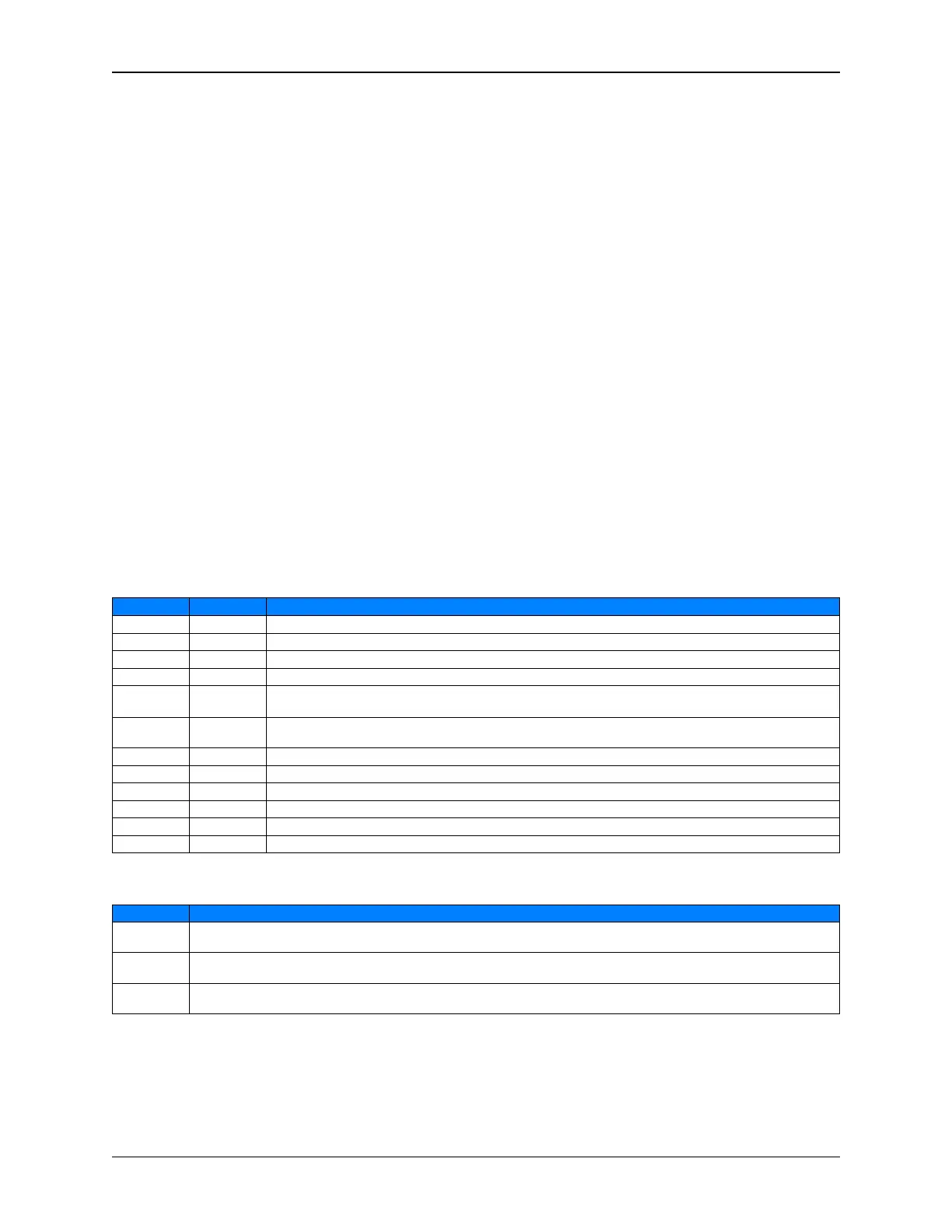
Commands supported by the eCNA
Command Response Description
CMD EVT RSP EVT Event Command. This allows the client to send an event to the eCNA for control purposes
CMD LOG RSP LOG Log Command. This command allows the client to manage the event log buffer.
CMD OUT RSP OUT Output Command. The client can use this command to control individual outputs.
CMD STS RSP STS Status Command. This command allows the client to request the status of various functions.
CMD RCK RSP RCK
Read the Clock Command. This allows the client to read the eCNA’s clock. Can be used for time
synchronization.
CMD SCK RSP SCK
Set the Clock Command. This allows the client to set the eCNA’s clock. Can be used for time
synchronization.
CMD CFG RSP CFG Configuration Command. This command is used to enable or disable the unsolicited messages.
CMD RID RSP RID Report Id Command. The eCNA returns it’s identification information to the client.
CMD RST RSP RST Report Status Record Command. The eCNA returns it’s status record to the client.
CMD XST RSP XST Exchange Status Record Command. The eCNA exchanges it’s status record with the client.
CMD SMW RSP SMW Status/Control Message Write Command. This allows a client to write text messages to it’s table.
CMD SMR RSP SMR Status/Control Message Read Command. This allows a client to read text messages from any table.
Unsolicited Messages supported by the eCNA
Message Description
RPT EVT
Unsolicited Event Report. If enabled, these messages sent by the eCNA contain real time event data. The client
could use these for control purposes.
LOG EVT
Unsolicited Event Log. If enabled, these records sent by the eCNA contain the logged event data. The client could
use these for reports.
STM EVT
Unsolicited Status/Control Event. If enabled, these messages sent by the eCNA on a Status/Control message
change in the CAI or RDI table.
88
eCNA-10 Operation and Installation Manual Version 1.270-00



 To Next Page