© EPRAD Incorporated
4.3.19 Setup: Light Control
The eCNA-10 software supports up to four QDC-400 4-channel dimmer control boards for a total of
sixteen channels. If the QDC-400 is installed on the LIN use the following two screens to set up the
QDC-400.
U
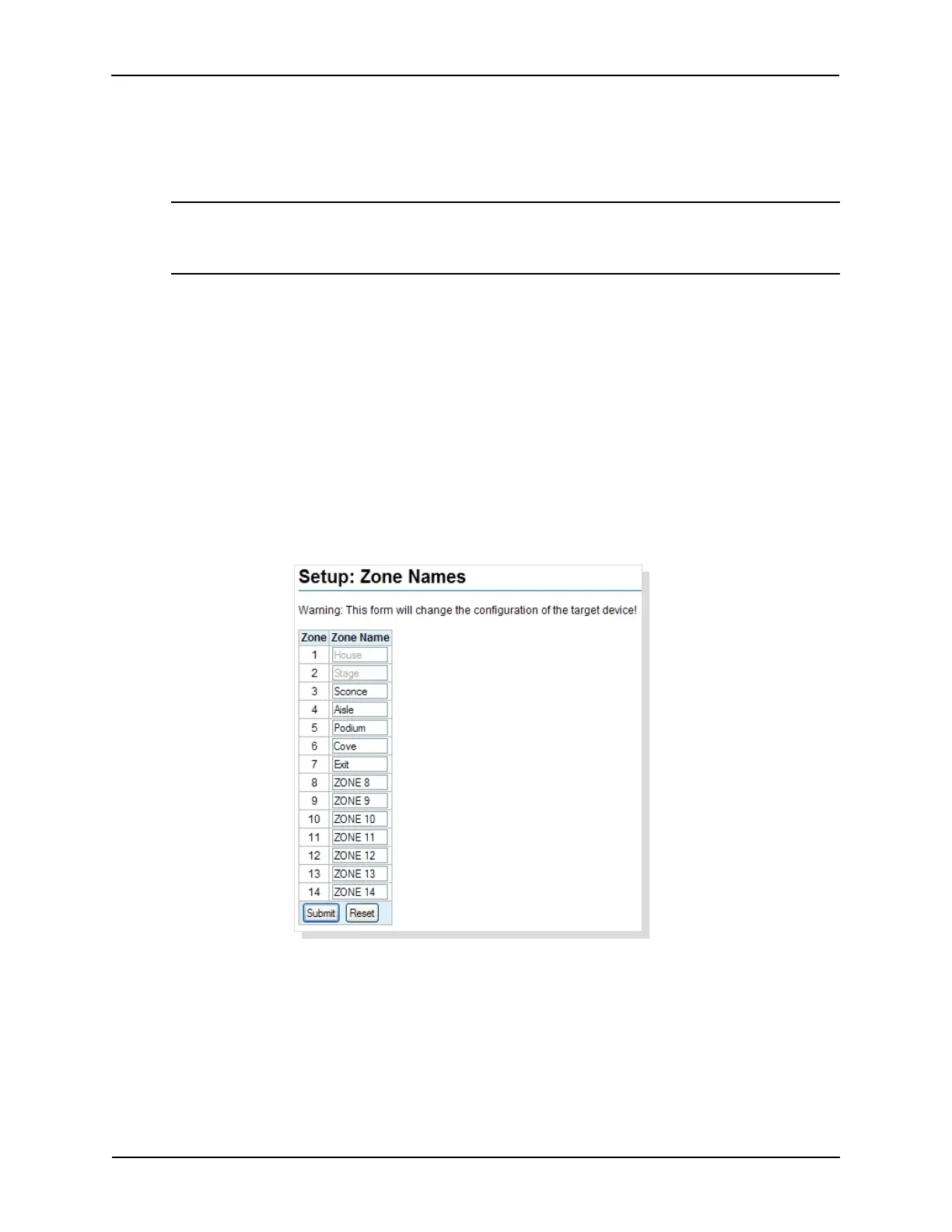
4.3.20 Setup: Zone Names
Click on Zone Names under Light Control in the Setup Menu. Up to sixteen different light zones are
supported by the QDC dimmer. Each zone can be can be named to indicate it’s particular function.
Zone 1 is fixed for House lights and Zone 2 is fixed for Stage lights. Zones 3 through 16 can be
named with up to eight characters of text. Click in the Zone Name text box and enter the zone name.
These names are used in the QDC-400 Dimmer Boards setup screen and the Lights instruction.
All characters are supported except:
double quote “ less than < ampersand &
single quote ‘ greater than > open bracket [
semi-colon ; backslash \ close bracket ]
Click on the Reset button to put the original data back. Click the Submit button to save new settings
to the eCNA-10.
Note: This board is powered by the Local I/O Network (LIN). If more than one QDC-400
dimmer control board is to be installed on the LIN, make sure the eCNA-10's power supply
is of sufficient size. See Power Supply section.
51
eCNA-10 Operation and Installation Manual Version 1.270-00



 To Next Page