© EPRAD Incorporated
4.3.16 Setup: Virtual I/O
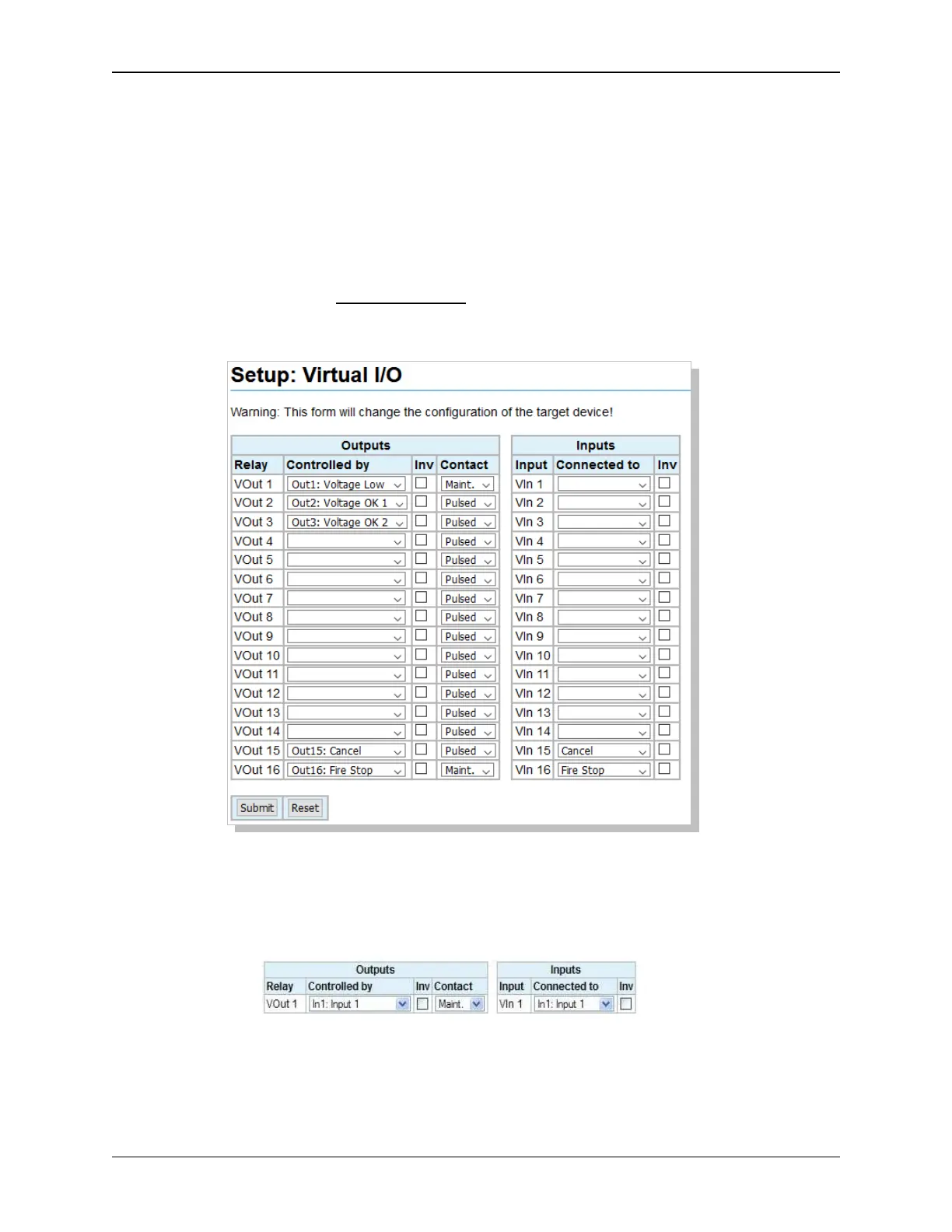
Click on Virtual I/O under General in the Setup Menu. This screen is used to configure the Virtual
Outputs (VOutx) that are transmitted over Ethernet Multicast to the other eCNAs. The Virtual Inputs
(VInx) are simply the Boolean “OR” of the flags from all other eCNAs. For instance, if you have 3
eCNAs the VIn1 is the “OR” of the 3 eCNA’s VOut1s. eCNAs must be configured to be part of the
same Multicast group. The “Controlled by” and “Connected to” dropdown lists are identical to all other
“physical” I/O boards.
Example: eCNA #1 VOuts 10000000 10000001
eCNA #2 VOuts 00000000 10000001
eCNA #3 VOuts 00000000 00000001
eCNA VIns 10000000 10000001 Logical “OR” results of the three eCNA’s Vout flags
Note 1: Be aware that the “Fault Behavior” configuration of the output control flags follow the same
rules as before. Consider it when designing your application to avoid undesired behavior.
Note 2: It is possible to configure “latched on” conditions that may or may not be desirable:
In this example if any eCNA sets VOut1, it will be permanently latched on.
44
eCNA-10 Operation and Installation Manual Version 1.270-00



 To Next Page