© EPRAD Incorporated
The Prev and Next buttons take you to another device setup screen.
4.3.15 Setup: Clock Events
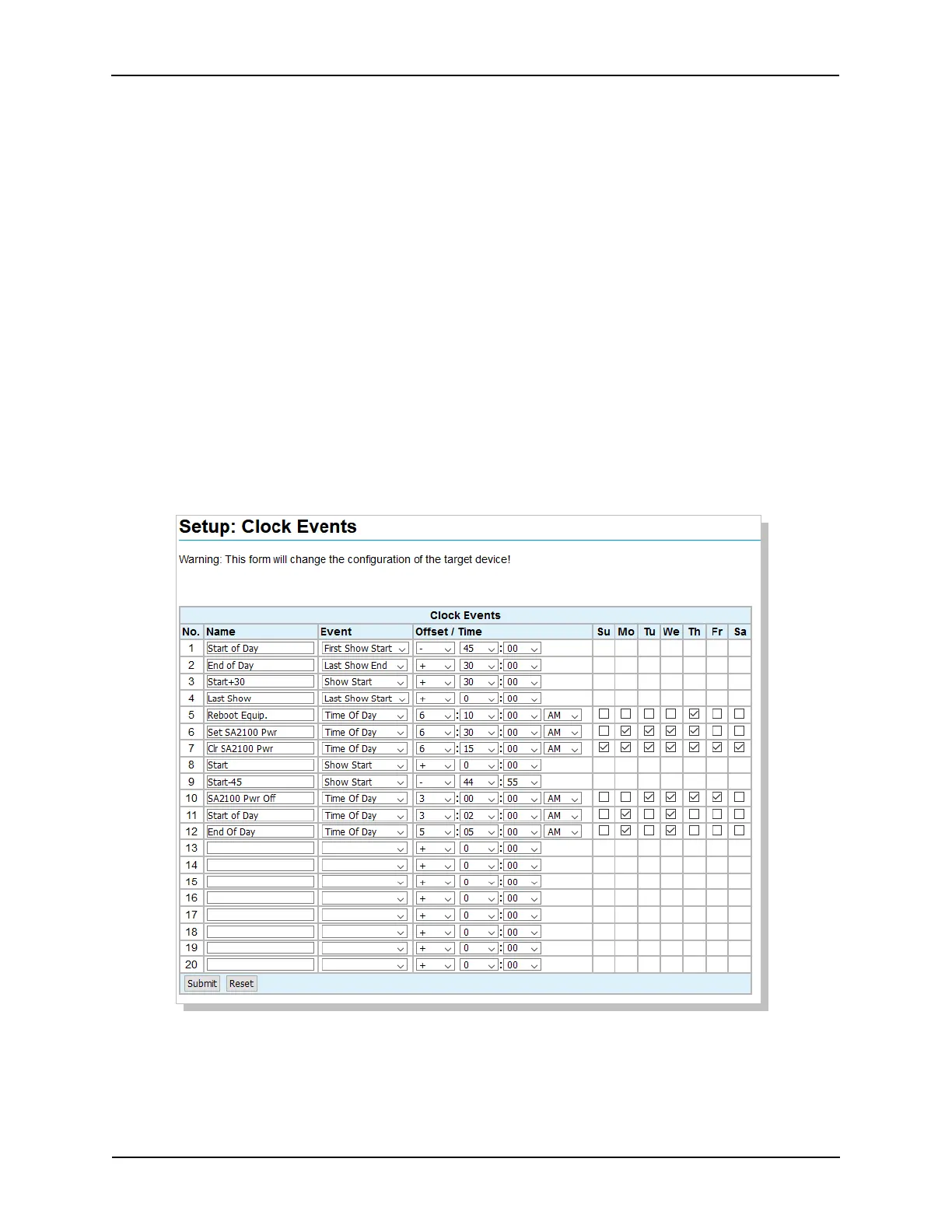
Click on Clock Events under General in the Setup Menu. This screen is used to configure events
based on the day’s show schedule and the time of day. The EPRAD nanoHost Cinema Integration
System is required to get the show schedule.
The following events can be define based on the day’s schedule:
• First Show Start
• First Show End
• Show Start
• Show End
• Last Show Start
• Last Show End
A “+” or “-“ offset time can be applied to the event. For example (see below), event #1 will occur 45
minutes before the start of the first show and event #2 will occur 30 minutes after the end of the last
show.
Time of Day events will occur at the time and day(s) assigned. For example, clock event #5 will occur
at 6:10 am every Thursday.
You can use the clock events to create triggers just as with any other event. The name of the clock
event is shown in the “Controlled by” column on the Triggers screen.
Note: Click on the Clock Event number to enable or disable the event.
43
eCNA-10 Operation and Installation Manual Version 1.270-00



 To Next Page