© EPRAD Incorporated
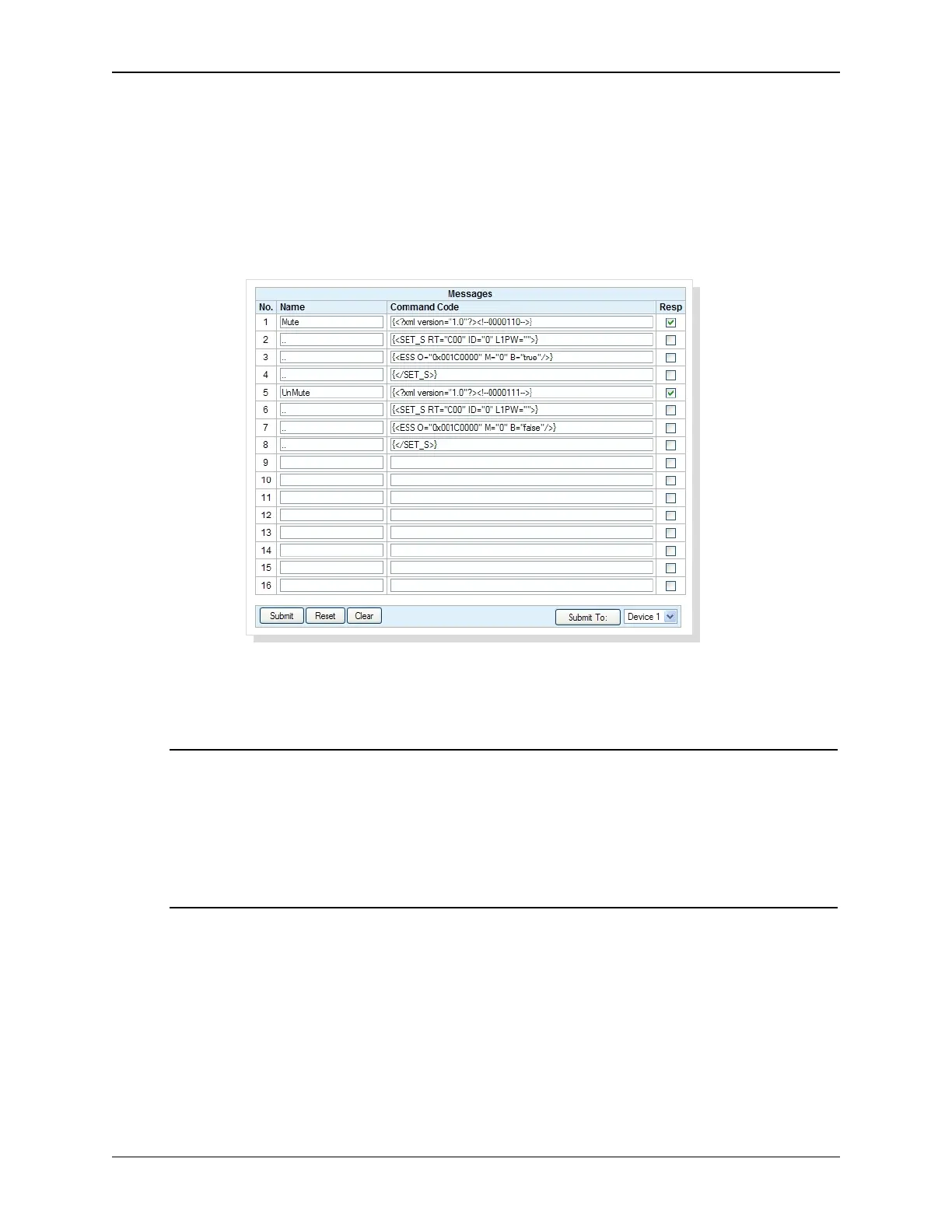
Message command codes can be concatenated by assigning a name starting with two periods (“..”).
In the example below, the names on lines 2, 3 and 4 start with “..” and the resulting Mute command
message sent is: <?xml version="1.0"?><!--0000110--><SET_S RT="C00" ID="0" L1PW=""><ESS
O="0x001C0000" M="0" B="true"/></SET_S>
The editor rules regarding binary (hex) and ASCII messages must be adhered to for each separate
command code line. In example below, note that the ASCII text on each line is inside the curly
braces “{ }”. The Resp checkbox for the first line of the message is used for the entire message.
(i.e. the Resp configuration flag for “..” named messages are ignored.)
Only use commands that force an action at the device (such as turning the lamp on). Status
commands that request information from the device serve no purpose here. Status requests for
some supported devices are handled automatically by the eCNA.
U
The Resp checkbox tells the eCNA whether or not to expect a response from the Remote Device.
Some devices send an acknowledgment to the command, so this box must be ‘checked’ if the device
sends a response.
The Execute button allows execution of the message from the setup screen. This is useful for
debugging and testing purposes.
Click Submit to save configuration to the eCNA. Click Reset to abort any changes. The Clear button
clears all configuration and message data from the form. Again, you must click Submit to save it to
the eCNA. The Submit To: button allows you to save configuration data from the current form to
another remote device.
Note: Remember, these are the actual command codes sent to the device, so be sure to
enter them correctly. An incorrect command code could result in either no action or
adverse behavior of the receiving device.
It is also important that you understand very well what these commands do in the context
of the overall operation of the device in order to use them properly.
Contact the manufacturer of the device or EPRAD for additional support.
42
eCNA-10 Operation and Installation Manual Version 1.270-00



 To Next Page