© EPRAD Incorporated
NEC
®
Projector Control Commands
Name Description
Command Code
(1) (2) (6)
Lamp Off This command sets the Lamp Control Mode to Lamp Off 03 2F 12 02
Lamp On This command sets the Lamp Control Mode to Lamp On 03 2F 12 01
Lamp Standard This command sets the Lamp Control Mode to Lamp Standard (in conjunction with
Power On/Off)
03 2F 12 00
Douser Open This command cancels picture mute by opening the lens douser 02 17
Douser Close This command mutes a picture by closing the lens douser 02 16
Title List Selects from Title/Entry List: 1 through 100. xx = 00 through 99 (List number - 1).
For example xx = 07 for list number 8
02 03 00 xx
Macro Key 1 This command activates the Preset (Macro) Key number 1 02 03 06 00
Macro Key 2 This command activates the Preset (Macro) Key number 2 02 03 06 01
Macro Key 3 This command activates the Preset (Macro) Key number 3 02 03 06 02
Macro Key 4 This command activates the Preset (Macro) Key number 4 02 03 06 03
Macro Key 5 This command activates the Preset (Macro) Key number 5 02 03 06 04
Macro Key 6 This command activates the Preset (Macro) Key number 6 02 03 06 05
Macro Key 7 This command activates the Preset (Macro) Key number 7 02 03 06 06
Macro Key 8 This command activates the Preset (Macro) Key number 8 02 03 06 07
292-A This command selects the signal input port 292-A 02 03 05 1A
292-B This command selects the signal input port 292-B 02 03 05 1B
292-Dual This command selects the signal input port 292-Dual 02 03 05 1C
DVI-A This command selects the signal input port DVI-A 02 03 05 38
DVI-B This command selects the signal input port DVI-B 02 03 05 39
DVI-Dual/Twin This command selects the signal input port DVI-Dual/Twin 02 03 05 3A
Power On This command switches on the main power of the projector. The projector doesn’t
accept any other command during power on processing
02 00
Power Off This command switches off the main power of the projector. The projector doesn’t
accept any other command during power off processing. (It contains a cooling
period.)
02 01
Picture Mute On This command blanks the picture 02 10
Picture Mute Off This command cancels the blank picture condition. If the douser is closed, this
function does not work
02 11
The NEC NC Series projectors may support more control commands. If additional control is required,
please consult NEC projector documentation or call EPRAD.
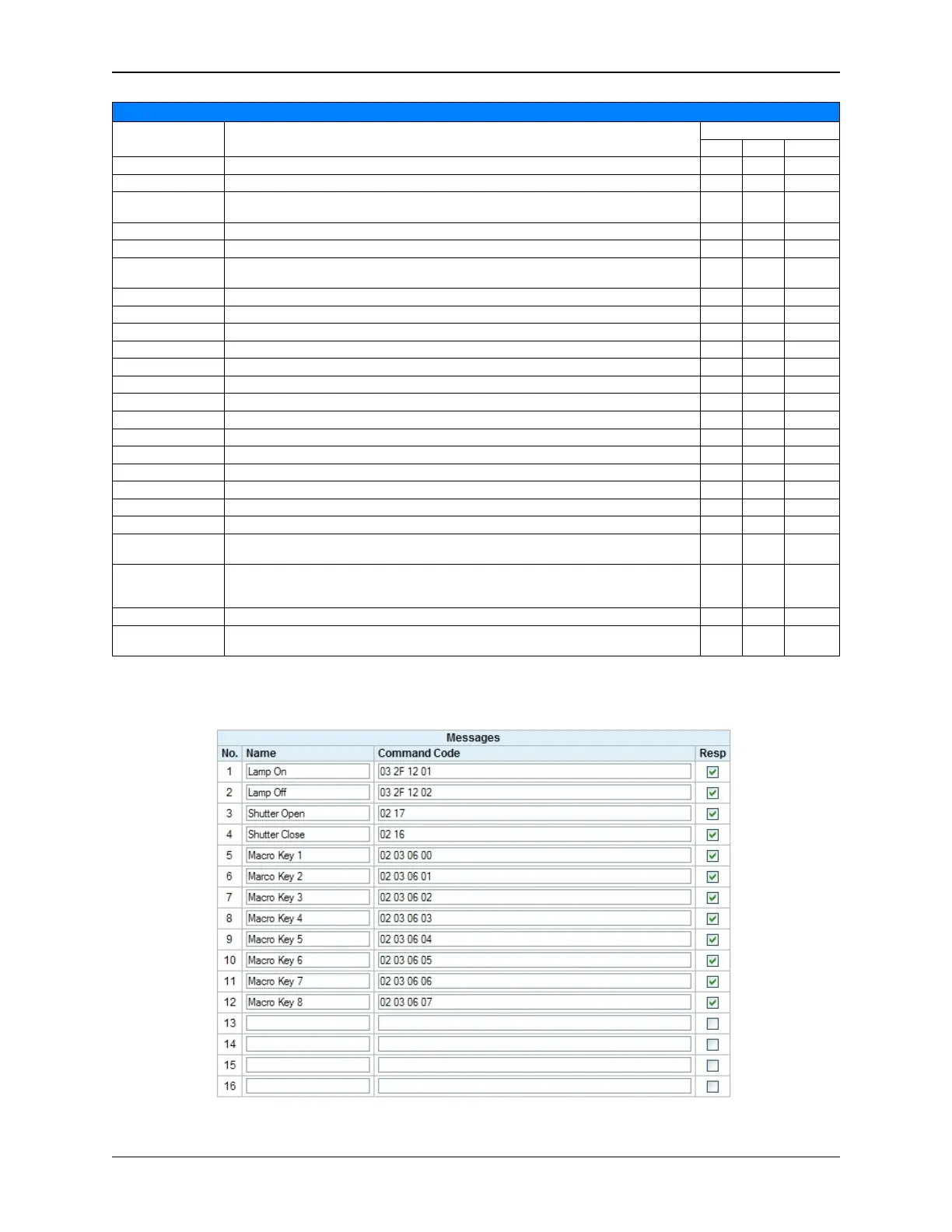
The Resp checkbox should be checked for all NEC commands.
152
eCNA-10 Operation and Installation Manual Version 1.270-00



 To Next Page