Sensor+ Connect Web Interface 29
Rooms & Presets
Assign Dimmers
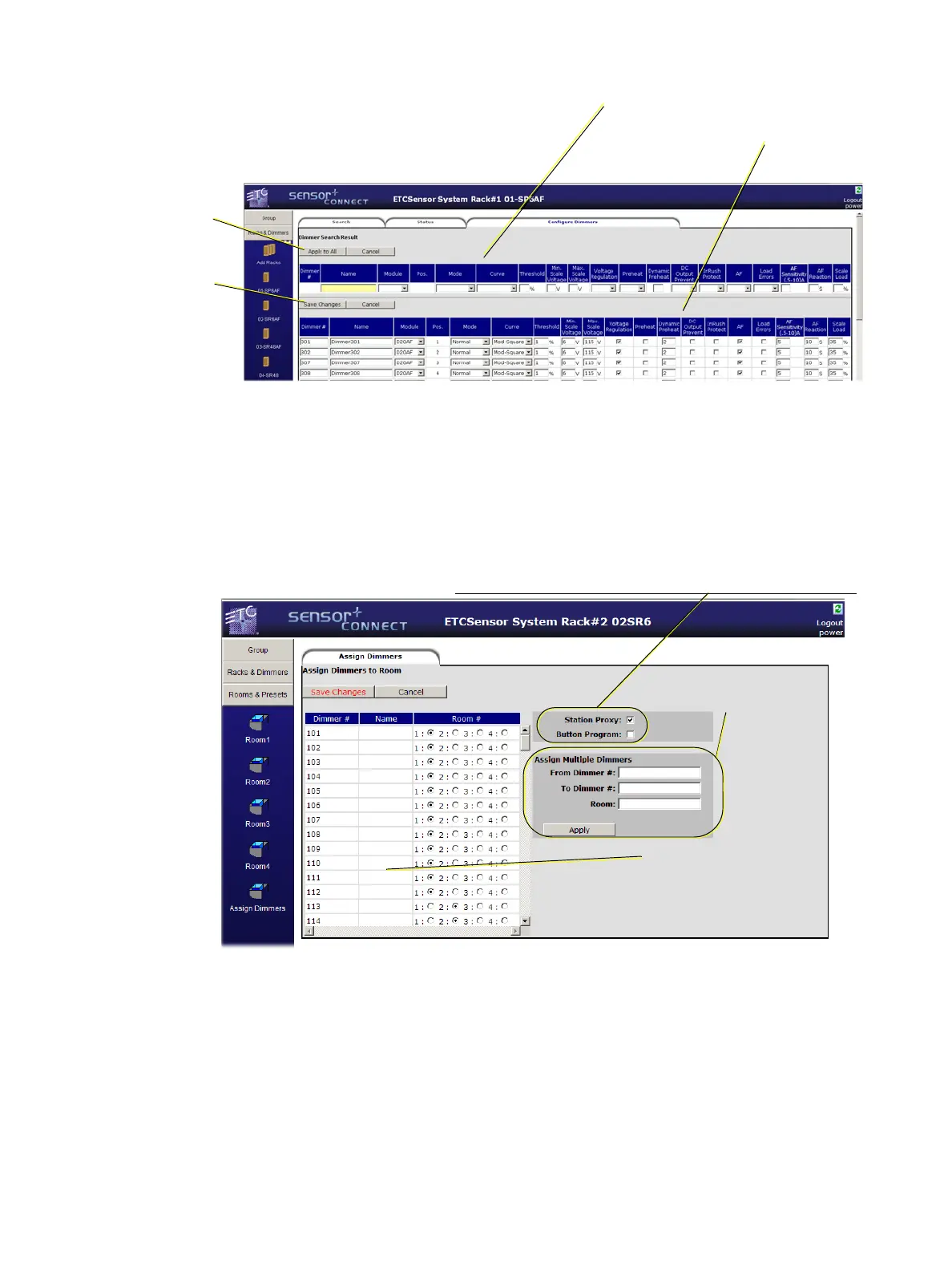
All dimmers in a group default to being in (and thus available only to) Room1. You can assign a dimmer
or range of dimmers to any of the rooms (1-4) only once. Shown below, dimmers 101-112 are
assigned to Room1 and dimmers 113-114 are assigned to Room2.
Room (1-4)
Clicking on a room in the navigation bar will bring up the display shown below. This is where you
create presets, name presets, record or snapshot presets to give them level information or clear a
preset to remove all level information from it.
Use this section to
make changes that will
get applied to all
found dimmers below.
This section gets
the changes
applied to it.
Apply to All
makes the
changes to the
table below.
Save Changes
updates the
information in
the CEM+
Use this section
to assign a
range of
dimmers to a
room.
Use this section to assign an
individual dimmer to a room.
Dimmers may only be
assigned to a single room at
a time.
Station Proxy =
Station Master
on
page 63
Button Program =
Record a Preset from a Wall Station
on
page 68
Used with SmartLink stations and SmartLink products



 To Next Page