QUANTUM™ LX EVAPORATOR CONTROL PANEL
OPERATION
090.610-O (MAR 2016)
Page 20
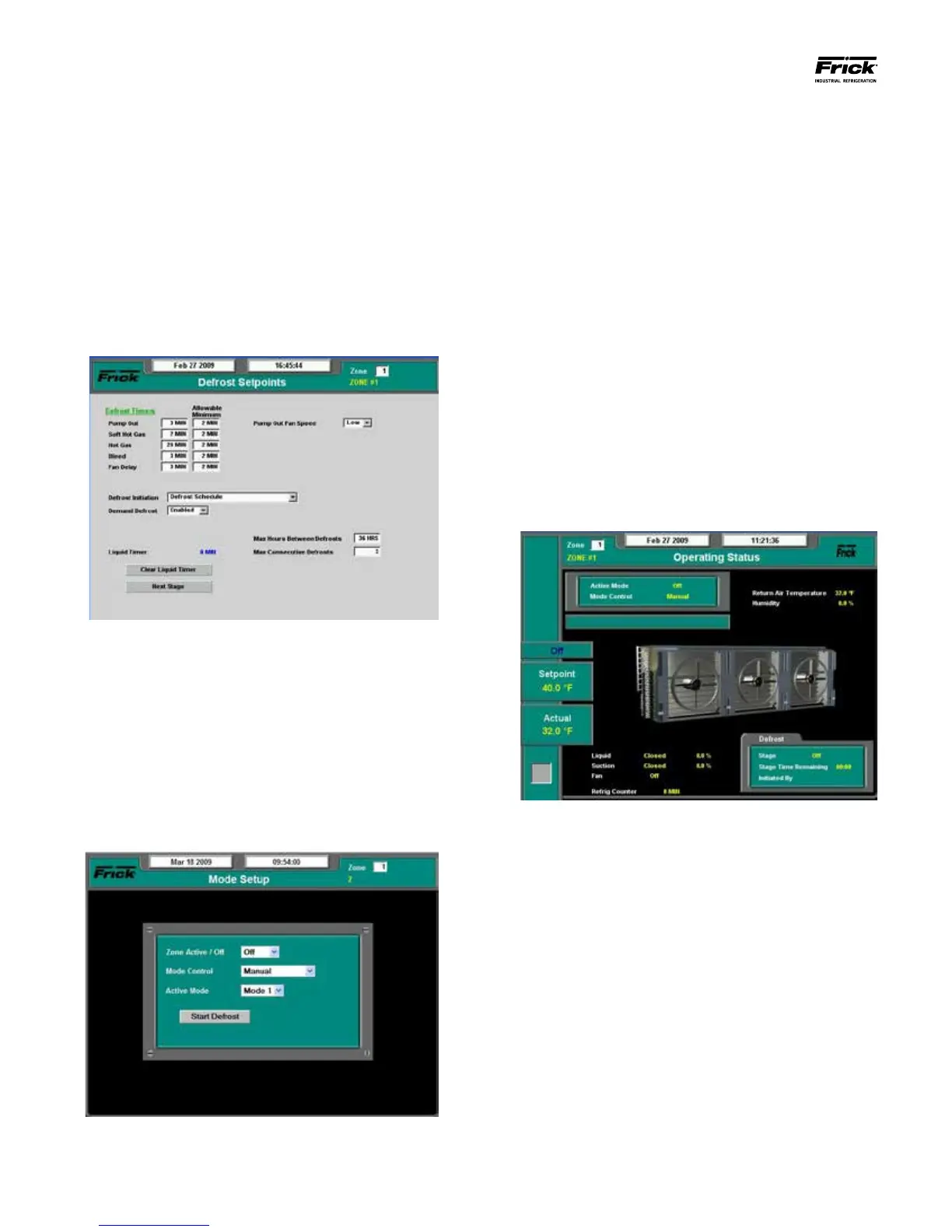
Zone Active / Off – This drop down menu must be
set to Active for the zone to be able to run.
Mode Control – Set this based upon whether you
would prefer Manual, Mode Schedule or Digital Input
operation. Allows the user to manually set the active
mode:
• Manual - Allows the zone to follow which-
ever Mode (1-4) setpoints have been setup,
based upon the Active Mode.
• Mode Schedule – The zone will follow the
Mode Schedule.
Active Mode – If Mode Control is set to Manual, the
user can set the active Evaporator mode.
A Defrost can be initiated at anytime be pressing the
[Start Defrost] button.
THE HOME SCREEN
This screen will appear each time the Interface Panel has
been powered up (default). It can also be accessed from
the main menu by selecting Home.
Many of the operating characteristics for each zone can
be viewed from here. The upper left hand corner of the
screen tells you which zone is currently being viewed, and
the zone setpoint box allows you to enter the number of
any other enabled zone that you may wish to view.
The square grey box in the lower left hand corner will
contain a red blinking dot if any zone being viewed has an
active alarm condition, or a yellow blinking dot if any zone
has an active warning..
This screen will display basic alarm information for the se-
lected zone, as well as the current temperature and zone
setpoint. At the bottom of this screen, basic status infor-
mation is provided about valves and the fan. The Defrost
box provides information when a defrost is underway.
The four Cooling Mode screens allow each zone to
operate with four separate groups of setpoints. This
screen shows the setpoints available for congura-
tion based upon the selecting mode on the Current
Zone Conguration page. Most importantly, the Liq-
uid On and Off temperatures should be set, as well as
the Fan On and Off temperatures. It is also recom-
mended to set the Alarm High and Low temperatures
for each Mode.
Defrost Setpoints
Access this screen from the Main Menu. Select Set-
points, then Defrost, and nally Defrost Setpoints:
The Defrost Setpoints screen permits the user to
specify the duration of each defrost step. Addition-
ally, the Defrost Initiation should be set for each zone.
During the conguration process, it is possible to
start a defrost via the Mode Setup screen (see next
section). The Next Stage button on the Defrost Set-
points screen can then be used to advance through
the defrost in order to validate valve operation.
THE MODE SCREEN
Access this screen from the Main Menu. Select Modes:
This screen is used to set each of the individual zones as
to which Mode (1-4) they will perform. As described ear-
lier, set the Zone number to the zone you which to setup.





 To Next Page