QUANTUM™ LX EVAPORATOR CONTROL PANEL
OPERATION
090.610-O (MAR 2016)
Page 30
GRAPHIC SCREENS
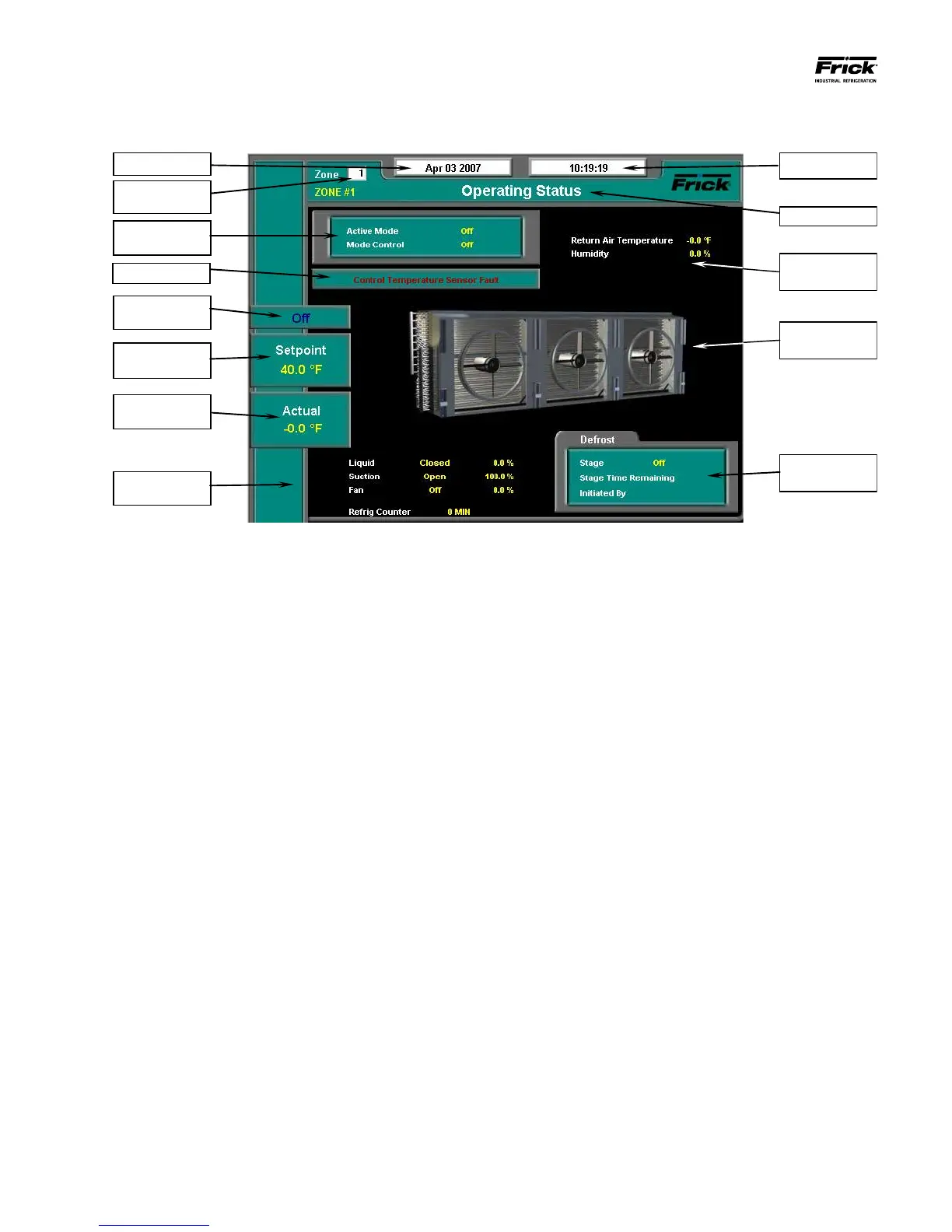
OPERATING STATUS
The most important information about the selected zone is
displayed here:
ZONE SELECTED – This setpoint box allows the user to
enter the ID number of the Evaporator zone that they wish
to view on this screen. When a different zone number is
entered and submitted, the screen data will be updated
with the information from that zone. This same setpoint
box appears on many of the screens.
DATE - The actual date will be displayed in this box.
The date must rst be set correctly on the Conguration
screen. The primary use of the date feature is to provide
a date stamp for Warnings and Shutdowns. Refer to the
section entitled Setting the Date and Time for further in-
formation.
TIME - The actual time will be displayed in this box.
The time must rst be set correctly on the Conguration
screen. The time will also need to be adjusted for those
locations which observe Daylight Savings Time. The pri-
mary use of the time feature is to provide a time stamp
for Warnings and Shutdowns. Refer to the section entitled
Setting the Date and Time for further information.
SCREEN TITLE - Each screen will have a title. The Quan-
tum™ LX manuals will extensively refer to screens by
these names. When referred to in these manuals, screen
names will be shown in bold italic print, such as Operat-
ing Status.
MODE OF OPERATION – Shows the current settings for
Active Mode and Mode Control:
Active Mode – Will show one of the following:
• Off
• Mode 1
• Mode 2
• Mode 3
• Mode 4
Mode Control – Will display one of the following:
• Off
• Manual
• Automatic.
ALARM STATUS - The alarm status is displayed in the box
below the Mode of Operation box. The status box is blank
if there are no alarms present.
If a warning or shutdown condition exists, the name
of the condition will be shown in red letters.
OPERATIONAL STATUS BOX - Shows the present oper-
ating status of the zone:
Off – The zone is not being actively controlled, which
means that all outputs are off unless Suction is set
to always on the Current Zone Conguration screen.
Cooling – The zone is in a temperature control mode
and the liquid valve is open because the control tem-
perature equals or exceeds the liquid on setpoint.
The suction valve open.
Satised - The zone is in a temperature control
mode and the liquid valve is closed because the con-
trol temperature is less than or equals the liquid off
setpoint. During this time, the suction valve is typi-
cally open.
Defrost – The zone is going through a defrost cycle.
Heating - The zone is in a temperature control mode
and is using hot gas to provide heating.





 To Next Page