QUANTUM™ LX EVAPORATOR CONTROL PANEL
OPERATION
090.610-O (MAR 2016)
Page 48
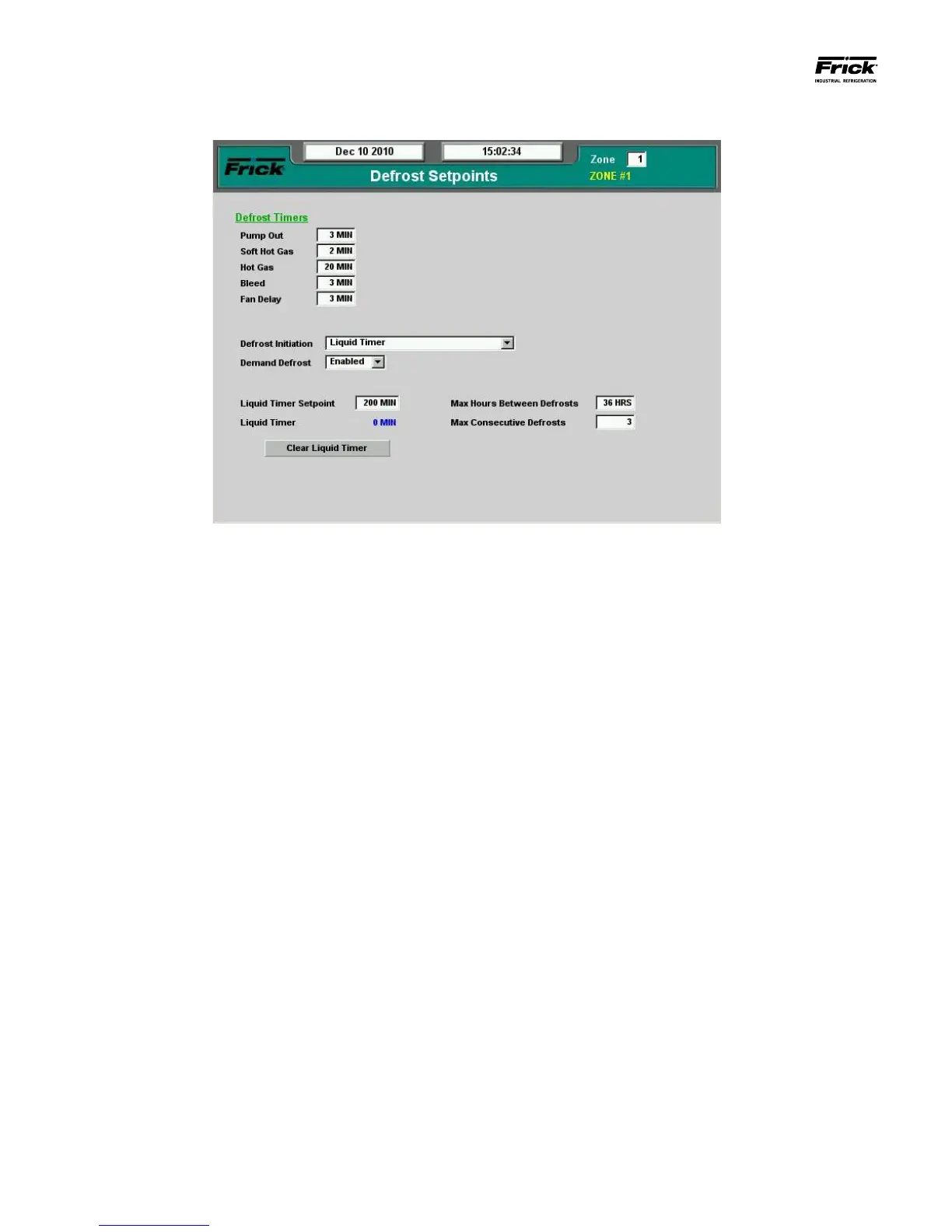
SETPOINTS – Defrost Setpoints
Defrost is used to remove the build up of ice that reduces
cooling efciency. The defrosting of a zone can consist of ve
steps: Pump out, Soft Hot Gas, Hot Gas, Bleed, and Fan Delay.
Each step has an operator adjustable time setpoint.
The following setpoint boxes appear on this screen:
Defrost Timers
[Pump Out] - The liquid output is closed (de-ener-
gized) while the suction valve and the fan output re-
main opened (energized) to remove and evaporate as
much as possible of the remaining liquid refrigerant.
[Soft Hot Gas] – (Enhanced unit only) The soft hot
gas valve is opened, the other valves are closed, and
the fans are stopped. The soft hot gas valve is used
to slowly turn on hot gas and lower the pressure dif-
ferential that occurs when going from cooling to de-
frosting.
[Hot Gas] – The hot gas valve is opened, the other
valves are closed, and the fans are stopped. The hot
gas solenoid is energized for the set amount of time.
This step allows high pressure/high temperature gas
to enter the evaporator coil and melt the frost build
up on the evaporator coils clearing the coil for good
airow.
[Bleed] – The hot gas solenoid output is de-ener-
gized, and the bleed solenoid output is energized
for the set amount of time. This bleed step is usu-
ally energized for a few minutes to allow the hot gas
trapped in the evaporator coil to slowly release from
the tubing. This prevents quick over pressurization of
the suction piping line and vessel.
[Fan Delay] - The bleed solenoid is de-energized and
the liquid and suction solenoid outputs are energized
again allowing the liquid refrigerant to cycle through
the evaporator coil thus cooling the evaporator to an
operating temperature. This step usually lasts for just
a few minutes and is used mainly to frost the small
amount of water left on the unit so as to not blow
water over product when the fan is restarted. After
Fan Delay, the fan output is energized again to pro-
vide air movement across the evaporator coil to re-
initiate the cooling process.
[Liquid Timer Setpoint]
[Maximum Hours Between Defrosts] – Enter the
maximum number of hours that you want between
defrosts.
[Defrost Initiation] – The following drop down box
is provided:
• None
• Defrost Schedule – Defrosts are initiated at
the times specied in the Defrost Schedule.
• Liquid Timer – Defrosts are initiated when
the Liquid Timer exceeds the Liquid Timer
setpoint.
• Defrost Schedule with Liquid override – De-
frosts are initiated according to the Defrost
Schedule, provided that the Liquid Timer
has exceeded the Liquid Timer setpoint.





 To Next Page