EasyManua.ls Logo

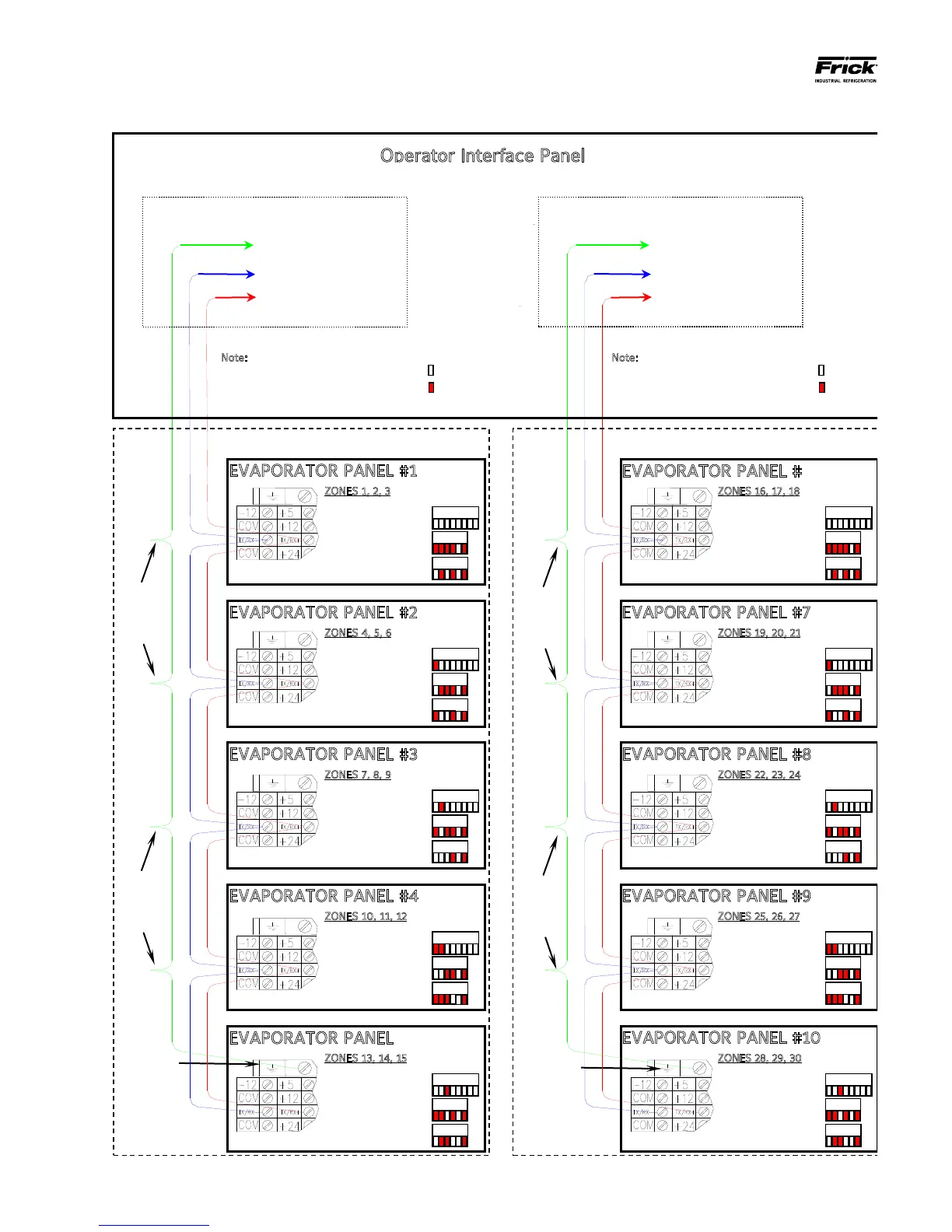
Frick QUANTUM LX - Evaporator System Communications Wiring Diagram

Frick QUANTUM LX
84 pages
Print Icon
To Next Page IconTo Next Page
To Previous Page IconTo Previous Page
Loading...
QUANTUM™ LX EVAPORATOR CONTROL PANEL
OPERATION
090.610-O (MAR 2016)
Page 8
EVAPORATOR SYSTEM COMMUNICATIONS WIRING DIAGRAM
EVAPORATOR PANEL #1
123456
123456
12345678
DIPSWITCH
Settings
ZONES 1, 2, 3
Analog Board 1
Digital Board 1
Digital Board 6 (opt)
EVAPORATOR PANEL #2
123456
123456
12345678
DIPSWITCH
Settings
ZONES 4, 5, 6
Analog Board 2
Digital Board 2
Digital Board 7 (opt)
EVAPORATOR PANEL #3
123456
123456
12345678
DIPSWITCH
Settings
ZONES 7, 8, 9
Analog Board 3
Digital Board 3
Digital Board 8 (opt)
EVAPORATOR PANEL #4
123456
123456
12345678
DIPSWITCH
Settings
ZONES 10, 11, 12
Analog Board 4
Digital Board 4
Digital Board 9 (opt)
EVAPORATOR PANEL #5
123456
123456
12345678
DIPSWITCH
Settings
ZONES 13, 14, 15
Analog Board 5
Digital Board 5
Digital Board 10 (opt)
EVAPORATOR PANEL #6
123456
123456
12345678
DIPSWITCH
Settings
ZONES 16, 17, 18
Analog Board 1
Digital Board 1
Digital Board 6 (opt)
EVAPORATOR PANEL #7
123456
123456
12345678
DIPSWITCH
Settings
ZONES 19, 20, 21
Analog Board 2
Digital Board 2
Digital Board 7 (opt)
EVAPORATOR PANEL #8
123456
123456
12345678
DIPSWITCH
Settings
ZONES 22, 23, 24
Analog Board 3
Digital Board 3
Digital Board 8 (opt)
EVAPORATOR PANEL #9
123456
123456
12345678
DIPSWITCH
Settings
ZONES 25, 26, 27
Analog Board 4
Digital Board 4
Digital Board 9 (opt)
EVAPORATOR PANEL #10
123456
123456
12345678
DIPSWITCH
Settings
ZONES 28, 29, 30
Analog Board 5
Digital Board 5
Digital Board 10 (opt)
COMM. 4 Cable Run
COMM. 3 Cable Run
Shield
Termination
Twist
Shield
Wires
Together
Twist
Shield
Wires
Together
Shield
Termination
Twist
Shield
Wires
Together
Twist
Shield
Wires
Together
Operator Interface Panel
Shield Wire Not Connected
Comm. 4
+RX/TX
-RX/TX
Shield Wire Not Connected
Comm. 3
+RX/TX
-RX/TX
Note: For the DIPSWITCH settings
shown below, a shaded box indicates a
closed or ON position, an unshaded
box indicates an open or OFF position.
= OFF
= ON

OFF
ON
Note: For the DIPSWITCH settings
shown below, a shaded box indicates a
closed or ON position, an unshaded
box indicates an open or OFF position.
= OFF
= ON
OFF
ON

Table of Contents

Other manuals for Frick QUANTUM LX

Related product manuals