QUANTUM™ LX EVAPORATOR CONTROL PANEL
OPERATION
090.610-O (MAR 2016)
Page 71
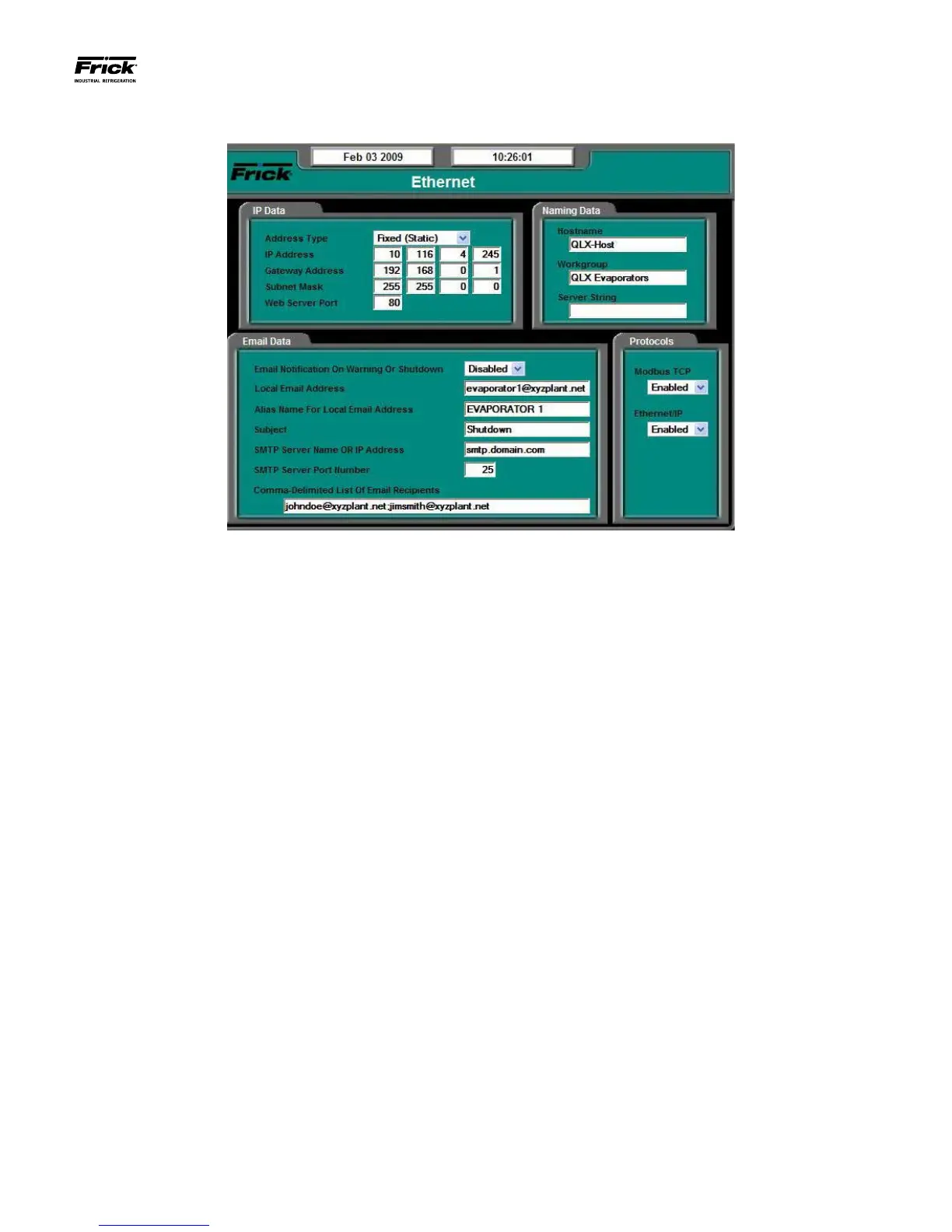
CONFIGURATION – Ethernet
DESCRIPTION: This screen is used to view and set basic Eth-
ernet operational values. It is from this screen that all internet
and e-mail based operating characteristics are set. NOTE: In
order to connect to the Internet, a valid Internet account and
connection must be used.
NOTE: User Level 1 or above must be set to access this
screen.
The following elds are provided:
IP Data:
[Address Type] - The following drop down menu is
provided:
• Fixed (Static)
• DHCP (Dynamic)
This should be set by the network or LAN administra-
tor.
[IP Address] - Four setpoint boxes are provided here.
The network or LAN administrator will enter the nu-
merical IP address for this specic Quantum™ LX
panel.
[Gateway Address] - Four setpoint boxes are pro-
vided here. The network or LAN administrator will
enter the numerical Gateway address.
[Subnet Mask] – Like IP addresses, a subnet mask
contains four bytes (32 bits) and is often written us-
ing the same "dotted-decimal" notation. A subnet
mask neither works like an IP address, nor does it ex-
ist independently from them. Instead, subnet masks
accompany an IP address and the two values work
together.
Applying the subnet mask to an IP address splits the
address into two parts, an "extended network ad-
dress" and a host address.
For a subnet mask to be valid, its leftmost bits must
be set to '1'. Conversely, the rightmost bits in a valid
subnet mask must be set to '0', not '1'.
All valid subnet masks contain two parts: the left side
with all mask bits set to '1' (the extended network
portion) and the right side with all bits set to '0' (the
host portion).
[Web Server Port] - One setpoint box is provided
here. The network or LAN administrator will enter the
numerical address for this Web port (80 is typically
used).
Email Data
[Email Notication On Alarm or Shutdown] - For
the E-mail notication feature to work, it must be en-
abled (it is disabled as a default). The following drop
down menu is provided:
• Disabled
• Enabled
[Local Email Address] - Use this setpoint box to
enter a valid E-mail address that messages are sent
from.
[Alias Name For Local Email Address] - Enter here a
custom name to identify more clearly the local Email
address. When a message is sent to all recipients,
this is the name that will appear in the Email FROM
column.





 To Next Page