QUANTUM™ LX EVAPORATOR CONTROL PANEL
OPERATION
090.610-O (MAR 2016)
Page 81
MISCELLANEOUS SCREENS
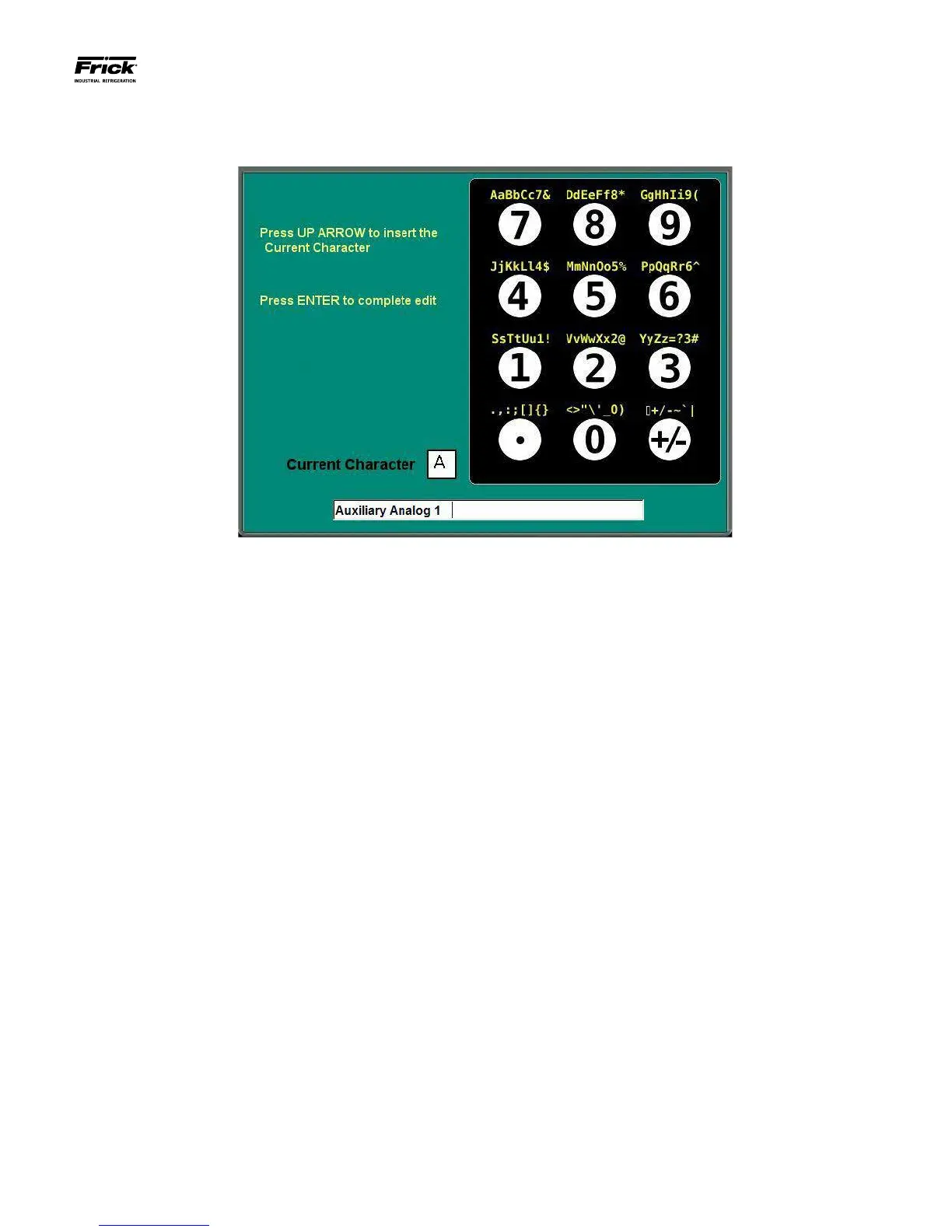
Alpha
The Alpha screen shows a graphic representation of the Quan-
tum™ LX numerical keypad. It is accessible from any screen
that allows the user to enter alpha/numeric data, such as some
of the Calibration screens, for example. The symbols that ap-
pear above each key on this screen, are the possible combina-
tions of symbols that are associated with the digital portion of
the key. Pressing any of these keys repeatedly will cause the
characters immediately above the keys on the keypad to ap-
pear in the Current Character box. This is a similar technique
that is used for sending text messages on a cellular phone.
As a example, suppose that you wanted to modify the text line
in the screen example shown above. You want to change the
line from reading Auxiliary Analog 1, to Packing Room 1. The
rst thing you would do, is to use the [Backspace] key on the
keypad, to position the cursor (blinking vertical line), to the far
left side of the text. Notice that each time the backspace key is
pressed, the character to the left of the ashing cursor line is
erased. Once the ashing cursor is at the beginning of the line,
press the number [6] key and notice that a capital P, for Pack-
ing appears in the Current Character box (P is the rst symbol
in the line right above the numeral [6] key). When the letter
that appears in the Current Character Box is the one that you
wish to select, press the [^] key (up arrow) to copy the Current
Character to the bottom text line. Next press the [7] key twice,
and notice that on the rst press, a capital A appears, and on
the second press, a lower case a appears (for Packing).
Continue entering the text using this method. When you need
to enter a space, simply press the [+/-] key once, then the [^]
(up arrow), a space will be entered on the text line.
Finish all text entry, and when you are satised that it is what
you want, press the [Enter] key, which will cause the text entry
screen to be replaced by the previous screen, then press the
[Submit] key to accept the changes.





 To Next Page