QUANTUM™ LX EVAPORATOR CONTROL PANEL
OPERATION
090.610-O (MAR 2016)
Page 22
• System Ammonia Shutdown – If any congured
zone within the system has an active Ammonia
Shutdown, then the System Ammonia Shutdown
output as set on this screen will be energized.
Additionally, you can congure the board and channel for
the standard system warning and shutdown alarms.
• System Warning – If any congured zone within
the system has any active Warning, then the
System Warning output as set on this screen will
be energized.
• System Shutdown - If any congured zone
within the system has any active Shutdown,
then the System Shutdown output as set on this
screen will be energized.
These can be used to alert the user if ANY congured
zone has an active warning or shutdown.
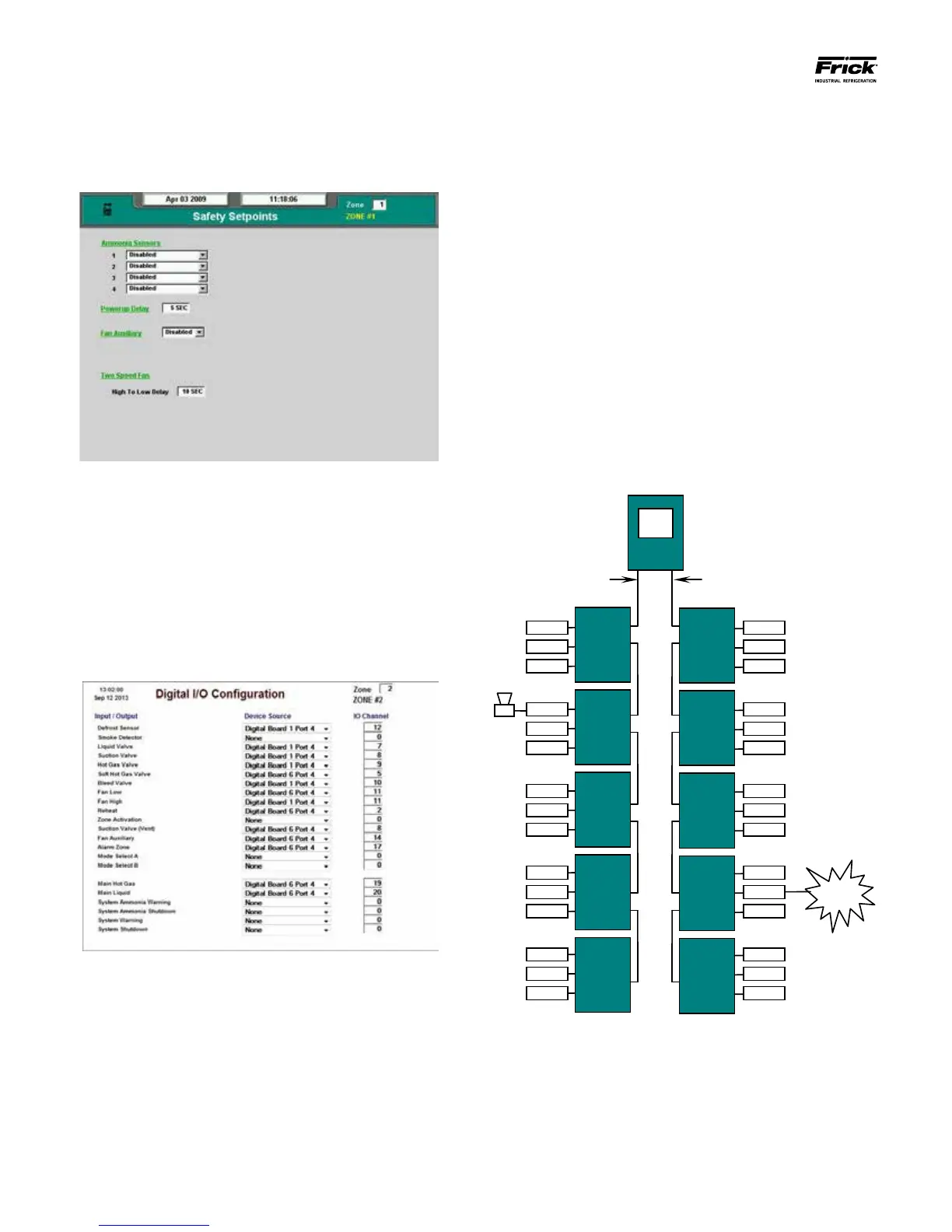
Refer to the following pictorial for an example:
Communications from
Comm. 4 on Q4/Q5
board
Communications from
Comm. 3 on Q4/Q5
board
Only the zone which has the physical warning/shutdown out-
put needs to be congured. Any warnings or shutdowns within
the system will then cause that output to be energized. In the
example shown above, zone 26 has an active warning. Zone 4
has been congured for Digital Board 2 as the Device Source
and the I/O channel has been set to 19. This particular warn-
ing from zone 26 will cause the horn on zone 4 (output 19) to
sound.
In order for a zone to properly display and act upon alarms
and shutdowns, the zone must have one or more am-
monia sensors assigned to it. To access this screen, select
Menu > Setpoints > Safety:
Finally, there are four system wide alarm inputs that can
be congured. NOTE: This manual has been written
based upon Session Level 2 security. To assess the fol-
lowing screen, Session Level 3 must be set.
Up to four ammonia sensors may be mapped in the sys-
tem to any zone. These assignments must be made to
every zone.
To access this conguration screen, select Menu > Con-
guration > Digital I/O:
At the bottom of this screen there is an ammonia warning
and shutdown alarm output which the board can be cong-
ured for. These will alert the user if any congured zone has
an active ammonia warning or an active ammonia alarm.
This can be any unused output. The Ammonia warning /
shutdowns can be used for plant warnings that pertain to
ammonia and not standard shutdowns or warnings.
• System Ammonia Warning – If any congured
zone within the system has an active Ammonia
Warning, then the System Ammonia Warning
output as set on this screen will be energized.





 To Next Page