ET[9]=40,20 10
th
point in the ECAM table
ET[10]=0,0 Starting point for next cycle
EB 1 Enable ECAM mode
JGZ=4000 Set Z to jog at 4000
EG 0,0 Engage both X and Y when Master = 0
BGZ Begin jog on Z axis
#LOOP;JP#LOOP,V1=0 Loop until the variable is set
EQ2000,2000 Disengage X and Y when Master = 2000
MF,, 2000 Wait until the Master goes to 2000
ST Z Stop the Z axis motion
EB 0 Exit the ECAM mode
EN End of the program
The above example shows how the ECAM program is structured and how the commands can be given to the
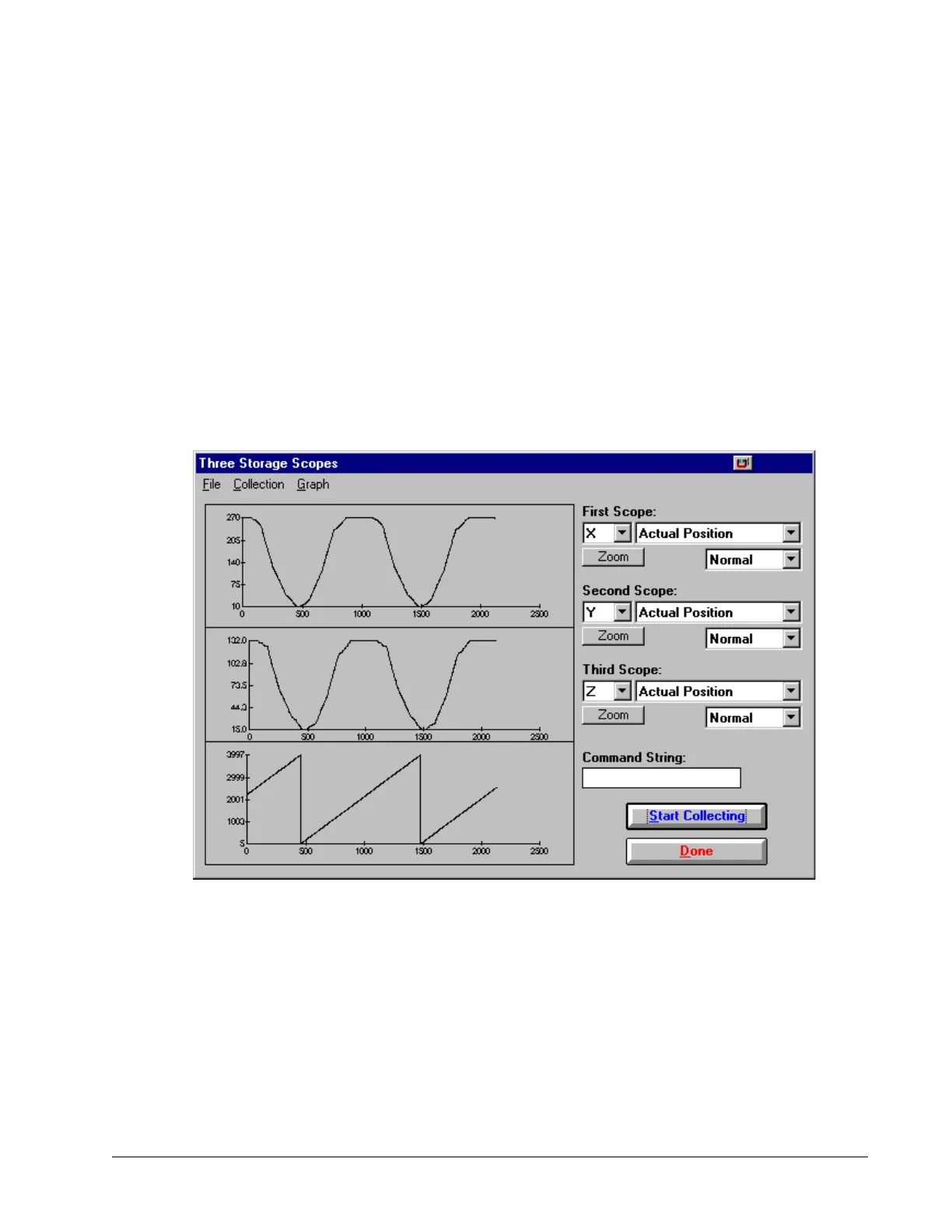
controller. The next page provides the results captured by the WSDK program. This shows how the motion will be
seen during the ECAM cycles. The first graph is for the X axis, the second graph shows the cycle on the Y axis and
the third graph shows the cycle of the Z axis.
Figure 6.13: Three Storage Scopes
DMC-40x0 User Manual Chapter 6 Programming Motion • 104



 To Next Page