DigiDevice
40
Calibration procedure
During the calibration procedure of a product, based on the values of the above described parameters,
the system automatically positions the shutters in some positions and acquires load, in order to obtain
the experimental calibration diagram for the selected product.
The sequence is made of some steps where the shutters are positioned and remain in such position for
a set time, measuring the weight decrease in the hopper.
Before to perform the procedure, remove the spreading disks (the spreading disk, if calibration is
performed on one only hopper), install the special calibration kit and use a collection bin for the unloaded
product.
Once loaded the hopper and started the sequence through the key near to the icon
in the message,
the operator only has to wait for sequence execution; when the collection bin is full (based on the
capacity inserted in the parameter), the sequence pauses: empty the bib and launch the sequence
again, until all the steps are completed.
At the end of the sequence, a message informs the operator about its correct execution.
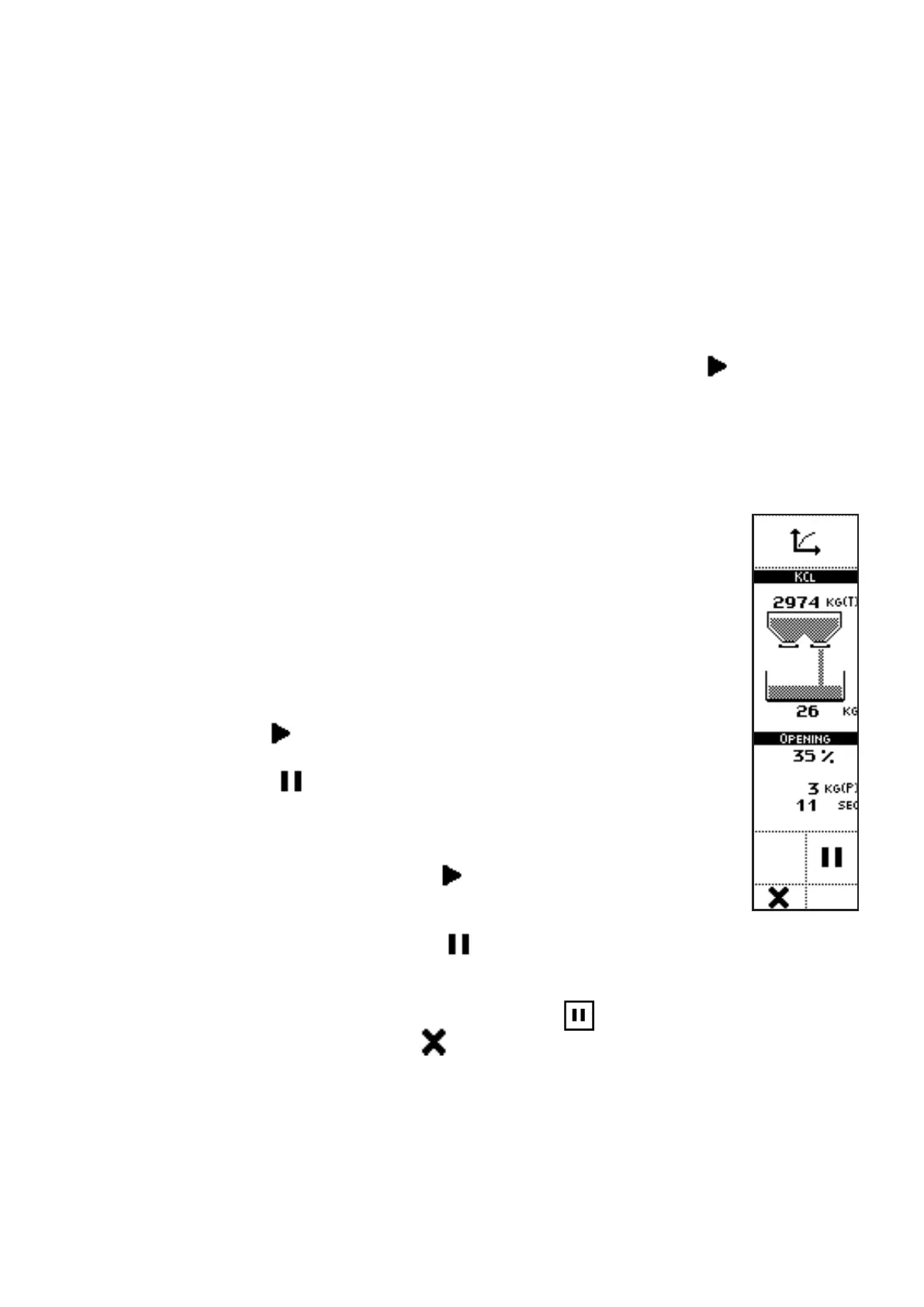
VISUALIZATIONS
• PRODUCT NAME;
• WEIGHT AND GRAPHIC DISPLAY OF THE WEIGHT IN THE HOPPER;
• GRAPHIC DISPLAY OF THE USED SHUTTER (right shutter on the right
side image);
• WEIGHT IN THE COLLECTION BIN;
• SHUTTER POSITION (OPENING PERCENTAGE);
• KG (P): partial weight, unloaded during the actual calibration step;
• ACTUAL STEP DURATION: on each new step, after a settling time for
the shutters, the actual phase duration count starts;
• The START (
) icon is displayed before the procedure start command
or when the sequence is paused because the collection bin is full;
• The PAUSE (
) icon is displayed after the sequence has started,
instead of the icon START.
COMMANDS
• Press the side key near to the icon
to start the calibration sequence
or restart it after a pause automatically activated by the system to allow
emptying of the collection bin.
• Press the side key near to the icon
to pause the calibration sequence. The user can
pause the sequence to empty the collection bin (as indicated by the diagnostic message
that appears after pausing the sequence). When the pause is selected by the user, to
recover the sequence the side key near to the icon
shall be pressed.
• Pressing the key below the icon
causes exit from the sequence, without data saving
(as confirmed by the diagnostic message that appears after canceling the procedure).



 To Next Page