VLT
®
5000 Series
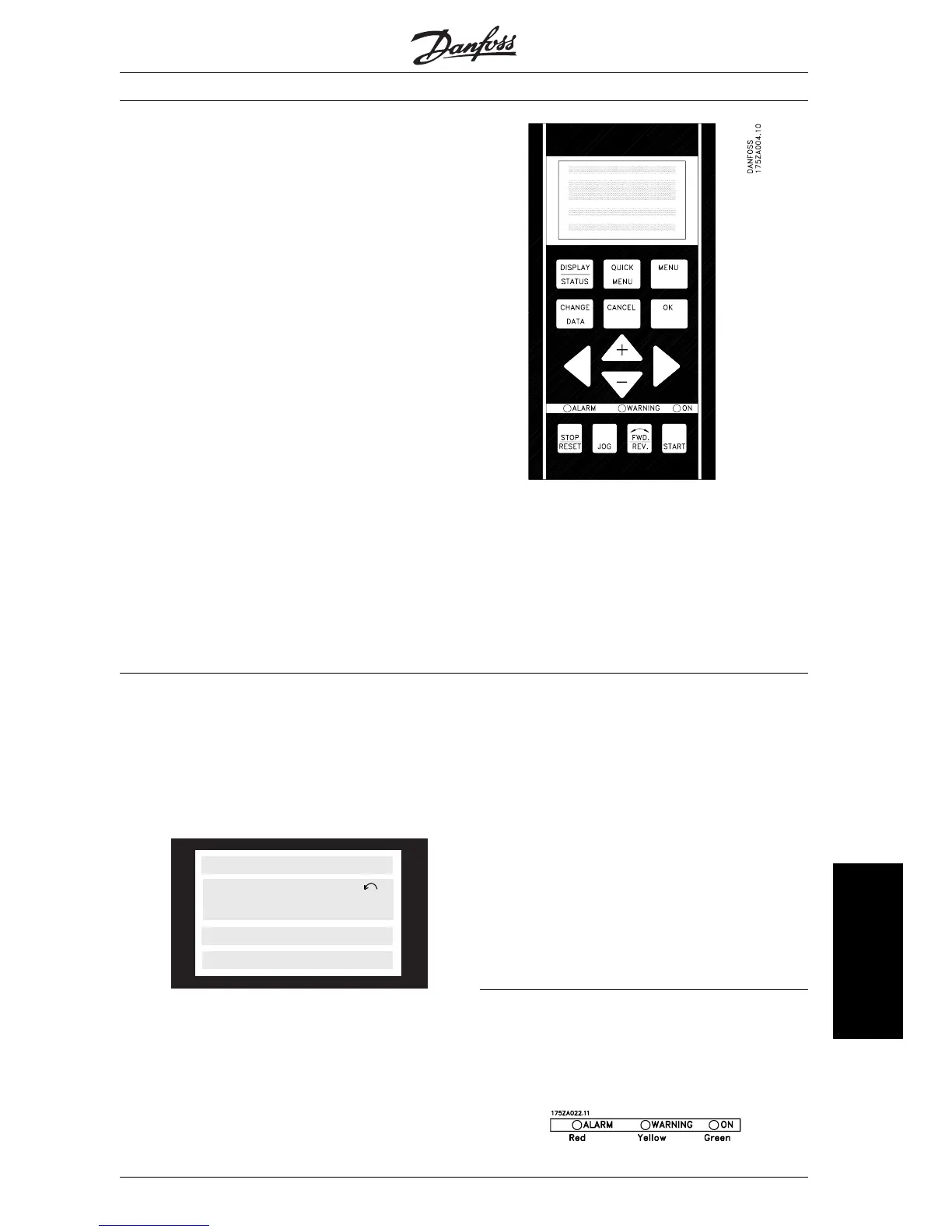
■ Control panel
The front of the VLT frequency converter features a
control panel - LCP (Local Control Panel), which
makes up a complete interface for operation and
monitoring of the VLT 5000 Series.
The control panel is detachable and can - as an al-
ternative - be installed up to 3 metres away from the
VLT frequency converter, e.g. on a front panel, by
means of a mounting kit option.
The functions of the control panel can be divided
into three groups:
• display
• keys for changing program parameters
• keys for local operation
All data are indicated by means of a 4-line alpha-
numeric display, which in normal operation is able to
show 4 measurements and 3 operating conditions
continuously. During programming, all the informa-
tion required for quick, effective parameter Setup of
the VLT frequency converter will be displayed. As a
supplement to the display, there are three LEDs for
voltage (power or 24 V external), warning and alarm.
All program parameters of the VLT frequency con-
verter can be changed immediately from the control
panel, unless this function has been blocked via pa-
rameter 018.
■ Display
The LCD-display has rear lighting and a total of 4
alpha-numeric lines together with a box that shows
the direction of rotation (arrow) and the chosen
Setup as well as the Setup in which programming is
taking place if that is the case.
12345678
SETUP
1
12345678901234567890
12345678901234567890
12345678901234567890
175ZA443.10
1st line
2nd line
3rd line
4th line
1st line shows up to 3 measurements continuously
in normal operating status or a text which explains
the 2 nd line.
2nd line shows a measurement with related unit
continuously, regardless of status (except in the case
of alarm/warning).
3rd line is normally blank and is used in the menu
mode to show the selected parameter number or pa-
rameter group number and name.
4th line is used in operating status for showing a
status text or in data change mode for showing the
mode or value of the selected parameter.
An arrow indicates the direction of rotation of the
motor. Furthermore, the Setup which has been se-
lected as the Active Setup in parameter 004 is
shown. When programming another Setup than the
Active Setup, the number of the Setup which is
being programmed will appear to the right. This sec-
ond Setup number will flash.
■ LEDs
At the bottom of the control panel is a red alarm
LED and a yellow warning LED, as well as a green
voltage LED.
MG.51.A1.02 - VLT is a registered Danfoss trade mark
71
Operation of the VLT
frequency converter








 To Next Page