Chapter 4 System Configuration
© 2017 Harmonic Inc. All rights reserved. 152 Harmonic MediaGrid Release 4.1
Managing Memory Usage by the File System Driver
as long as the Cache Memory Limit is also appropriately increased. When writing to a file, this
parameter determines how many modified slices are allowed to be retained in cache before
being flushed to the Harmonic MediaGrid server. Decreasing the ReadAhead value below the
default can allow for more open files in a smaller cache, but may reduce the bandwidth
performance for both read and write operations.
Cache Memory Limit. The FSD allocates memory for buffering cache from a single pool, the
cache memory limit. When the FSD exceeds this limit, it begins to free memory until its usage
is below this number. This limit defaults to 200MB on Linux and Mac OS X. The size of this
limit on Windows changes dynamically based on the operating system version and physical
RAM. The default value should be sufficient for clients with connectivity up to 1Gb/sec.
Advanced users, depending on the workflow and the client’s bandwidth capabilities, might
consider increasing this value.
IMPORTANT: The default value is sufficient for most workflows. If you are unsure of whether you should
change it, please contact Harmonic Technical Support for assistance.
NOTE: The cache memory limit should not exceed 25% of the physical memory.
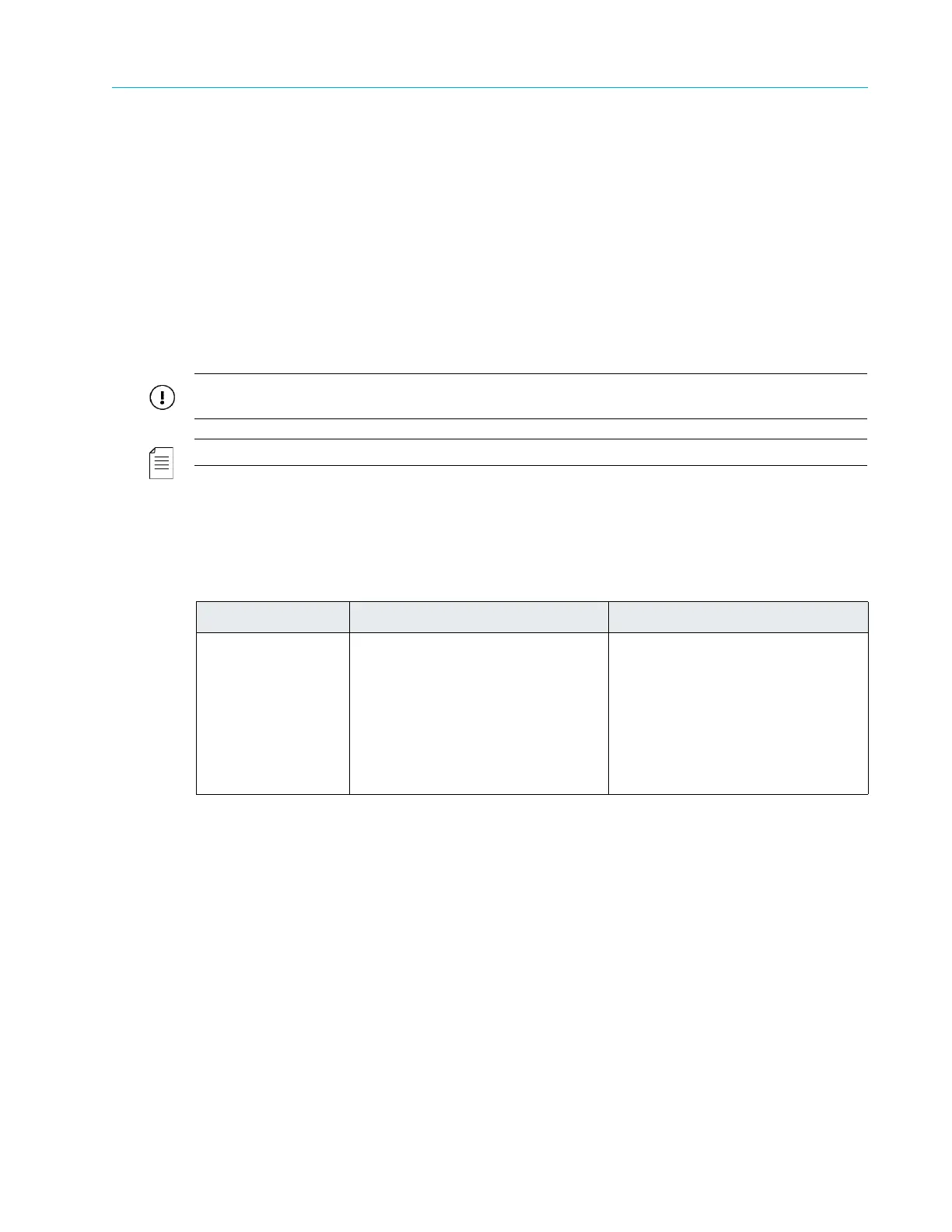
Table 4–2 provides information on how changes to the ReadAhead parameter affect performance.
For the currently supported range of readahead values, refer to the Harmonic MediaGrid Release
Notes for your client FSD.
Calculating the Cache Memory Limit
The total cache memory demand can be calculated as follows:
(1 + ReadAhead) * SliceSize * Number of files open at once
For example, if the ReadAhead value is 3 slices, the SliceSize is 2MB, and the expected number
of open files at once is 50, the cache memory demand is 400MB ([1+3] * 2 * 50).
Additional Memory Usage Parameters for Linux Clients
In addition to ReadAhead and Cache Memory Limit, the following three parameters can be used
to manage memory usage on a Linux client:
Table 4–2: Performance Considerations
Parameter Increase Decrease
ReadAhead Pros
Increases read throughput
Increases write throughput
Cons
Increases latency on random
read
Increases memory usage
Pros
Decreases memory usage
Decreases latency on random
read
Cons
Decreases read throughput
Decreases write throughput



 To Next Page