Chapter 2 System Installation with the Content-
Server 4000 Series
© 2017 Harmonic Inc. All rights reserved. 63 Harmonic MediaGrid Release 4.1
Connecting the Harmonic MediaGrid 4000 System Components
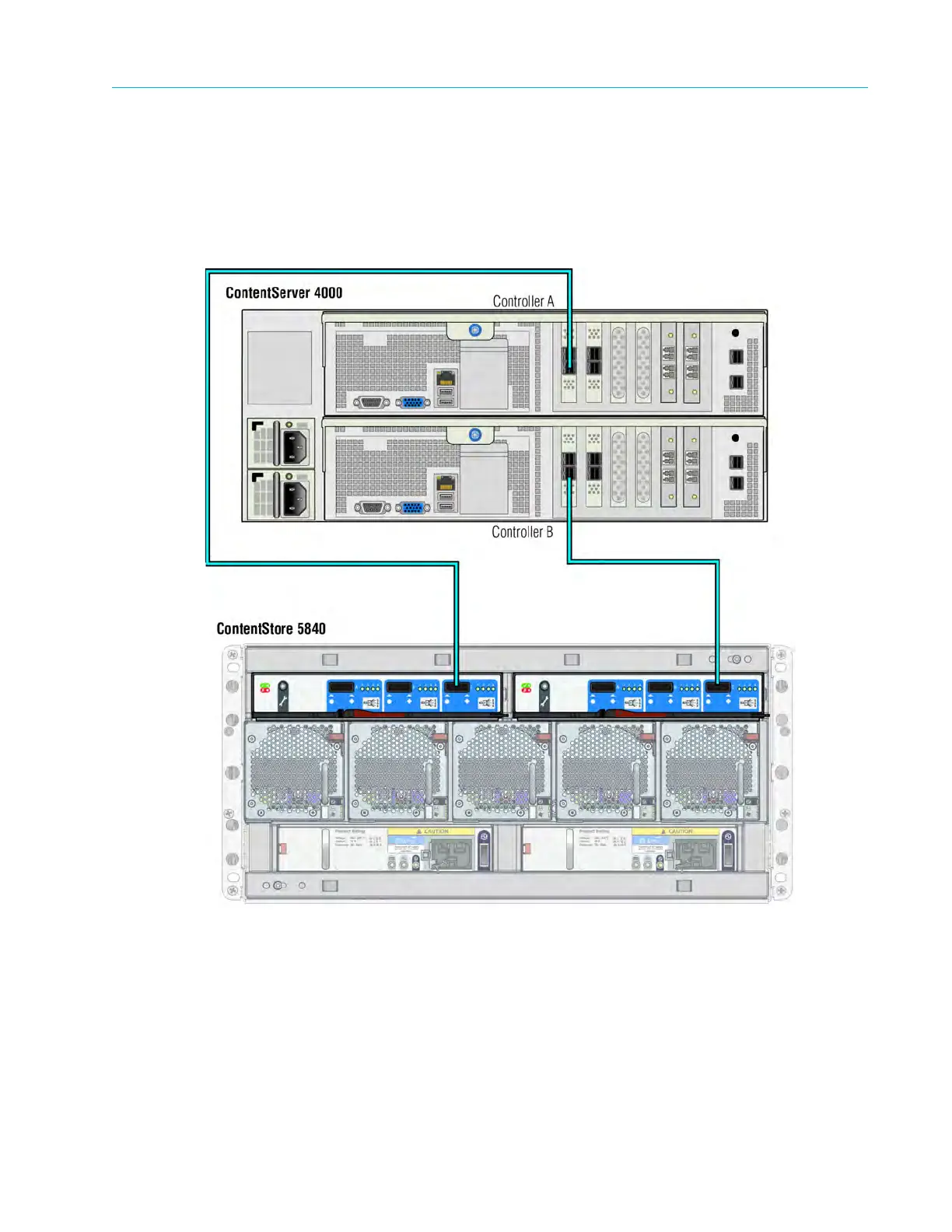
1. Starting with Controller A on the ContentServer, connect a SAS cable to an open SAS port.
Connect the other end of the cable to the right-hand SAS port on the left-hand I/O module of
the ContentStore 5840.
2. On Controller B of the ContentServer, connect a SAS cable to an open SAS port. Connect the
other end of the cable to the right-hand SAS port on the right-hand I/O module of the
ContentStore 5840.
Figure 2–23: Connecting the ContentServer 4000 to the ContentStore 5840
Connecting Network Switches to the Client Network: One-rack System
This section provides instructions for connecting the network switches in a one-rack Harmonic
MediaGrid system to the client network. Refer to Connecting Network Switches to the Client Network:
Two-rack System for other connection options.
Refer to the following figure when connecting the network switches to the client network.



 To Next Page