Chapter 2 System Installation with the Content-
Server 4000 Series
© 2017 Harmonic Inc. All rights reserved. 56 Harmonic MediaGrid Release 4.1
Connecting the Harmonic MediaGrid 4000 System Components
Connecting the SystemManager to the Network Switch
This section provides instructions for connecting the SystemManager to a 1 GbE network switch
module. For details about the SystemManager platform included in your Harmonic MediaGrid
system, refer to the Harmonic SystemManager Installation Guide.
IMPORTANT: vDHCP must be disabled in the SystemManager application before connecting the
SystemManager device to the 1 GbE network switch. Refer to “Disabling vDHCP” in the Harmonic
SystemManager User Guide for instructions.
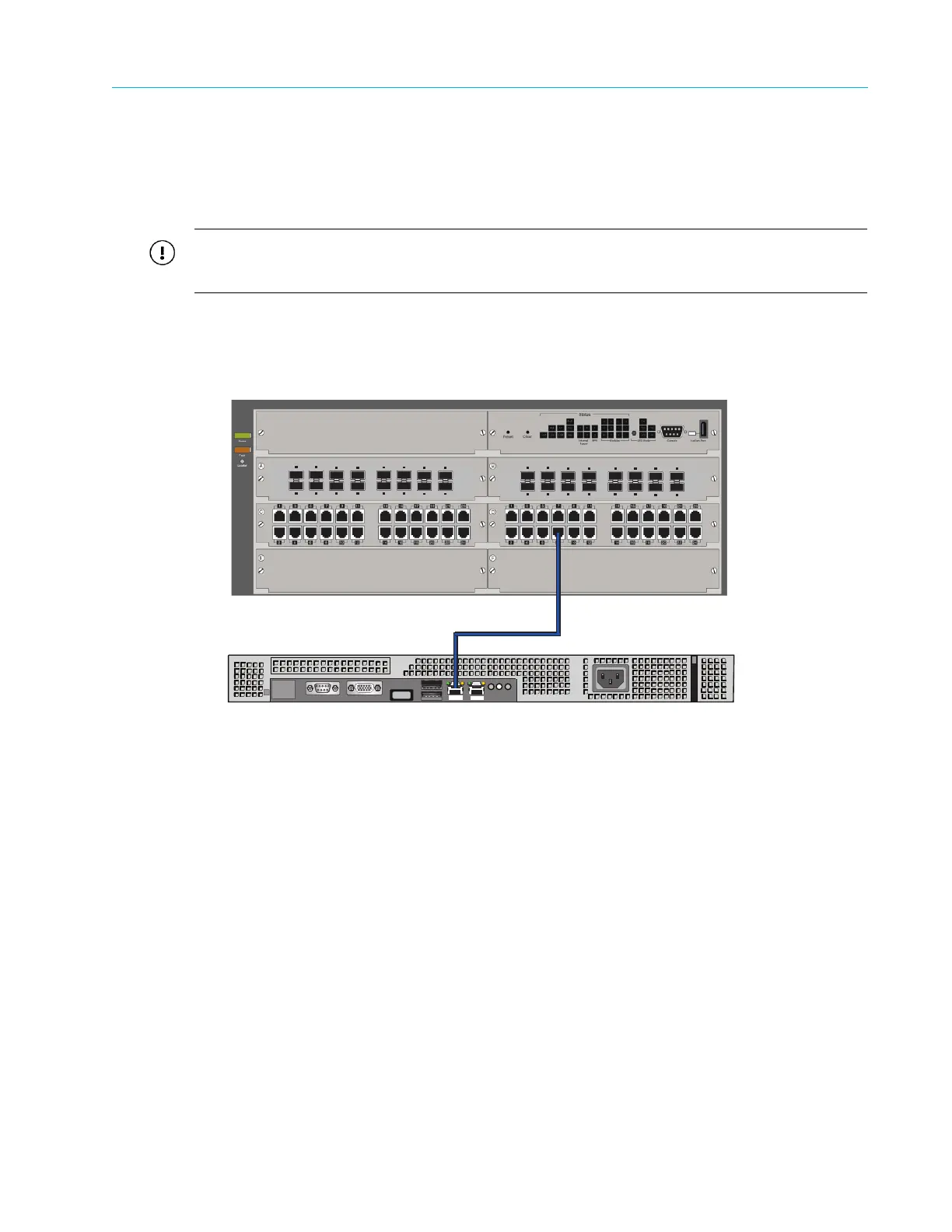
To connect a SystemManager to a network switch:
1. Connect a CAT-6 Ethernet cable to port 1 on the SystemManager.
2. Connect the other end of the Ethernet cable to port 8 on switch module D.
Figure 2–17: SystemManager and Network Switch Connection
Connecting the ContentServer 4000 to the Network Switch
1. Starting with Controller A, connect a red CAT-6 Ethernet cable to the BMC port (maximum
data rate 100Mb/s). Connect the other end of the cable to an open port on the first 1 GbE
switch module.
2. Using white 10 GbE SFP+ cables, connect NIC 4 and NIC 5 on Controller A to open ports on
the first 10 GbE switch module.
3. Using white 10 GbE SFP+ cables, connect NIC 2 and NIC 3 on Controller A to open ports on
the second 10 GbE switch module.
4. On Controller B, connect a red CAT-6 Ethernet cable to the BMC port (maximum data rate
100Mb/s). Connect the other end of the cable to an open port on the second 1 GbE switch
module.
5. Using blue 10 GbE SFP+ cables, connect NIC 4 and NIC 5 on Controller B to open ports on
the second 10 GbE switch module.
6. Using blue 10 GbE SFP+ cables, connect NIC 2 and NIC 3 on Controller B to open ports on
the first 10 GbE switch module.
7. Continue connecting the remaining ContentServers in the same manner.
3
4
5
6
7
8
1
2
11
12
13
14
15
16
9
10
10-GbE SFP+ Ports
3
4
5
6
7
8
1
2
11
12
13
14
15
16
9
10
10-GbE SFP+ Ports
Gb 1
Gb 2
SystemManager Rear Panel



 To Next Page