Chapter 6 Accessing the Harmonic MediaGrid
© 2017 Harmonic Inc. All rights reserved. 189 Harmonic MediaGrid Release 4.1
Mounting a Harmonic MediaGrid File System Using Linux
To mount a Harmonic MediaGrid file system:
1. Use the type “
omfs” in the mount command to access the Harmonic MediaGrid file system,
for example:
mount –t omfs /mediagrid/filesys /mnt –o
username=username,password=password
NOTE: This information is case-sensitive.
This should automatically load the Linux FSD.
2. If the Linux FSD does not automatically load, type the following:
modprobe omfs
Additional Mount Options Using Linux
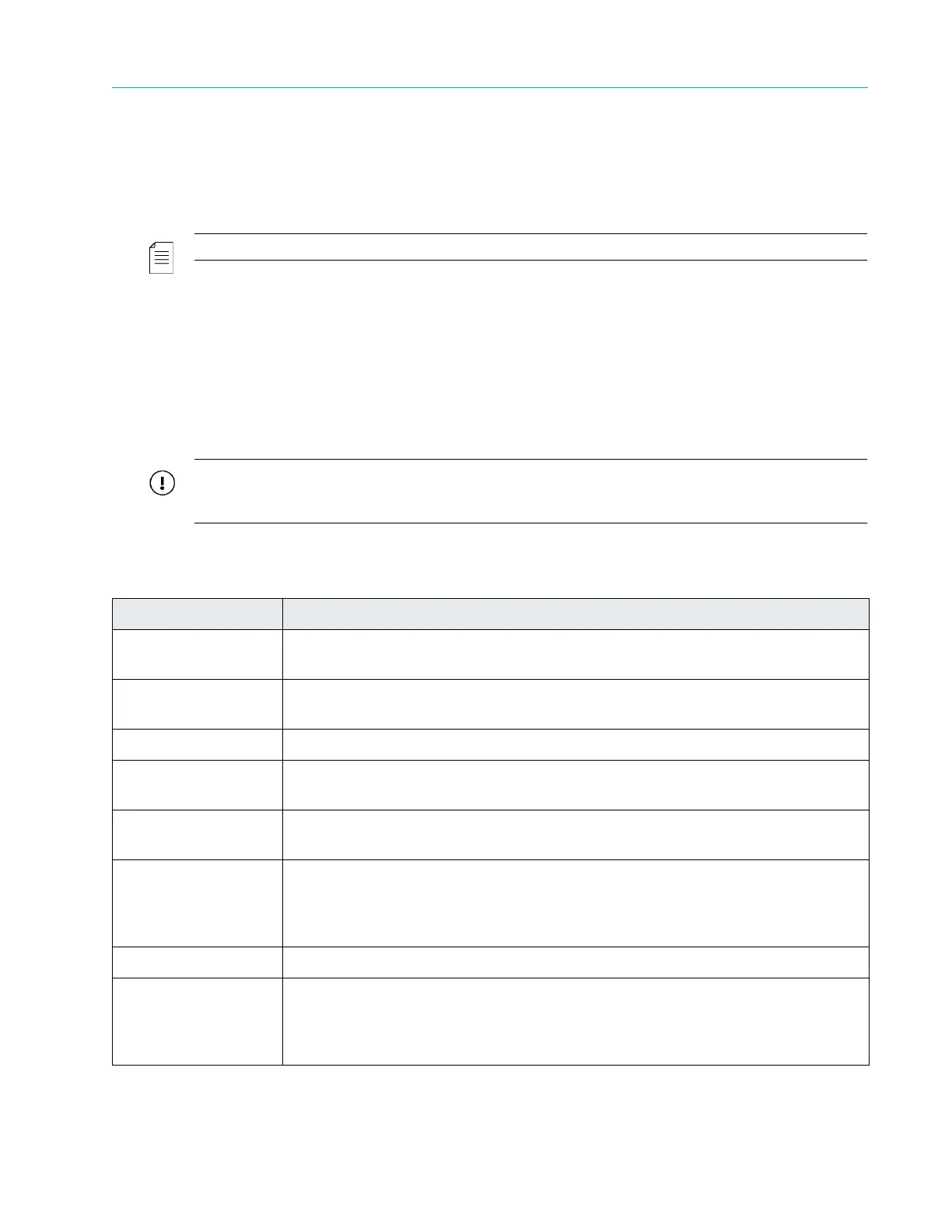
The following file system mounting options are available using the Linux FSD. For more
information about memory usage parameters, refer to Managing Memory Usage by the File System
Driver
IMPORTANT: With the exception of the first four options listed below (“username”, “password”,
“domain”, and “readahead”), do not modify any of the values in this table without first contacting
Technical Support.
Table 6–2: Linux FSD Mount Options
Option Description
username=xyz Specify the required user name. You are prompted for a user name if it is not
specified.
password=abc Specify the required password. You are prompted for a password if it is not
specified.
domain=abc Specify the Windows domain name (optional).
readahead=n Specifies the amount of ReadAhead data (in slices) to be pre-fetched for each
open/active file. Supported values are 0 through 50. The default value is 3.
filelimit=m Specify the maximum number of concurrently open files. Used to prevent the
system from running out of memory. The default is 1024. m=0 yields no limit.
mode Enable file permissions. This displays the proper file permissions when listing files
and directories. It also enables the ability to set permissions using standard Linux
commands (e.g., chmod). Enabling this option decreases the speed at which files
and directories are listed.
exportfs Allows a mounted file system to be shared using NFS.
lock=abc Specify the lock type. The following types are supported:
none = locking is off
adv (default) = advisory locking
mand = mandatory locking



 To Next Page