Chapter 3 System Installation with the Content-
Server 3000 Series
© 2017 Harmonic Inc. All rights reserved. 90 Harmonic MediaGrid Release 4.1
Connecting the Harmonic MediaGrid 3000 System Components
About BMC Connectivity
Each controller on the ContentServer contains a troubleshooting utility called the Baseboard
Management Console (BMC), which can be accessed in the event of system failure. The BMC
requires a 1 GbE connection from NIC 0 on each controller on a ContentServer to the network
switch.
Connecting the ContentDirectors to a Network Switch
Follow these instructions for single-site Harmonic MediaGrid systems. If you are configuring a
stretch cluster, follow instructions in Connecting ContentDirectors in a Stretch Cluster instead.
IMPORTANT: Ports 1-4 on switch modules C and D are reserved for ContentDirector private interface
(ports 2 and 3) connections only.
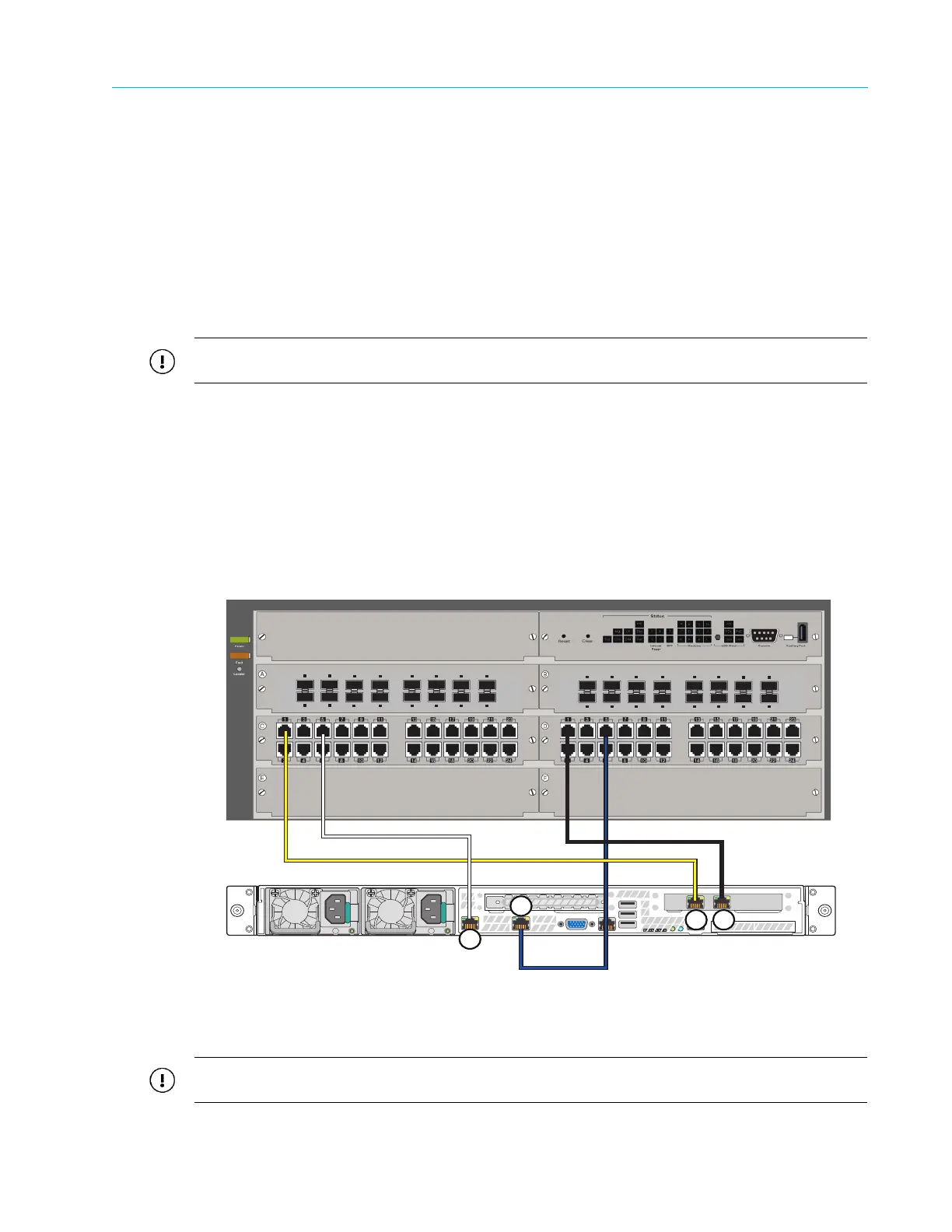
1. Connect the ContentDirector private interfaces (ports 2 and 3) to the switch as follows:
a. Connect port 2 on the first ContentDirector to port 1 on switch module D.
b. Connect port 3 on the first ContentDirector to port 1 on switch module C.
2. Connect the ContentDirector public interfaces (ports 1 and 0) to the switch as follows:
a. Connect port 1 on the first ContentDirector to port 5 on switch module C.
b. Connect port 0 on the first ContentDirector to port 5 on switch module D.
3. Continue connecting any remaining ContentDirectors in the same manner, starting with port
2 on the switch for the private interfaces and port 6 on the switch for the public interfaces.
Figure 3–20: Connecting ContentDirectors to the Network Switch
Connecting ContentDirectors in a Stretch Cluster
IMPORTANT: Make sure to connect ContentDirectors as shown in Figure 3–21. Incorrectly connecting the
ContentDirectors may result in problems with your Harmonic MediaGrid system.
3
4
5
6
7
8
1
2
11
12
13
14
15
16
9
10
10-GbE SFP+ Ports
3
4
5
6
7
8
1
2
11
12
13
14
15
16
9
10
10-GbE SFP+ Ports
ContentDirector
3 2
0
1



 To Next Page