Chapter 8 Hardware Reference
© 2017 Harmonic Inc. All rights reserved. 249 Harmonic MediaGrid Release 4.1
ContentServer 4000
Power Supply LED
A power supply LED is located directly beneath each AC power connector. Refer to Table 8–27 for
a description of the power supply LED states.
ContentServer 4000
Front Panel Components
Rear Panel Components
Front Panel Components
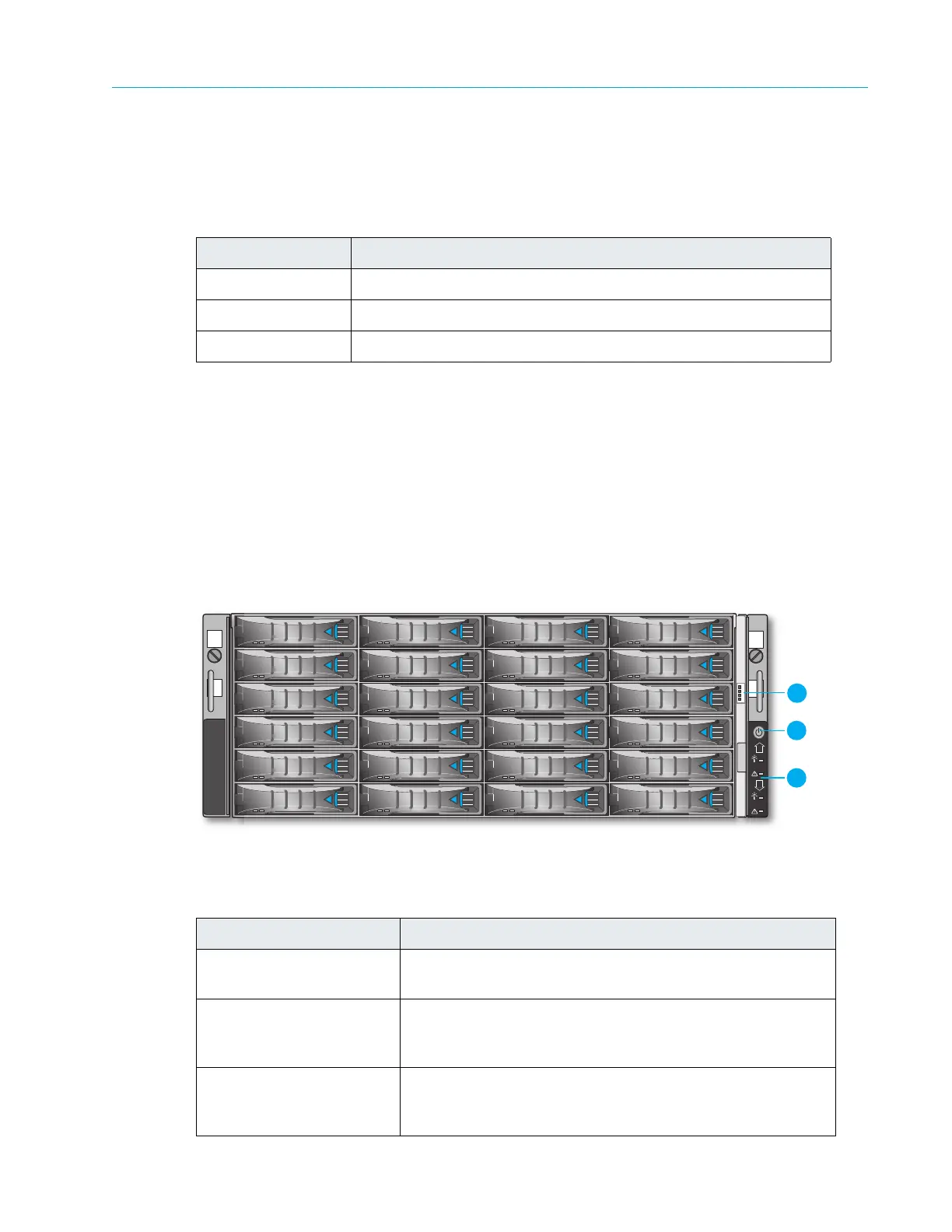
The front panel contains hot-swappable disk drives, a power button, a connector for the bezel,
and control panel with system status LEDs.
Figure 8–28: ContentServer 4000 Front Panel View
Table 8–27: Power Supply LED Descriptions
LED State Description
Off AC power not connected
Green System on
Amber System is in power down state, or power cord has been removed.
Table 8–28: ContentServer 4000 Front Panel Components
Component Description
1.Bezel LED control
connec
tor
Powers the light bar on the bezel.
2. Power button Depress this button to power both nodes
on or off. Powering
off with this button removes the main power but keeps
standby power supplied to the system.
3. Control panel Shows Operational State and Fault indicators for both
Contro
ller A and Controller B. For information about LED
indicators, refer to Table 8–29.



 To Next Page