Chapter 3 System Installation with the Content-
Server 3000 Series
© 2017 Harmonic Inc. All rights reserved. 97 Harmonic MediaGrid Release 4.1
Connecting the Harmonic MediaGrid 3000 System Components
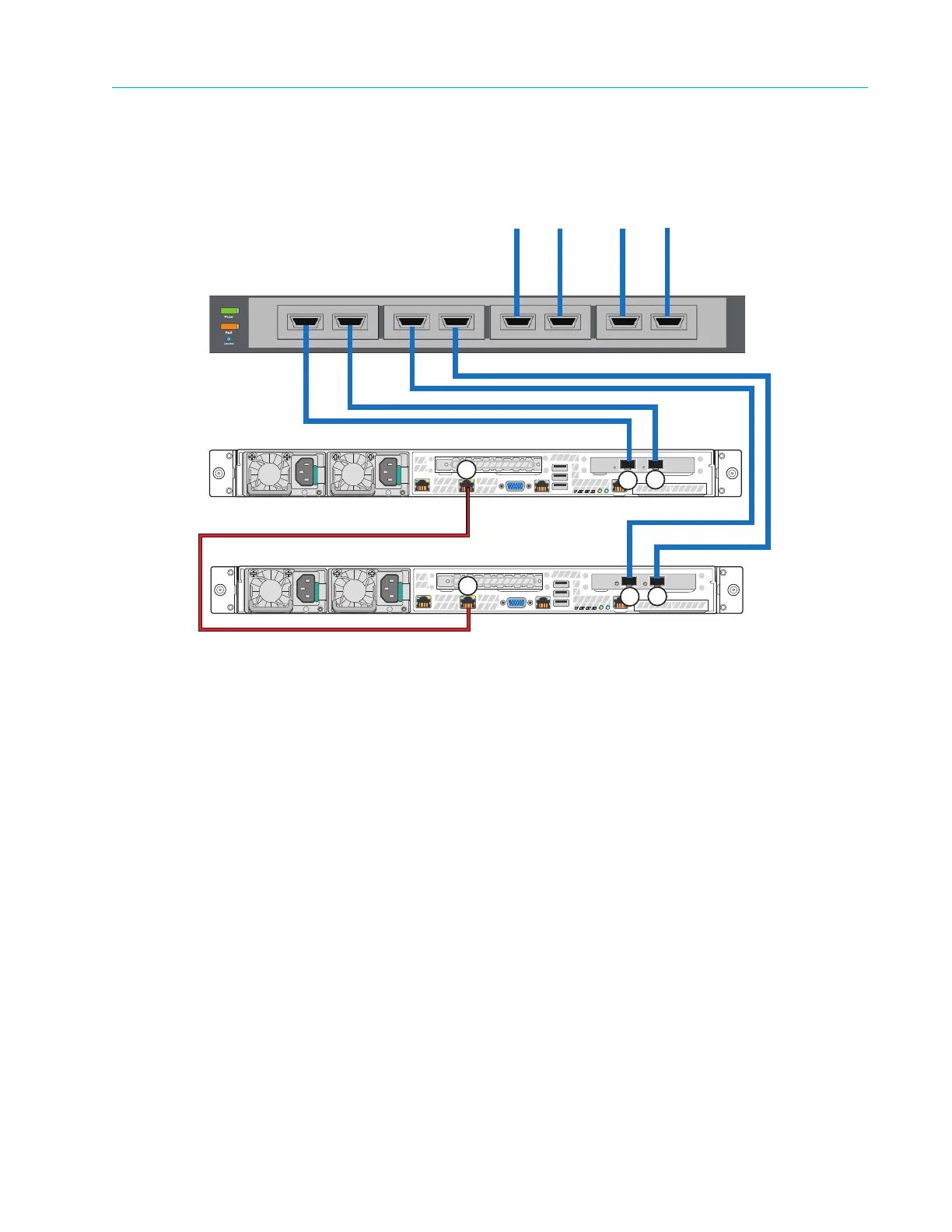
For information on configuring the ContentBridges in an HA pair, refer to Configuring High Bandwidth
ContentBridges in a High Availability (HA) Pair.
Figure 3–26: High Bandwidth ContentBridges connected in an HA pair to the network switch
Connecting the ContentBridge 1000B to the Network Switch
1. Complete these connections if one or more optional ContentBridges are part of the Harmonic
MediaGrid system.
a. Connect port 1 on the first ContentBridge to the first available port on switch module C.
b. Connect port 0 on the first ContentBridge to the first available port on switch module D.
c. Continue connecting any remaining ContentBridges in the same manner.
Connecting the ContentServer 3000 to ContentStore(s) 3160
This section provides instructions for connecting the ContentServer 3000 to one or more
ContentStore 3160 nodes. Figure 3–27 shows the connections, including two ContentStore 3160
nodes.
Customer Core Switch
To Harmonic MediaGrid Network
ContentBridge 2010F
ContentBridge 2010F
2
3
1
1
2
3



 To Next Page