Chapter 3 System Installation with the Content-
Server 3000 Series
© 2017 Harmonic Inc. All rights reserved. 98 Harmonic MediaGrid Release 4.1
Connecting the Harmonic MediaGrid 3000 System Components
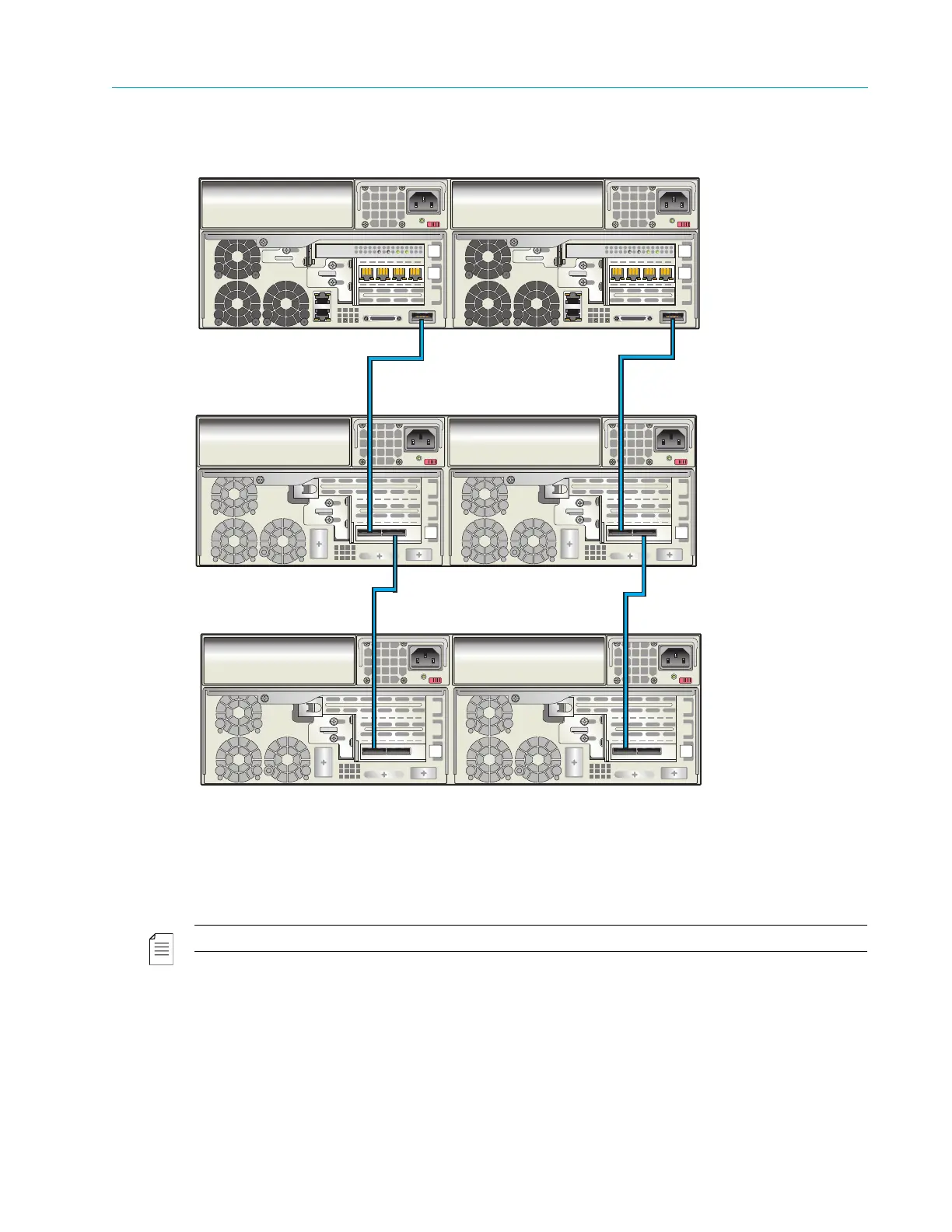
Figure 3–27: Connecting the ContentServer 3000 to ContentStores 3160
To connect the ContentServer to multiple ContentStores:
1. Starting with the left-hand controller on the ContentServer, connect a SAS cable to the SAS
port. Connect the other end of the cable to the left-hand SAS port on the left-hand controller
of the first ContentStore.
NOTE: Do not twist SAS cables or bundle them with power cables.
2. On the right-hand controller of the ContentServer, connect a SAS cable to the SAS port.
Connect the other end of the cable to the left-hand SAS port on the right-hand controller of
the first ContentStore.
3. Starting with the left-hand controller on the first ContentStore, connect a SAS cable to the
open right-hand SAS port. Connect the other end of the cable to the left-hand SAS port on the
left-hand controller of the second ContentStore.
ContentStore
ContentStore
ContentServer



 To Next Page