Chapter 3 System Installation with the Content-
Server 3000 Series
© 2017 Harmonic Inc. All rights reserved. 93 Harmonic MediaGrid Release 4.1
Connecting the Harmonic MediaGrid 3000 System Components
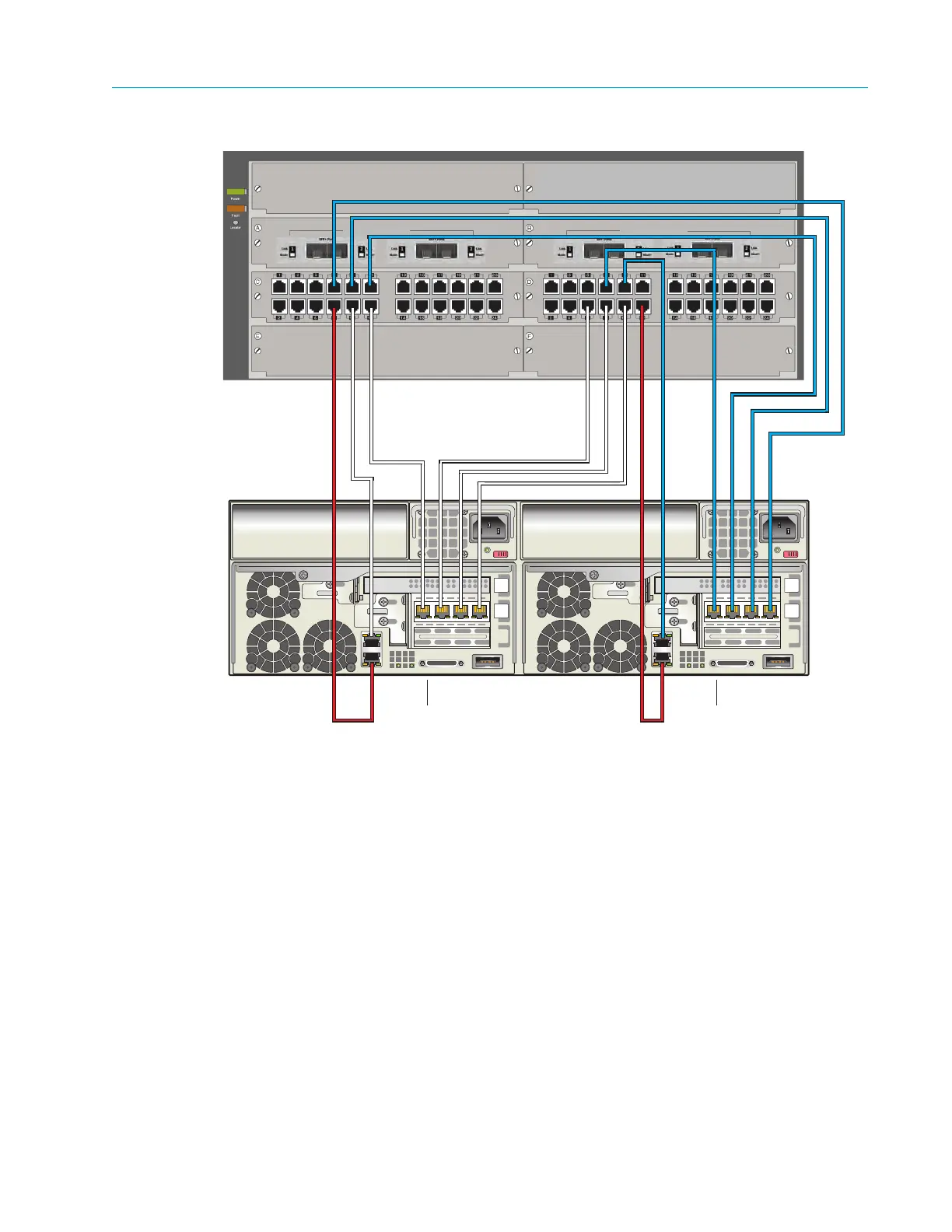
Figure 3–23: ContentServer 3000 and 1 GbE Network Switch Connections
To connect the ContentServer to a network switch:
1. St
arting with the left-hand controller, connect a red CAT-6 Ethernet cable to NIC 0. Connect
the other end of the cable to an open port on the first 1 GbE switch module. This will serve as
the BMC connection.
2. Using white CAT-6 Ethernet cables, connect two of the open NICs on the left-hand controller
to open ports on the first 1 GbE switch module.
3. Using white CAT-6 Ethernet cables, connect the remaining three NICs on the left-hand
controller to open ports on the second 1 GbE switch module.
4. On the right-hand controller, connect a red CAT-6 Ethernet cable to NIC 0. Connect the other
end of the cable to an open port on the second 1 GbE switch module. This will serve as the
BMC connection for this controller.
5. Using blue CAT-6 Ethernet cables, connect two of the open NICs on the right-hand controller
to open ports on the second 1 GbE switch module.
6. Using blue CAT-6 Ethernet cables, connect the remaining three NICs on the right-hand
controller to open ports on the first 1 GbE switch module.
7. Continue connecting the remaining ContentServers in the same manner.
SFP+ Ports
10-GbE SFP+ Ports
10-GbE SFP+ Ports
Controller B
Controller A
1 GbE Module A
1 GbE Module B



 To Next Page