User Manual
Operation and Management
Page 4-158 (Rev. 4.1/ SW v1.60/ December 2006)
4.3.5. Audio Status Menu
The Audio Status Menu displays information on the audio channels.
To access the Audio Status Menu in the front panel control interface go to
Status
Æ
Audio.
The following screen displays the Audio Status menu:
Audio 1-3-5
1 Audio 1
2 Audio 2
3 Audio 3
4 Audio 1
4.3.5.1. Audio (1..4)
Select Audio 1 through 4.
The Audio (1..4) Menu displays information on the audio decoding process.
When Musicam mode is activated, the following screen is displayed:
Audio (1..4) 1-3-5-1
1 ID MPEG
2 Layer LAYER2
3 Bit Rate 129000 [Bps]
4 Sample Rate 48 [KHz]
5 Mode STEREO
6 Decoding Errors 000894
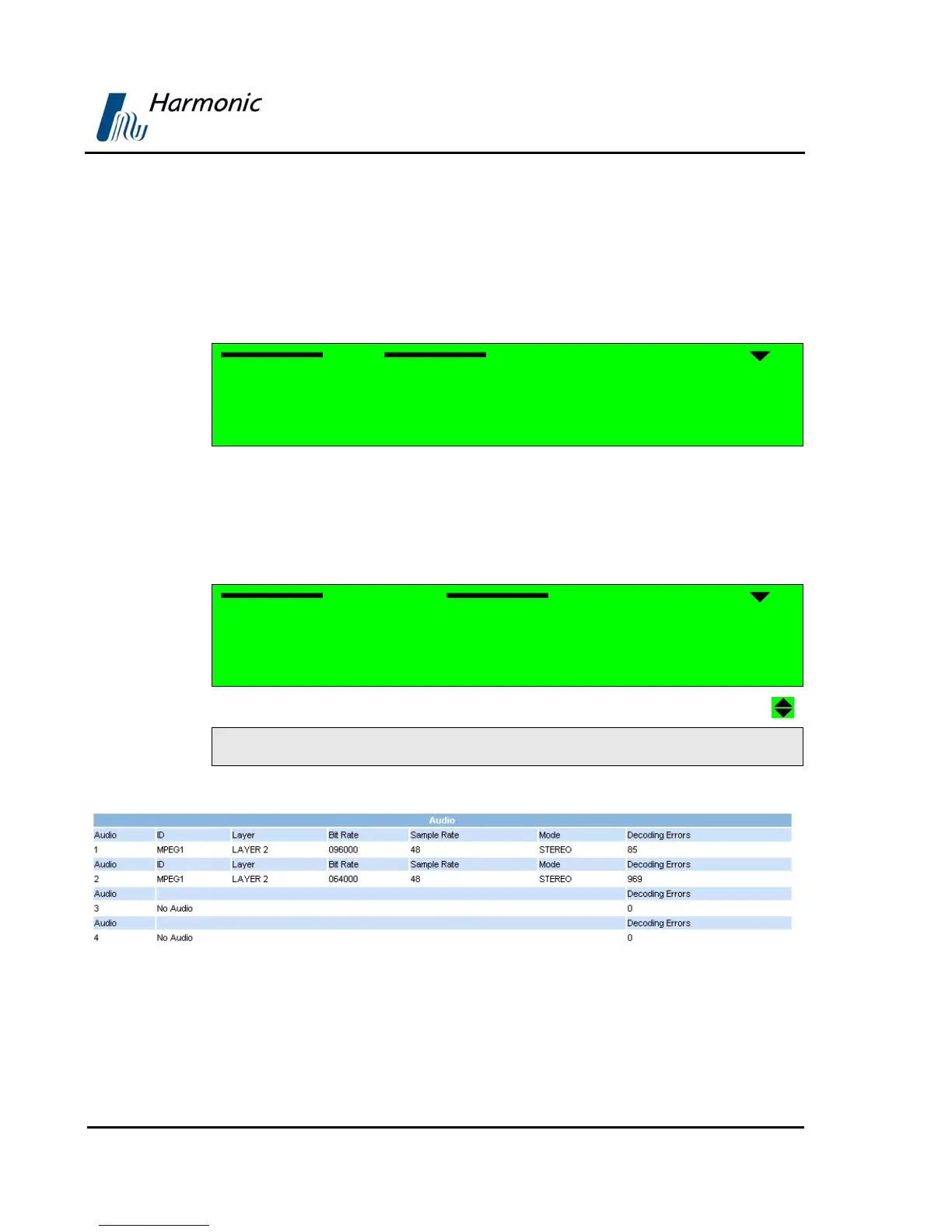
Figure 4-41 displays the corresponding Web management screen.
Figure 4-41: PVR 6000 Audio Status Screen



 To Next Page