User Manual
Installation
Page 2-8 (Rev. 4.1/ SW v1.60/ December 2006)
2.3.3. Insertion of the DVB-CI Module
(PCMCIA)
CAUTION
DO NOT REMOVE OR INSERT THE DVB-CI MODULE OR THE SMART CARD WHILE THE PVR 6000
IS POWERING UP OR INITIALIZING.
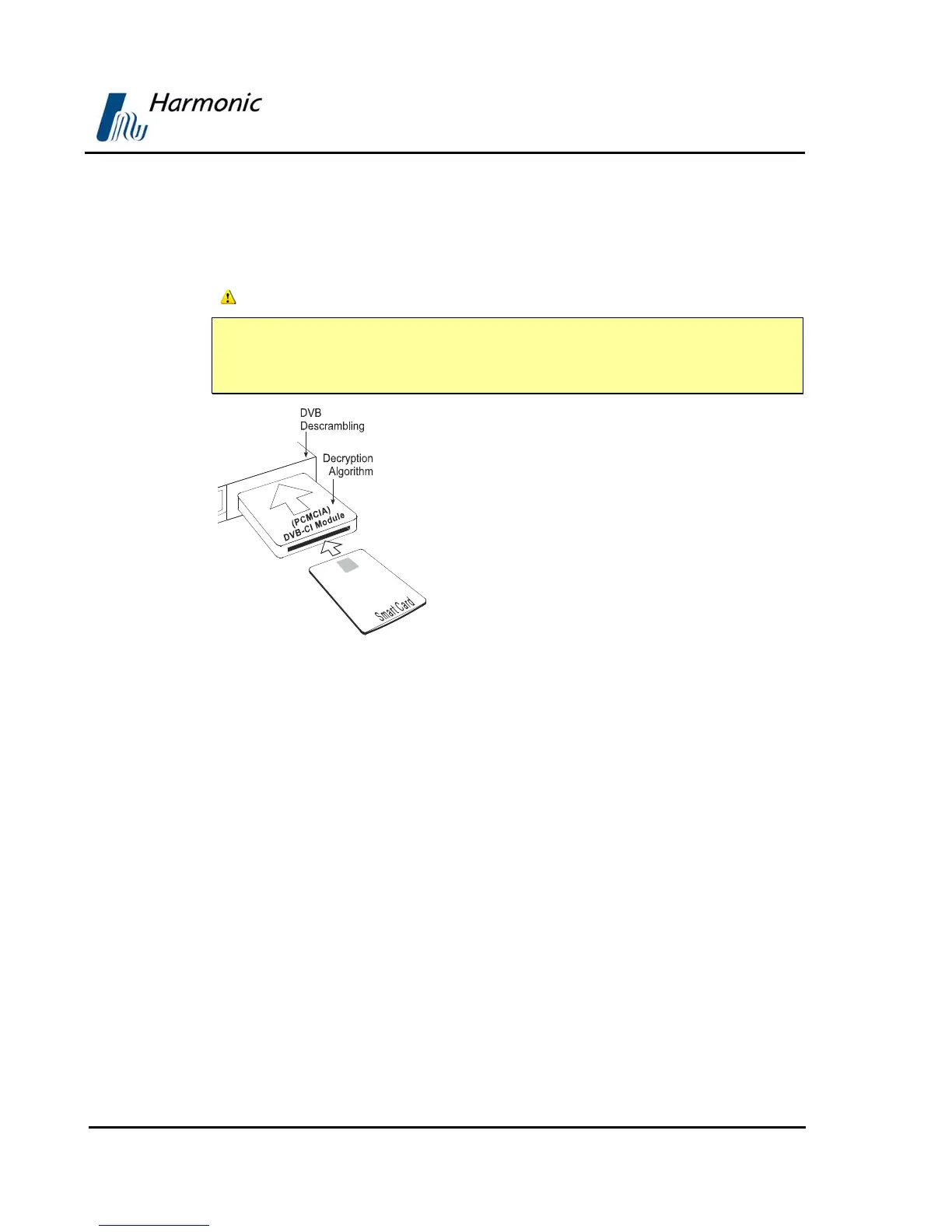
Figure 2-7: DVB-CI Module
Figure 2-7 illustrates the PVR 6000 with the
DVB-CI module (PCMCIA card) and the Smart
Card used to decrypt the incoming signal. The
PVR 6000 is provided with two PCMCIA slots for
up to two DVB-CI modules. The PCMCIA should
be firmly inserted into one of the two provided
slots to ensure contact. Each DVB-CI module
accommodates one Smart Card, inserted with
the UP mark pointing upwards and forward.
When installed, the card is detected
automatically by the PVR 6000 and enabled if the
three following conditions are valid:
• The installed card must be EN50221
compatible
• Services have been selected at TV1/TV2 (for
further information see section
4.2.5.1)
• Using a valid card licensing



 To Next Page