Tip: Connection Status is back to Connected by
F5.
3. Select Save and reboot a server blade by following step 10 and 11 of
Boot device setting on page 9-9.
Disconnecting data device
Note: Connection or disconnection of iSCSI Target device can be also set by
One CommandManager.(For details, see the Hitachi Compute Blade 500
OneCommandManager Guide.)
In the case that Target is set to Connect by OneCommandManager, iSCSI
Target is restored when OS rebooted even if disconnected by iSCSISelect
Utility.
Disconnection by OneCommandManager is required after disconnection by
Utility.
For details about disconnecting an iSCSI device, see the Hitachi Compute
Blade 500 OneCommandManager Guide.
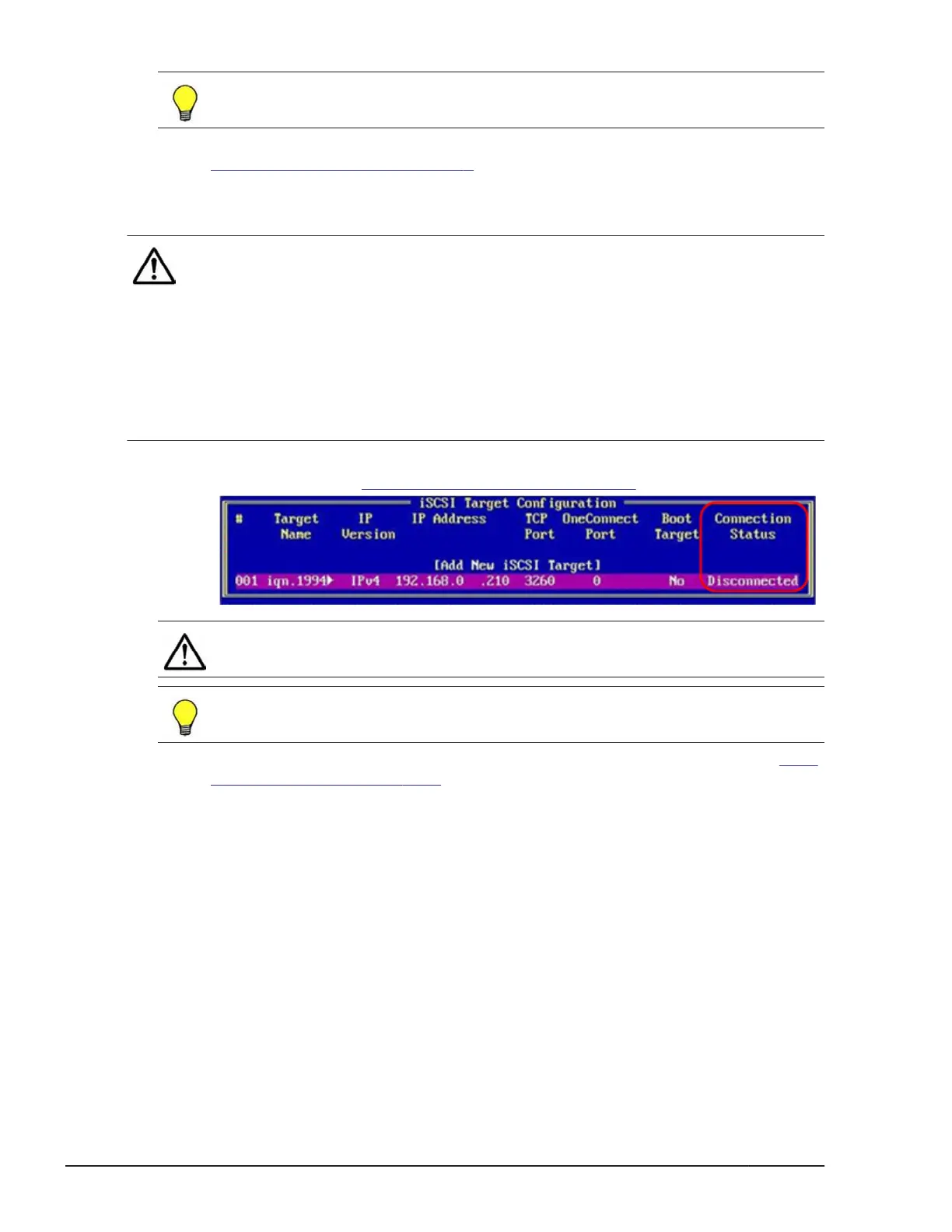
1. Press F6 and set Connection Status to Disconnected at the setting
menu in step 7 of Data device setting on page 9-12.
Note: All the contents of iSCSI Target setting are deleted by DEL.
Tip: Connection Status is back to Connected by
F5.
2. Select Save and reboot a server blade by following step 9 and 10 of Data
device setting on page 9-12.
9-16
iSCSI settings
Hitachi Compute Blade 500 Series EFI User's Guide

 To Next Page
 Loading...