3Dimensions System User Guide
Chapter 3: System Controls and Indicators
Page 26 MAN-05085-002 Revision 002
DRAFT Preview Copy-Generated May 30, 2018
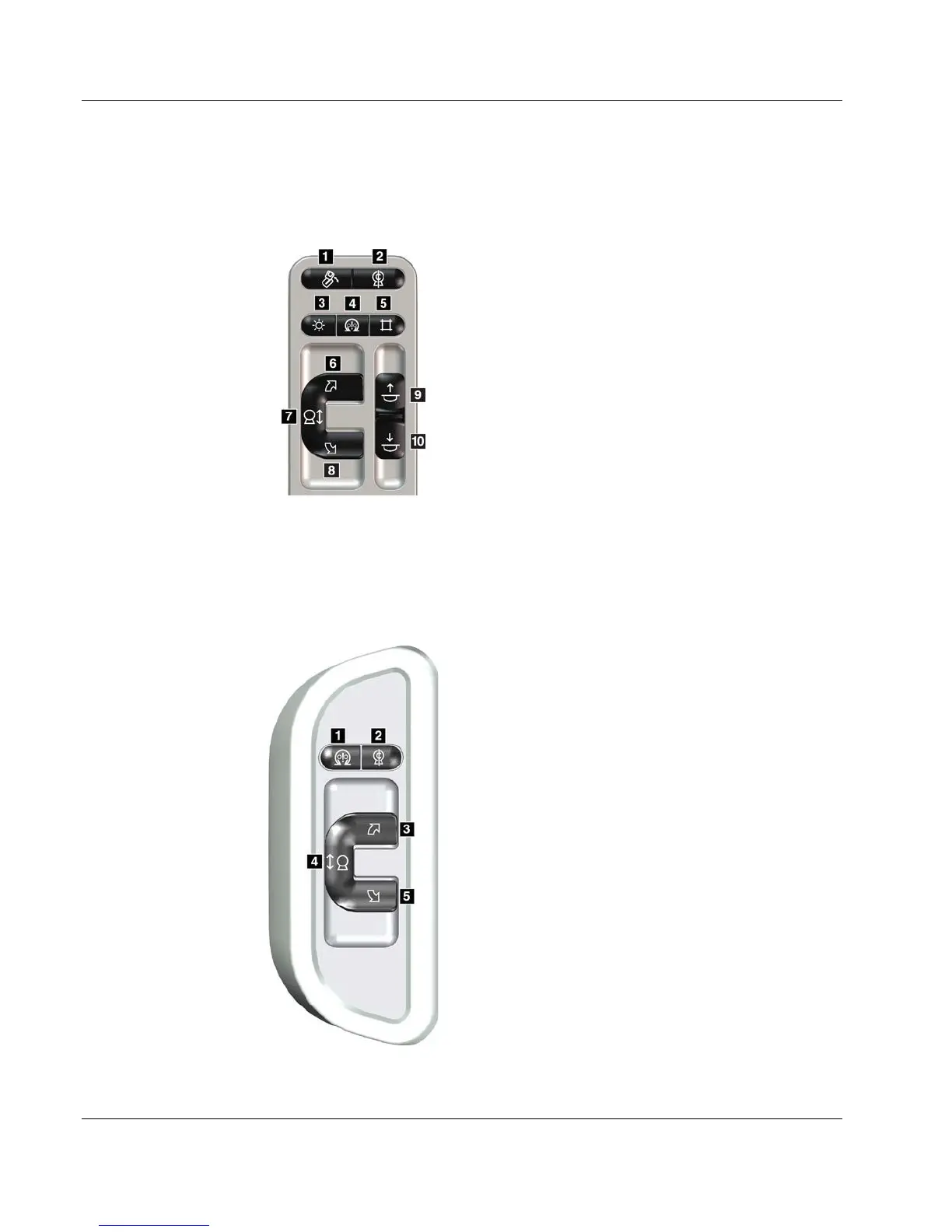
3.2.3 C-Arm Control Panels
There is a C-arm control panel on both the left side and right side of the C-arm. These
buttons provide the Collimator and C-arm functions.
Figure 10: C-arm Control Panel
Figure Legend
1. MLO Rotation
2. C-arm Zero
3. Light Field Lamp
4. Motor Enable
5. Collimator Override
6. Clockwise C-arm Rotation
7. C-arm Up and Down
8. Counterclockwise C-arm Rotation
9. Compression Up
10. Compression Down
3.2.4 Gantry Control Panels
Control panels on the Gantry provide additional access to C-arm functions. There is a C-
arm control panel on both the left side and right side of the Gantry.
Figure 11: Gantry Control Panel
Figure Legend
1. Motor Enable
2. C-arm Zero
3. Clockwise C-arm Rotation
4. C-arm Up and Down
5. Counterclockwise C-arm Rotation













 To Next Page