3Dimensions System User Guide
Chapter 3: System Controls and Indicators
Page 28 MAN-05085-002 Revision 002
DRAFT Preview Copy-Generated May 30, 2018
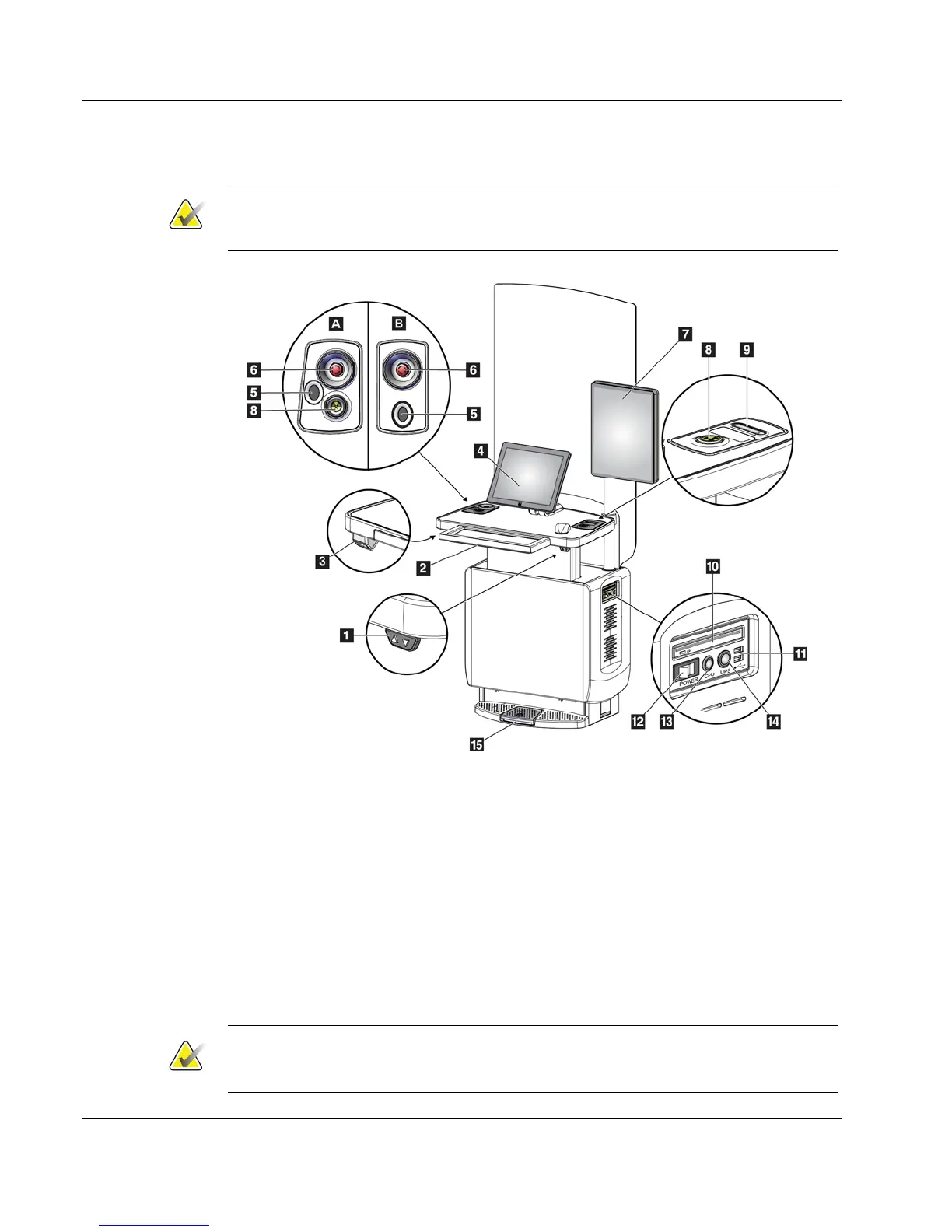
3.3 Universal Acquisition Workstation Controls and Displays
Note
Hologic configures some systems to meet specific requirements. Your system
configuration may not have all the options and accessories included in this manual.
Figure 13: Universal Acquisition Workstation Controls and Displays
Figure Legend
1. Height Adjustment Switch
2. Keyboard (in drawer)
3. Bar Code Scanner
4. Control Monitor
5. Fingerprint Scanner*
6. Emergency Off Switch*
7. Image Display Monitor
8. X-ray Activation Button*
9. Compression Release Button
10. CD/DVD Drive
11. USB Ports
12. Acquisition Workstation Power Switch
13. Computer Power On/Reset Button
14. Uninterruptible Power Supply (UPS)
Power Button
15. X-ray Footswitch
*A = series II UAWS layout; B = series I UAWS layout
Note
The controls for the Universal Acquisition Workstation installed in a mobile
environment are the same as the controls for the Universal Acquisition Workstation.













 To Next Page