3Dimensions System User Guide
Chapter 5: User Interface
Page 60 MAN-05085-002 Revision 002
DRAFT Preview Copy-Generated May 30, 2018
5.4.5 Add (or Remove) a View
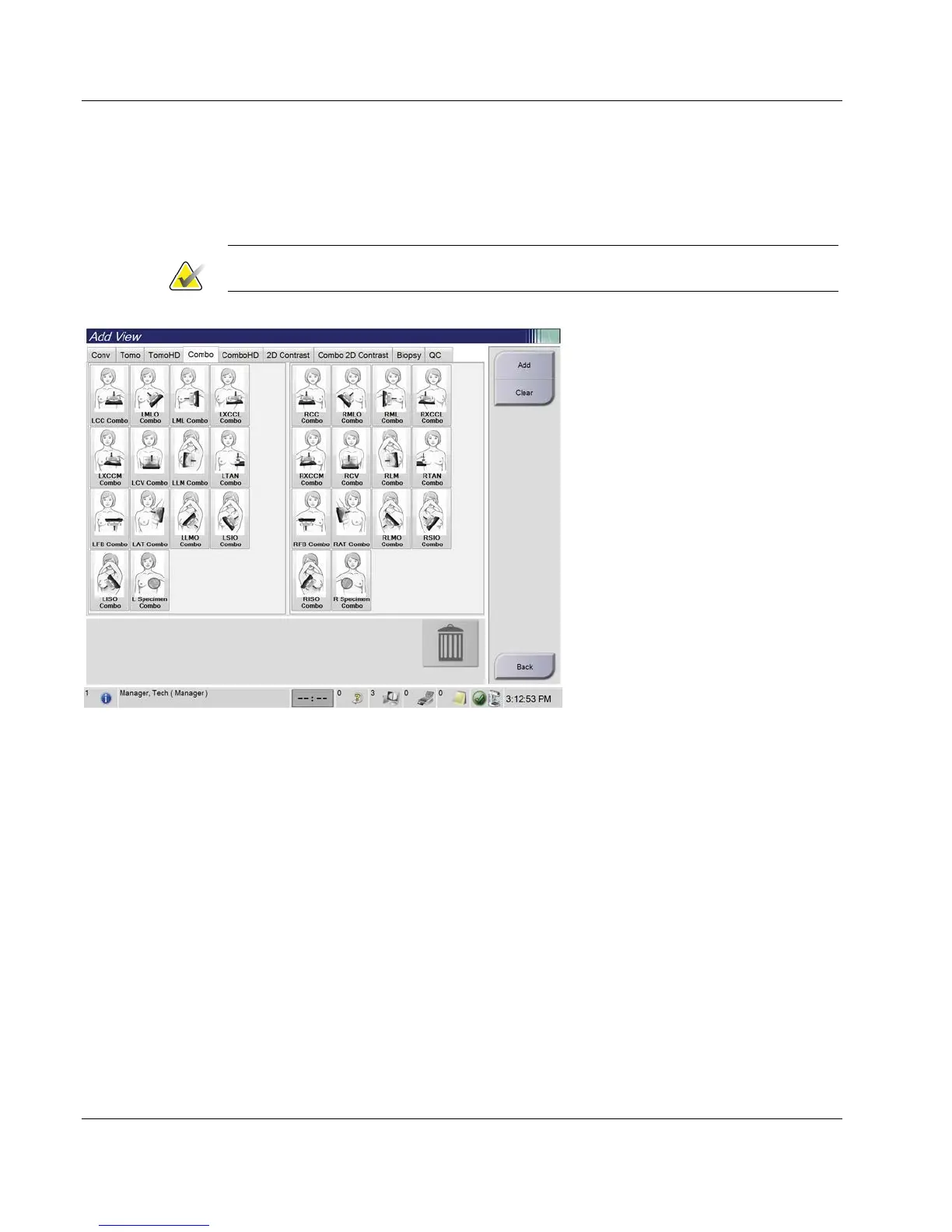
To Add a View
1. Select the Add View button to access the Add View screen.
Note
Depending on the license settings for your system, you may see different tabs.
Figure 33: Add View Screen
View Modifiers
ID = Implant Displaced
RL = Rolled Lateral
RM = Rolled Medial
RI = Rolled Inferior
RS = Rolled Superior
NP = Nipple in Profile
AC = Anterior Compression
IMF = Infra-Mammary Fold
AX = Axillary Tissue
2. Select the tab, then select the view. You can select a maximum of three View
Modifiers from the right panel of the screen.
3. Select the Add button. A thumbnail image of each selected view is added in the
bottom panel of the screen.
To Remove a View
• To remove a single view from the added list: select the view then select the trash can
icon.
• To remove all views from the added list: select the Clear button.













 To Next Page