3Dimensions System User Guide
Chapter 6: Images
Page 76 MAN-05085-002 Revision 002
DRAFT Preview Copy-Generated May 30, 2018
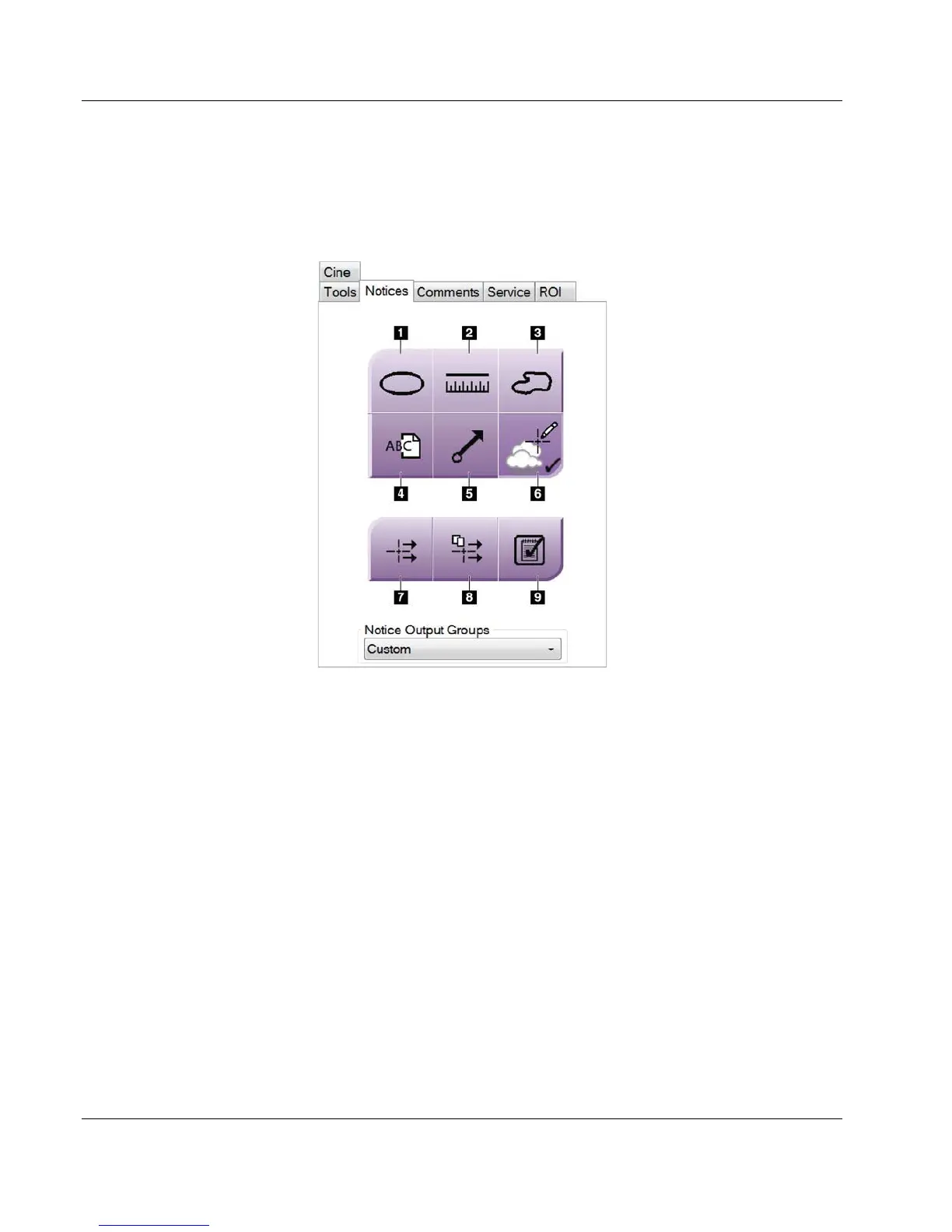
6.5.2 Notices Tab
The tools on the Notices tab allow you to mark and annotate images and send notices
about the displayed image or procedure. The Notice Output Groups drop-down menu at
the bottom of the tab allows you to select the destination for the Notices.
Figure 46: Tools on the Notices Tab
Figure Legend
1. The Oval tool draws an oval marking on the image.
2. The Ruler tool measures the distance between two points.
3. The Freehand tool draws a freehand marking on the image.
4. The Text tool adds a text note to the image without a marking.
5. The Arrow tool draws an arrow marking on the image.
6. The Markings tool shows or hides markings and annotations on an image.
7. The Send Notice tool sends a notice for the current image to the selected
destination.
8. The Send All Notices tool sends all notices for all images in the opened procedure
to the selected destination.
9. The Viewed tool changes the Patient Notices status to viewed.













 To Next Page