3Dimensions System User Guide
Chapter 4: Startup, Functional Tests, and Shutdown
Page 32 MAN-05085-002 Revision 002
DRAFT Preview Copy-Generated May 30, 2018
4. Type in your password and select Log In.
-OR-
Validate your fingerprint by pressing your finger in the fingerprint scanner.
Note
Most of the unique, repeatable fingerprint information is from the pad of the finger, not
the fingertip. Flat finger placement as shown in the left image results in fast and
accurate fingerprint identification.
Correct operation Incorrect operation
Note
If Quality Control tasks are due, the Select Function to Perform screen opens. You can
perform the quality tasks or you can select Skip.
4.3 Perform the Functional Tests
To make sure that the controls operate correctly, do the Functional Tests as part of your
monthly visual checklist. Make sure that all buttons work correctly (Gantry and C-arm
control panels, left and right sides).
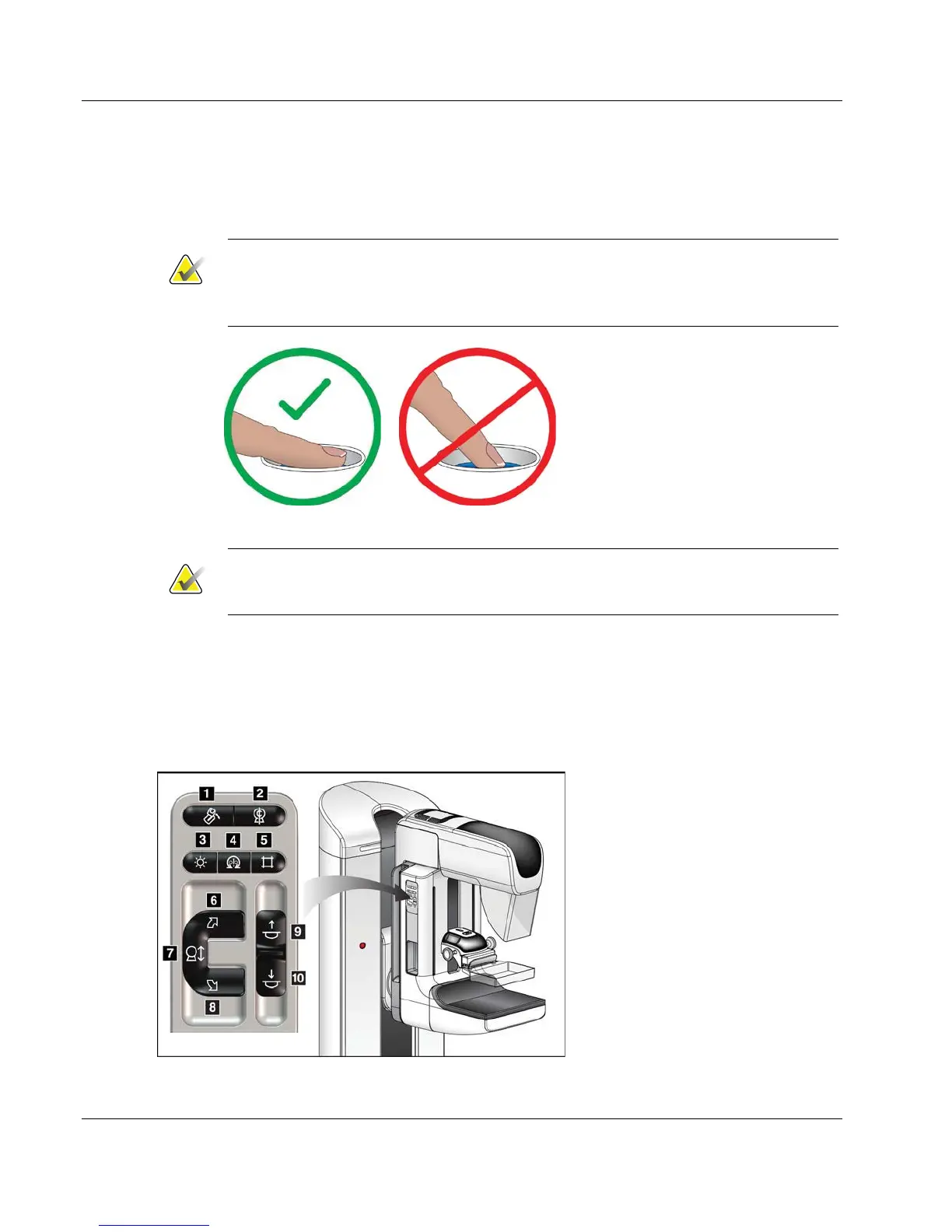
Figure 18: C-arm Control Panel (left side shown)
Figure Legend
1. MLO Rotation
2. C-arm Zero
3. Light Field Lamp
4. Motor Enable
5. Collimator Override
6. Clockwise C-arm Rotation
7. C-arm Up and Down
8. Counterclockwise C-arm Rotation
9. Compression Up
10. Compression Down













 To Next Page