3Dimensions System User Guide
Chapter 4: Startup, Functional Tests, and Shutdown
MAN-05085-002 Revision 002 Page 39
DRAFT Preview Copy-Generated May 30, 2018
C-Arm Automatic Rotation (Auto-Rotate)
Warning:
Risk of entrapment. Make sure that the C-arm has 50 cm (20 inches) of
clearance to any object during C-arm rotation. Do not use Auto Rotation
when C-arm clearance is less than 50 cm (20 inches).
Note
To stop the C-arm automatic rotation movement, press any button or the Emergency
Stop switch.
Motor Enable
Press the Motor Enable button and a Rotation button at
the same time to enable auto-rotation movement
clockwise or counterclockwise.
C-arm Zero
Press the Motor Enable button and the C-arm Zero
button at the same time. Release the buttons. The machine
beeps and the C-arm returns automatically to the zero
position.
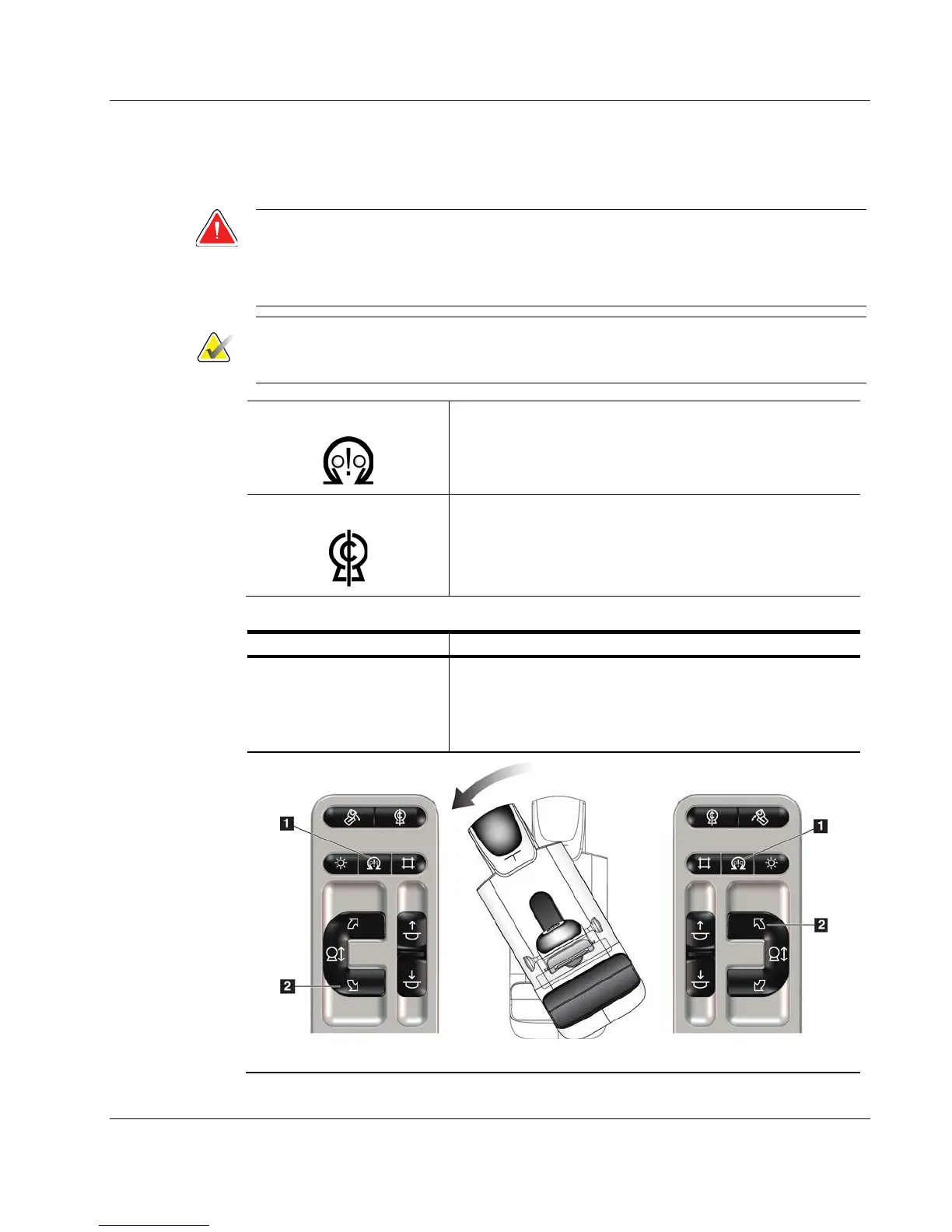
Table 7: Automatic C-arm Counterclockwise Rotation
Function Functional Test
Automatic
Counterclockwise C-arm
Rotation
Press the Motor Enable button (item 1) and the
Counterclockwise C-arm Rotation button (item 2) at the
same time. Release the buttons. The machine beeps and
the C-arm moves automatically counterclockwise.
Left Panel Right Panel













 To Next Page