P/N MAN-01964 Revision 001 37
DRAFT
Preview copy—Generated 7/9/2010
User Manual
Chapter 3—The User Interface
How to Use the On-Demand Outputs
7.2 How to Print
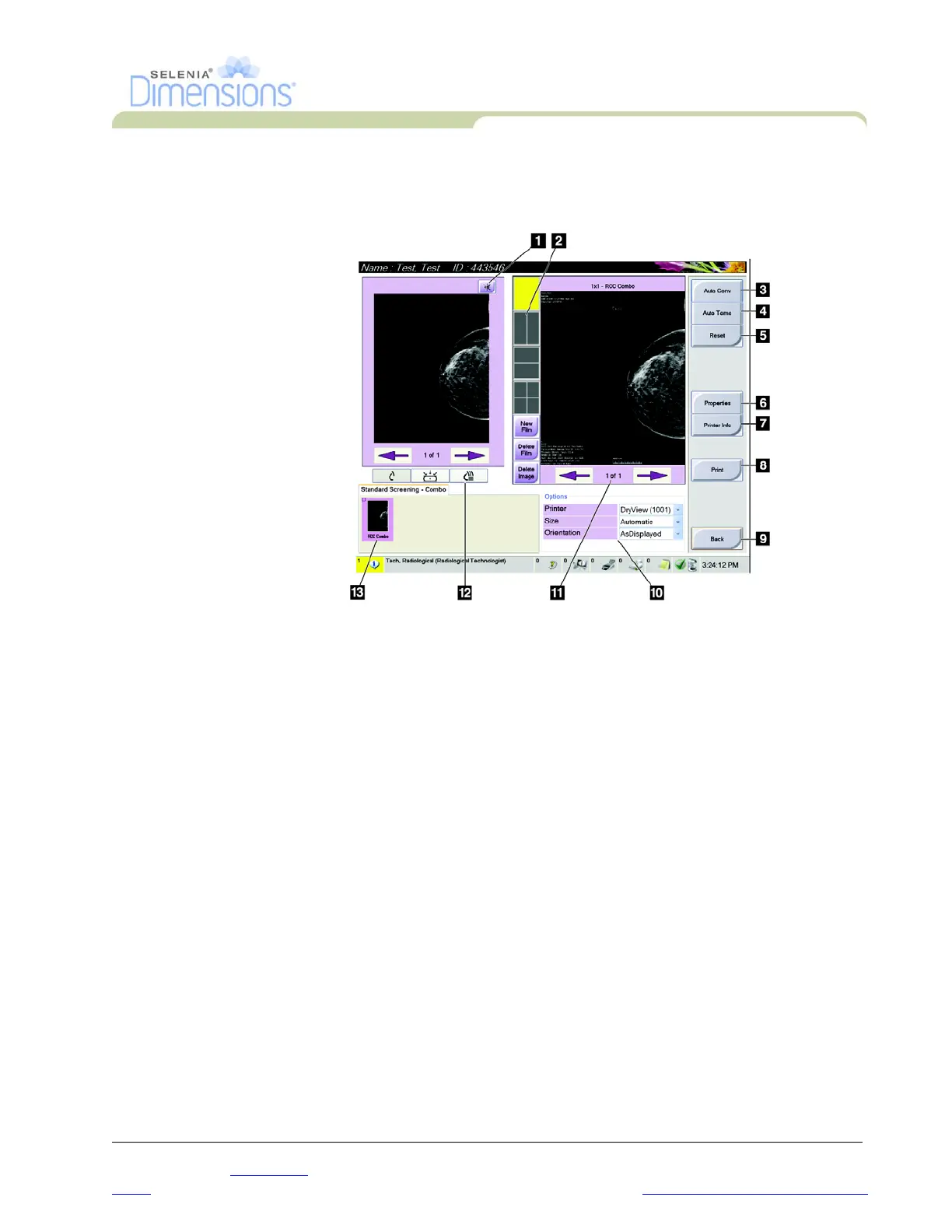
7.2.1 The Print Screen
Figure 3-10: The Print Screen
Legend for Figure3-10
1. Mirrors the image.
2. Selects the film format (number of tiles).
3. Prints Conventional images with the default setup.
4. Prints tomo images (slices or projections) that have been Tagged for Print
(Tomosynthesis option).
5. Returns the screen to previous settings.
6. Opens the Properties screen.
7. Shows the printer IP address, AE Title, Port and capability for True Size print.
8. Starts the print process.
9. Returns you to the Procedure screen.
10. Selects the printer options.
11. Allows you to step through the film pages.
12. Selects Conventional, Projection, or Reconstruction views (Tomosynthesis option).
13. Shows the Thumbnail image view.













 To Next Page