P/N MAN-01964 Revision 001 39
DRAFT
Preview copy—Generated 7/9/2010
User Manual
Chapter 3—The User Interface
About the Taskbar
9.0 About the Taskbar
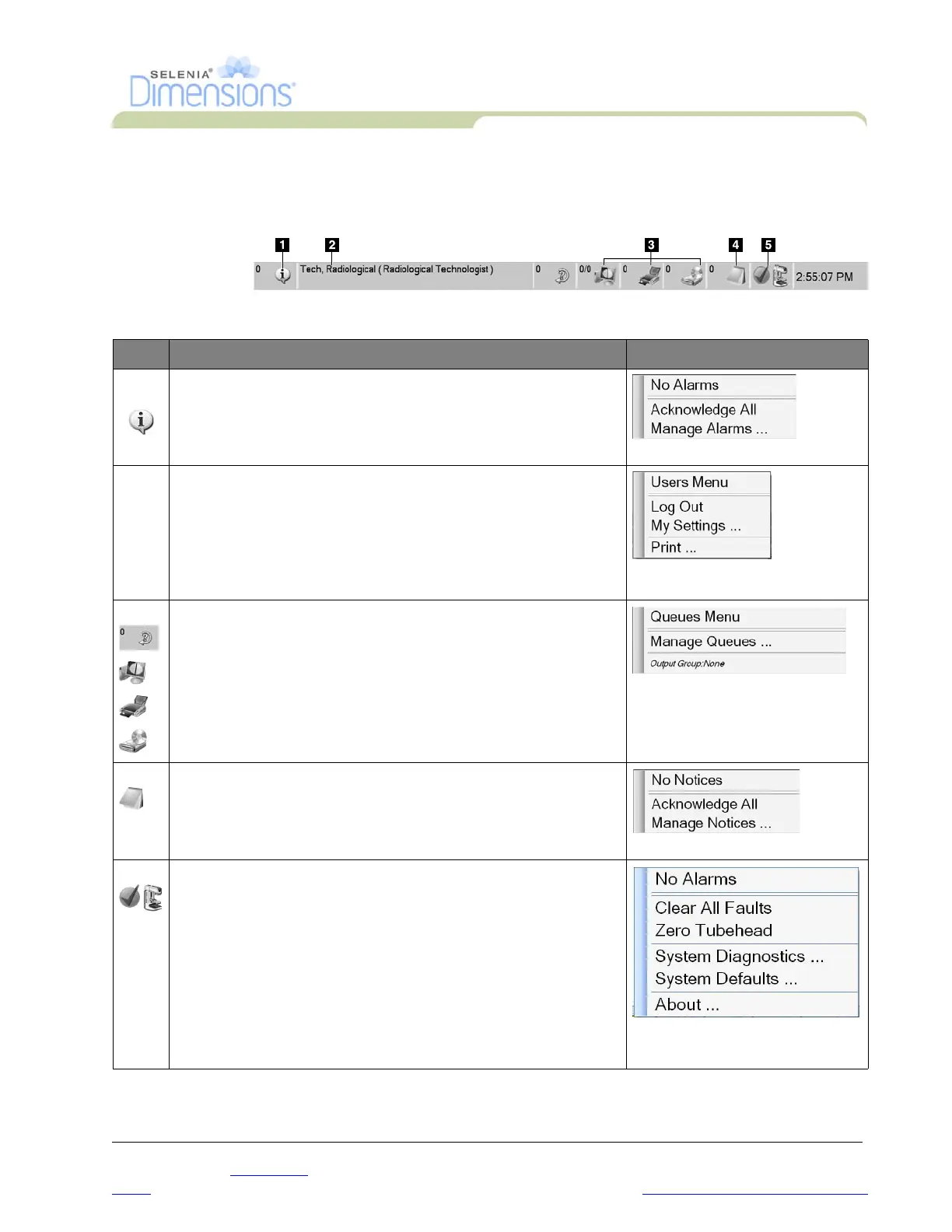
The taskbar at the bottom of the screen displays additional icons, which you can select to
access information or perform system tasks.
Table 3-1: Taskbar Menus
Description Menu
1 Information Icon
Select the Information icon to display a menu.
This section of the taskbar flashes a yellow color if an alarm exists.
Select
Acknowledge All
to remove the flashing indication. Select the
Manage Alarms
option to display and close any open alarms.
2 Current User Name
Select the user name to display a menu.
Log Out returns you to the Sign-in screen.
My Settings displays the Edit Operator screen to review or edit
Operator information, change your password, or use the
Fingerprint Capture feature.
Print prints the displayed patient list to a connected printer.
3 Output Device Icons
Select an output icon (query retrieve, workstation/archive, printer,
or CD-ROM) to display a menu. Each menu selection takes you to
the screen for that selection.
Manage Queues displays the status of jobs in the queue and job
details for the selected output, and allows you to filter the queue
display.
4 Notice Icon
Select the Notice icon to display a menu.
Select
Acknowledge All
to remove the flashing indication.
The Manage Notices icon allows you to select the display options
for the message like date or title.
5 System Status Icons
Select the Tubehead icon to display a menu. When a green
checkmark appears next to the tubehead icon, the detector and
generator are ready for use.
Clear All Faults deletes all error messages.
Zero Tubehead puts the tubehead at zero degrees of rotation for the
next exposure.
System Diagnostics accesses Subsystem settings.
System Defaults opens the Gantry Defaults screen to set the
Compression and Generator default values.
About displays information about the Acquisition Workstation.













 To Next Page