USER INTERFACE
6.20
ThinPrep™ 5000 Processor with AutoLoader Operator’s Manual
Note:
It may take several minutes for the
Pause
process to complete, depending on which operation
of sample processing the system was at when the
Pause
button was pressed. Wait for the user
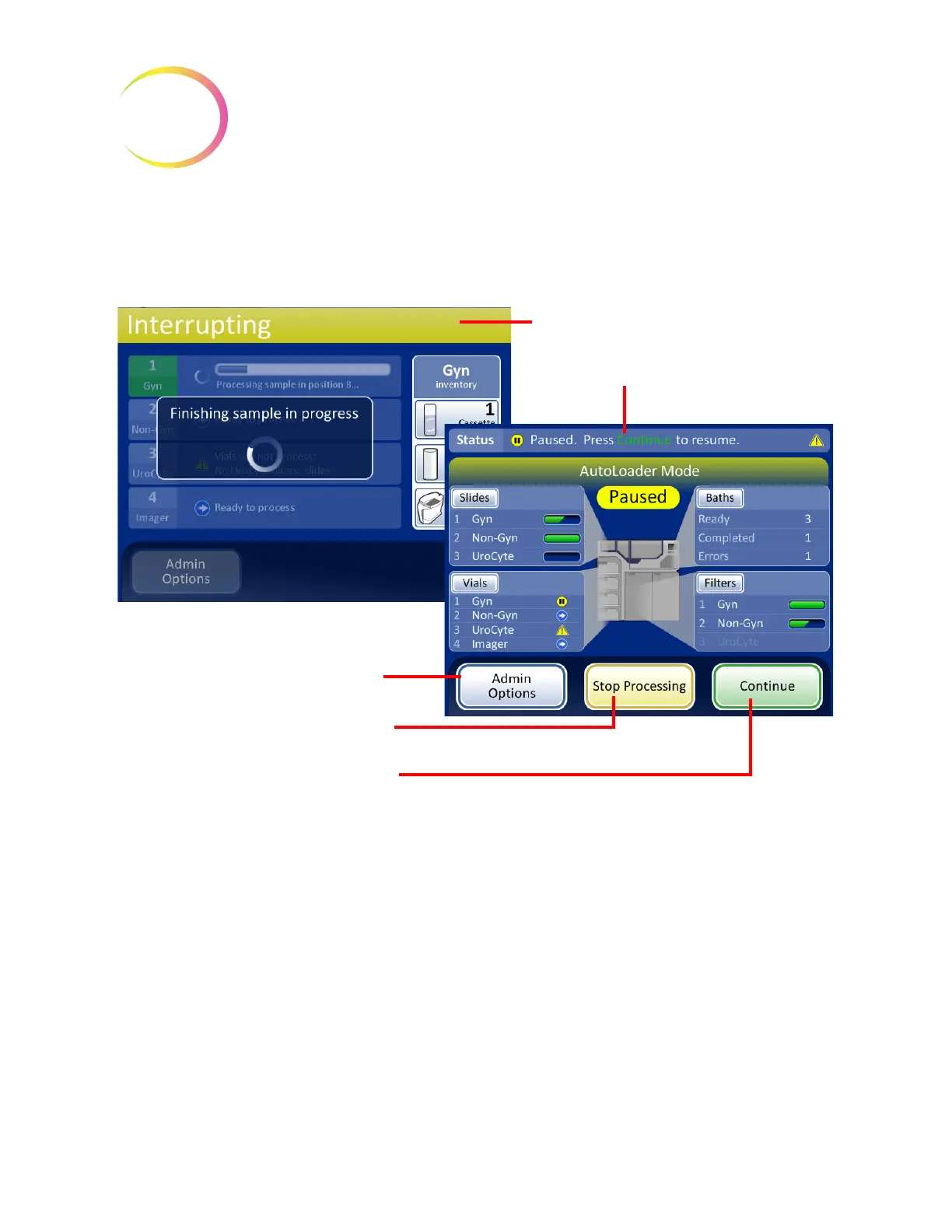
interface to display the Paused screen (Figure 6-22) before attempting to open any doors.
Figure 6-22 Processing Paused Screen
The doors unlock, with the exception of the processing compartment with the carousel and the door
for the vial tray in process.
• Completed slides may be unloaded by removing the fixative bath(s) from the baths
compartment. New, empty baths can be loaded.
• Slides and filters can be replenished if necessary. The types may be changed, as long as there
is the correct complement to continue processing the vial tray that is paused.
• A completed vial tray may be removed. A new vial tray can be added and the type changed,
as long as there are matching filters and slides.
• Admin Options are available.
• Liquid waste and filter waste may be emptied.
Close any open doors and press the
Continue
button when ready to continue with the batch.
Interrupting Processing screen
Batch Paused screen
Administrative Options
button -
Operator access to system settings and
reports
Stop Processing
button - ends the
batch
Continue
button continues with the
batch in process



 To Next Page