USER INTERFACE
6.48
ThinPrep™ 5000 Processor with AutoLoader Operator’s Manual
Note:
The accession ID in the vial ID is the portion of the vial ID that is used to configure the slide
ID. See “Configure Barcodes” on page 6.44 for more information.
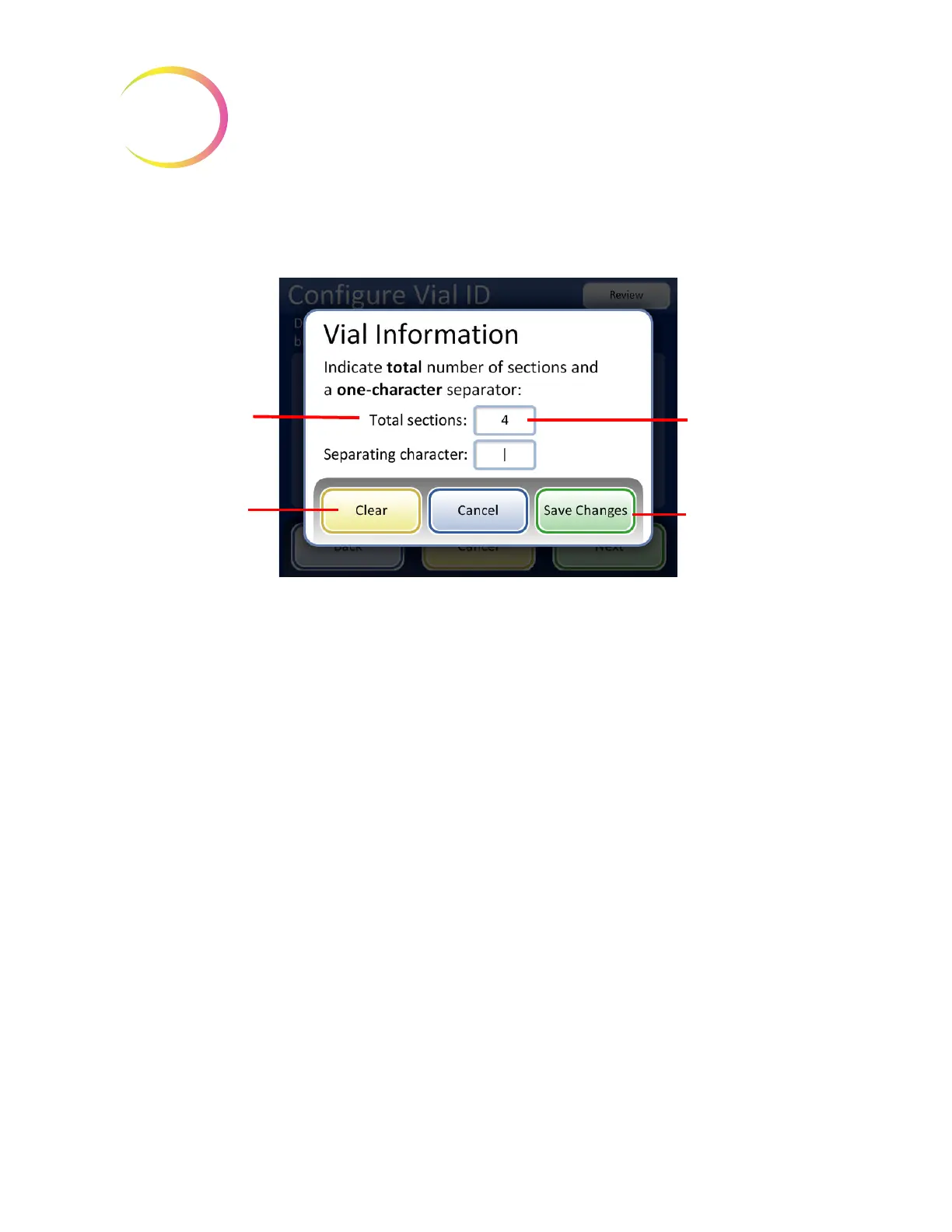
Figure 6-63 Vial information screen
Enter the total number of sections and a one-character separator. The total number of sections must
be between two and four. For example, if a vial ID always starts with data that is not the accession ID,
the ThinPrep 5000 processor with AutoLoader can be configured to consider the vial ID as two
segments: “Field 1” and the accession ID.
Touch the box to the right of the text to open the keypad. Enter the number or character and press
Done
to return to the Vial Information screen. Press the
Save Changes
button to save and return to
the Configure Vial ID screen. The Configure Vial ID screen now displays the number of sections.
Touch the position of the section where the accession ID is. In this example, the vial ID starts with the
accession ID and has three additional fields. In this example, the accession ID and the three
additional fields are separated by a “|” (vertical line) character.
Touch the box to
open the keypad
Touch the
Save
Changes
button to
save the informa-
tion and move to the
next screen.
Each of the sections
set-up in the Vial ID
configuration, can be
included in the label
design for laser-
etching slide IDs on
the AutoLoader.
To clear the Total
sections and
Separating
character fields,
touch
Clear
.



 To Next Page